Notion vs Todoist: Which Productivity App Is Better?
Quick Verdict
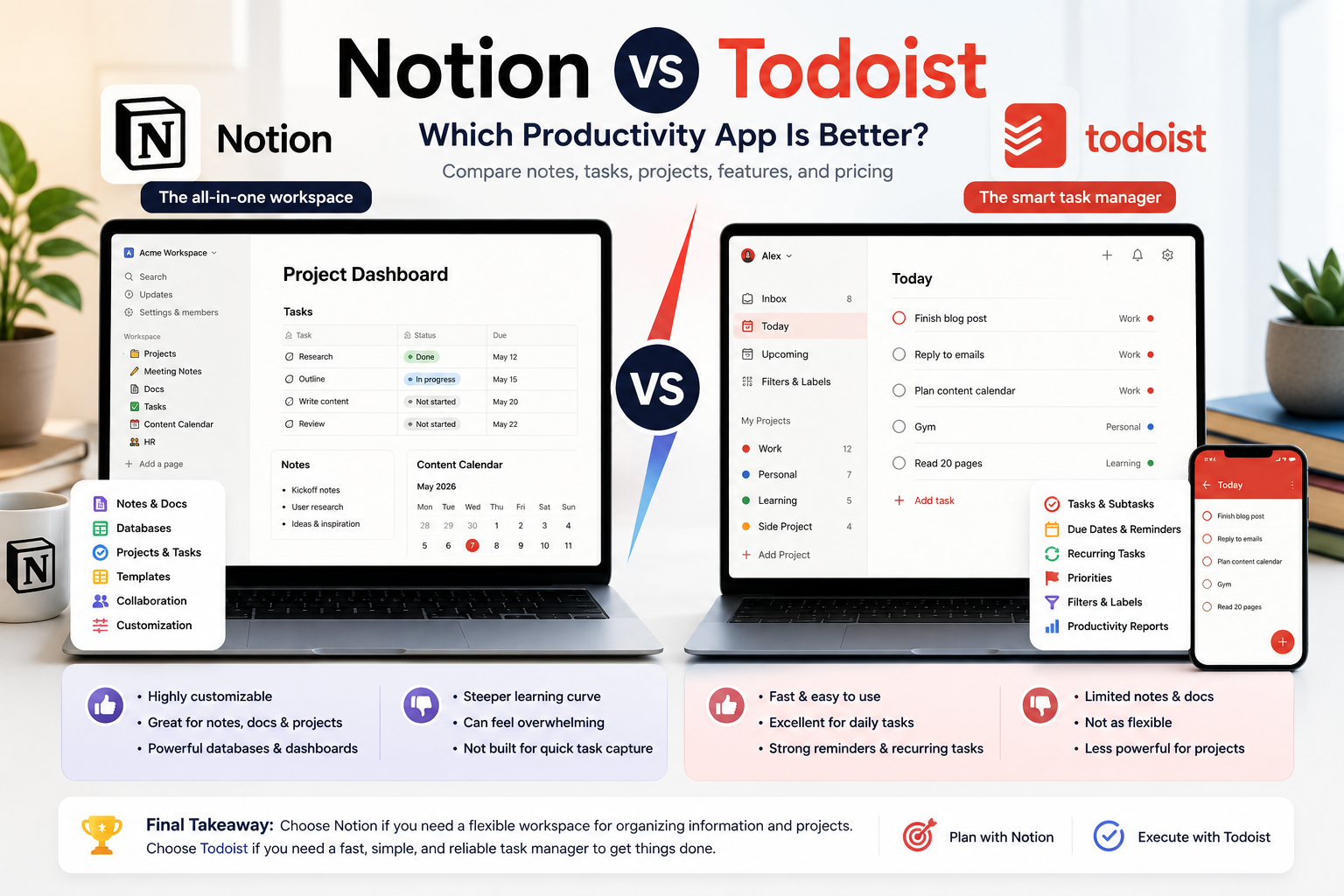
Notion and Todoist are both excellent productivity tools, but they solve different problems.
Notion is better if you want a flexible workspace for notes, documents, databases, project planning, dashboards, knowledge management, and team collaboration.
Todoist is better if you want a fast, simple, and reliable task manager for daily tasks, reminders, priorities, recurring deadlines, and personal productivity.
If you want the simplest answer:
- Choose Notion if you need a customizable workspace for notes, projects, databases, and planning.
- Choose Todoist if you need a focused task manager that helps you capture, organize, and complete tasks quickly.
- Choose Notion for project documentation, dashboards, content planning, student notes, and team knowledge.
- Choose Todoist for daily execution, recurring tasks, reminders, priorities, and simple personal productivity.
- Use both if you want Notion for planning and Todoist for execution.
Notion vs Todoist At A Glance
| Criteria | Better Choice | Why |
|---|---|---|
| Best for task management | Todoist | Faster, simpler, and more focused on tasks |
| Best for notes | Notion | More flexible for pages, documents, and knowledge bases |
| Best for project planning | Notion | Better for databases, dashboards, and structured workflows |
| Best for daily to-do lists | Todoist | Cleaner and quicker for everyday execution |
| Best for recurring tasks | Todoist | Stronger for reminders, due dates, and routines |
| Best for students | Notion | Better for notes, courses, planning, and study dashboards |
| Best for busy professionals | Todoist | Better for quick task capture and follow-up |
| Best for teams | Notion | Stronger for documentation and collaboration |
| Best for simplicity | Todoist | Less setup and less complexity |
| Best for customization | Notion | More flexible and adaptable |
| Best free plan | Depends | Notion is stronger for workspace content; Todoist is stronger for basic task management |
| Best overall productivity stack | Both | Notion for planning, Todoist for execution |
What Is Notion?
Notion is an all-in-one workspace for notes, documents, databases, tasks, projects, wikis, calendars, and team collaboration.
It is highly flexible. You can use it as a simple note-taking app, a project tracker, a personal dashboard, a content calendar, a CRM, a habit tracker, a knowledge base, or a team workspace.
That flexibility is Notion’s biggest strength.
It is especially useful when your productivity system needs structure, context, and customization.
Notion Is Best For
- Notes and documents;
- Project planning;
- Personal dashboards;
- Student organization;
- Content calendars;
- Team wikis;
- Knowledge management;
- Databases and trackers;
- Long-term planning;
- Custom productivity systems.
Where Notion Feels Strong
Notion is strong because it lets users build systems, not just lists.
You can create a page for a project, add notes, attach files, build a database, create task views, link related pages, publish pages, and organize everything in one workspace.
For users who like structure and customization, Notion can become the center of their digital life.
However, that flexibility also creates complexity. Notion can be powerful, but it can also become messy if users spend more time building systems than using them.
What Is Todoist?
Todoist is a dedicated task management app.
It is designed to help users capture tasks, organize them into projects, set priorities, add due dates, use recurring tasks, create filters, and complete work without unnecessary complexity.
Todoist is not trying to be a full workspace like Notion. It is trying to be one of the best task managers.
That focus is its biggest strength.
Todoist Is Best For
- Daily task management;
- To-do lists;
- Recurring tasks;
- Deadlines;
- Reminders;
- Personal productivity;
- Work follow-ups;
- Quick task capture;
- Prioritization;
- Simple project execution.
Where Todoist Feels Strong
Todoist is strong because it is fast.
You can capture a task quickly, add a due date, assign a priority, place it in a project, and move on.
It is especially useful for people who do not want to build a productivity system from scratch.
Instead of designing pages and databases, you simply manage tasks.
For users who need execution more than planning, Todoist is usually better than Notion.
Main Difference Between Notion And Todoist
The main difference is simple:
Notion helps you organize information.
Todoist helps you complete tasks.
Notion is a flexible workspace. Todoist is a focused task manager.
That distinction matters because many users compare them as if they solve the same problem. They overlap in productivity, but they are not identical tools.
Notion is better for planning, documenting, and building systems.
Todoist is better for capturing tasks, setting deadlines, and getting things done.
Pricing Comparison: Which App Offers Better Value?
Pricing changes frequently, and some discounts may be temporary. Always verify the latest prices, limits, and plan details directly on each official website before subscribing.
This comparison focuses on individuals, students, freelancers, professionals, and small teams.
| Tool | Free Plan | Entry Paid Plan Shown | Key Limits / Strengths | Best For | Value Rating |
| Notion | Yes, €0/member/month | Plus at €9.50/member/month billed yearly; Business at €19.50/member/month billed yearly | Free includes basic forms, sites, calendar, trial of Notion AI, databases, 5 MB file uploads, and 7-day page history; Plus adds unlimited file uploads, unlimited charts, unlimited collaborative blocks, 30-day page history, and unlimited guests | Best flexible workspace | ★★★★☆ 4.5/5 |
| Todoist | Yes, €0 | Pro at €5/month billed yearly or €7/month billed monthly; Business at €8/user/month billed yearly or €10/user/month billed monthly | Free includes 5 personal projects, smart quick add, task reminders, 3 custom filters, and 1 week activity history; Pro adds 300 personal projects, calendar view, task duration, custom reminders, 150 custom filters, report history, Todoist Assist, deadlines, and unlimited voice add | Best focused task manager | ★★★★☆ 4.6/5 |
How To Read This Pricing Table
Notion and Todoist are priced for different types of productivity.
Notion Plus is valuable if you need a flexible workspace with unlimited file uploads, richer collaboration, custom forms, charts, databases, and structured planning.
Todoist Pro is valuable if you need a focused task manager with more projects, reminders, calendar view, task duration, filters, report history, and task assistance.
For personal task management, Todoist offers better value because it is cheaper and more focused.
For workspace organization, Notion offers better value because it can replace several tools: notes, docs, databases, trackers, wikis, and planning dashboards.
Best Value Ranking
| Rank | Tool | Why It Ranks There |
| 1 | Todoist | Best value for focused task management, reminders, recurring tasks, and daily execution. |
| 2 | Notion | Best value for users who need notes, databases, dashboards, docs, and project planning in one workspace. |
Pricing Verdict
If you only need a task manager, Todoist Pro is the better value.
If you need a flexible workspace that can replace notes, docs, databases, project trackers, and planning dashboards, Notion Plus may be the better value.
The right choice depends less on price and more on workflow.
Choose Todoist if you want to execute tasks faster.
Choose Notion if you want to organize projects, notes, and information in one place.
Notion: Strengths And Weaknesses
Notion Strengths
Notion is strong because it can adapt to many workflows.
You can use it for:
- Notes;
- Project dashboards;
- Content calendars;
- Study systems;
- Habit trackers;
- Client portals;
- Team wikis;
- Product roadmaps;
- Personal knowledge management;
- Databases and trackers.
It is especially useful when information needs context.
For example, a project is not just a list of tasks. It may include research, decisions, documents, files, meeting notes, deadlines, resources, and next steps.
Notion handles that kind of structured information better than Todoist.
Notion Weaknesses
Notion can feel overwhelming.
Because it is so flexible, users may spend too much time building dashboards, templates, and systems instead of actually completing work.
Notion is also not as fast as Todoist for simple task capture. If you just want to add a task, set a reminder, and move on, Todoist feels lighter.
Notion is best when you need structure and context. It is less ideal when you need pure speed.
Todoist: Strengths And Weaknesses
Todoist Strengths
Todoist is strong because it removes friction.
You can quickly add a task, assign a due date, set a priority, add it to a project, and continue working.
It is excellent for:
- Daily to-do lists;
- Recurring habits;
- Work follow-ups;
- Deadlines;
- Personal projects;
- Reminders;
- Quick capture;
- Task prioritization;
- Simple project execution.
Todoist is especially useful for people who want a productivity app that does not require much setup.
Todoist Weaknesses
Todoist is not a full workspace.
It is not ideal for long-form notes, complex databases, team documentation, knowledge bases, or heavily customized dashboards.
You can organize tasks well, but you cannot build the same kind of flexible information system that Notion offers.
Todoist is best for execution. It is less useful as a central knowledge hub.
Feature Comparison
| Feature | Notion | Todoist |
| Notes and documents | Excellent | Limited |
| Task management | Good | Excellent |
| Recurring tasks | Limited compared with Todoist | Excellent |
| Reminders | Available but less task-focused | Strong |
| Databases | Excellent | No true database system |
| Dashboards | Excellent | Limited |
| Project planning | Strong | Good |
| Daily to-do lists | Good | Excellent |
| Calendar view | Available through Notion Calendar and views | Available on paid plans |
| File uploads | Free up to 5 MB; unlimited on paid plans | File limits depend on plan |
| Collaboration | Strong | Good |
| Customization | Excellent | Moderate |
| Simplicity | Moderate | Excellent |
| Best for planning | Notion | Good |
| Best for execution | Good | Todoist |
Ease Of Use
Todoist is easier to use immediately.
You can open it and start adding tasks within minutes. The interface is simple, the structure is clear, and the app is designed around action.
Notion has a steeper learning curve.
You can use it simply, but many of its best features come from pages, databases, templates, properties, linked views, and custom layouts.
That flexibility is powerful, but it requires more setup.
If you want a tool that works quickly with minimal configuration, choose Todoist.
If you want a tool you can customize deeply, choose Notion.
Project Management
Notion is better for planning and documenting projects.
A project in Notion can include:
- Goals;
- Notes;
- Tasks;
- Files;
- Deadlines;
- Meeting notes;
- Research;
- Databases;
- Status views;
- Linked pages.
That makes Notion useful for larger or more complex projects.
Todoist is better for execution.
A project in Todoist is mainly a list of tasks, deadlines, priorities, and responsibilities. That is exactly what many users need.
If your project needs documentation, choose Notion.
If your project needs task execution, choose Todoist.
Task Management
Todoist wins for task management.
It is faster, cleaner, and more focused.
Todoist is especially good for:
- Quick capture;
- Recurring tasks;
- Reminders;
- Priorities;
- Daily planning;
- Task filters;
- Labels;
- Deadlines;
- Personal productivity.
Notion can manage tasks, but it often feels heavier.
A Notion task database can be powerful, but it requires more setup and maintenance.
For most people, Todoist is the better task manager.
Users who primarily want time blocking and calendar management may prefer one of the best personal calendar apps instead of a broader workspace or task manager.
Notes And Knowledge Management
Notion wins for notes and knowledge management.
Todoist can store task comments and small notes, but it is not designed for deep documentation.
Notion is much better for:
- Long-form notes;
- Study material;
- Meeting notes;
- Research;
- Knowledge bases;
- Wikis;
- Personal dashboards;
- Linked pages;
- Structured content.
If your productivity system depends on information, Notion is the better tool.
Students: Notion Or Todoist?
For most students, Notion is the better main productivity app.
Students often need to manage:
- Class notes;
- Study plans;
- Assignments;
- Reading lists;
- Exam preparation;
- Project research;
- Course dashboards;
- Templates;
- Personal planning.
Notion is very good for that type of academic organization.
However, Todoist can still be useful for daily tasks, reminders, and deadlines.
The best setup for students may be:
- Notion for notes, study dashboards, and course planning;
- Todoist for assignments, deadlines, reminders, and daily execution.
Professionals: Notion Or Todoist?
For busy professionals, Todoist is often the better daily tool.
Professionals need to capture tasks quickly, follow up, remember deadlines, and move through work without overcomplicating their system.
Todoist is excellent for that.
Notion becomes more useful when professionals need:
- Meeting notes;
- Project documentation;
- Knowledge bases;
- Client dashboards;
- Content planning;
- Team collaboration;
- Workspaces with context.
The best setup for professionals may be:
- Todoist for tasks and follow-ups;
- Notion for planning, documentation, and project context.
Teams: Notion Or Todoist?
For teams, Notion is usually stronger for documentation and shared knowledge.
It can act as a company wiki, project hub, team dashboard, content calendar, roadmap, or internal knowledge base.
Todoist can work for team tasks, especially with Business plans, shared projects, activity logs, roles, permissions, and team collaboration features.
However, Todoist is not designed to replace a full team workspace.
Choose Notion if the team needs shared documentation.
Choose Todoist if the team mainly needs shared task execution.
Best App By Use Case
| Use Case | Best Choice |
| Daily to-do list | Todoist |
| Recurring tasks | Todoist |
| Reminders | Todoist |
| Simple personal productivity | Todoist |
| Notes and documents | Notion |
| Project dashboards | Notion |
| Knowledge base | Notion |
| Student planning | Notion |
| Task execution | Todoist |
| Team documentation | Notion |
| Quick task capture | Todoist |
| Custom productivity system | Notion |
| Content calendar | Notion |
| Freelance project planning | Notion |
| Work follow-ups | Todoist |
| Best combined setup | Notion + Todoist |
Should You Use Notion And Todoist Together?
Yes, using both can make sense.
Notion and Todoist work well together because they are good at different things.
A practical setup could look like this:
- Use Notion for project planning, notes, documents, dashboards, and long-term organization.
- Use Todoist for tasks, reminders, recurring routines, deadlines, and daily execution.
This avoids a common problem: trying to force one tool to do everything.
Notion is excellent for thinking and planning.
Todoist is excellent for doing and finishing.
Common Mistakes When Choosing Between Notion And Todoist
Mistake 1: Choosing Notion Only Because It Looks Powerful
Notion is powerful, but it can be too much if you only need a task list.
If your main problem is forgetting tasks, choose Todoist.
Mistake 2: Choosing Todoist When You Need A Knowledge Base
Todoist is excellent for tasks, but it is not ideal for notes, documentation, or long-term information management.
If your main problem is organizing information, choose Notion.
Mistake 3: Building A Complicated Notion System Too Early
Many users spend days building dashboards instead of doing work.
Start simple. Add complexity only when needed.
Mistake 4: Using Todoist Without Priorities And Dates
Todoist works best when tasks have due dates, priorities, labels, or projects.
A messy task list can become overwhelming.
Mistake 5: Expecting One App To Solve Every Productivity Problem
The best productivity system is not always one app.
Sometimes the best setup is Notion for planning and Todoist for execution.
Final Recommendation
Choose Notion if you want a flexible workspace for notes, documents, databases, project planning, dashboards, and team knowledge.
Choose Todoist if you want a fast, simple, and reliable task manager for daily tasks, reminders, recurring routines, and deadlines.
For students, Notion is usually the better main tool because it can organize notes, classes, projects, and study systems.
For busy professionals, Todoist is often better for daily execution and follow-ups.
For teams, Notion is stronger for documentation and knowledge management, while Todoist is better for shared task execution.
For most users, the best answer is not Notion or Todoist. It is Notion and Todoist used for different jobs.
Use Notion to plan.
Use Todoist to execute.
FAQ
Is Notion Better Than Todoist?
Notion is better for notes, databases, dashboards, documentation, and project planning. Todoist is better for task management, reminders, recurring tasks, and daily execution.
Is Todoist Better Than Notion For Tasks?
Yes. Todoist is usually better for task management because it is faster, simpler, and more focused on due dates, reminders, priorities, and recurring tasks.
Can Notion Replace Todoist?
Notion can replace Todoist for some users, especially if they prefer custom databases. However, Todoist is usually better for simple, fast, and reliable task management.
Can Todoist Replace Notion?
Todoist cannot fully replace Notion because it is not designed for notes, databases, dashboards, or knowledge management. It is mainly a task manager.
Which Is Better For Students, Notion Or Todoist?
Notion is usually better for students because it can organize notes, classes, assignments, projects, and study dashboards. Todoist is better for reminders and daily tasks.
Which Is Better For Professionals, Notion Or Todoist?
Todoist is better for professionals who need quick task capture, reminders, and follow-ups. Notion is better for professionals who need project documentation, planning, and knowledge management.
Should I Use Both Notion And Todoist?
Yes, using both can work very well. Use Notion for planning, notes, and project context. Use Todoist for tasks, reminders, and daily execution.
Which App Has Better Pricing?
Todoist is cheaper for task management. Notion offers better value if you need a full workspace with notes, databases, file uploads, dashboards, and collaboration.