Resume.io is designed for people who want a professional-looking resume without spending hours adjusting margins, fonts and page breaks. This updated Resume.io review examines the builder, templates, AI features, free downloads, paid exports, current pricing, cancellation process and legitimacy of the service.
Our verification was completed on October 21, 2026. We checked Resume.io’s public template selector and compared what it displayed with the company’s official pricing page, free-plan documentation, cancellation instructions and payments and refunds guidance. We did not purchase a subscription, so paid downloads, confirmation-email delivery and post-cancellation billing were not tested with a live paid account.
Disclosure: Toolytica may earn a commission if you purchase through selected links. This does not change the price you pay or the factual standards used in this review.
Quick Verdict
Resume.io is a strong short-term resume builder. Its editor is easy to understand, the templates are polished and users can move their content between designs without rebuilding the document. It is particularly useful for a first resume, a deadline-driven application or a job seeker who dislikes formatting in Word.
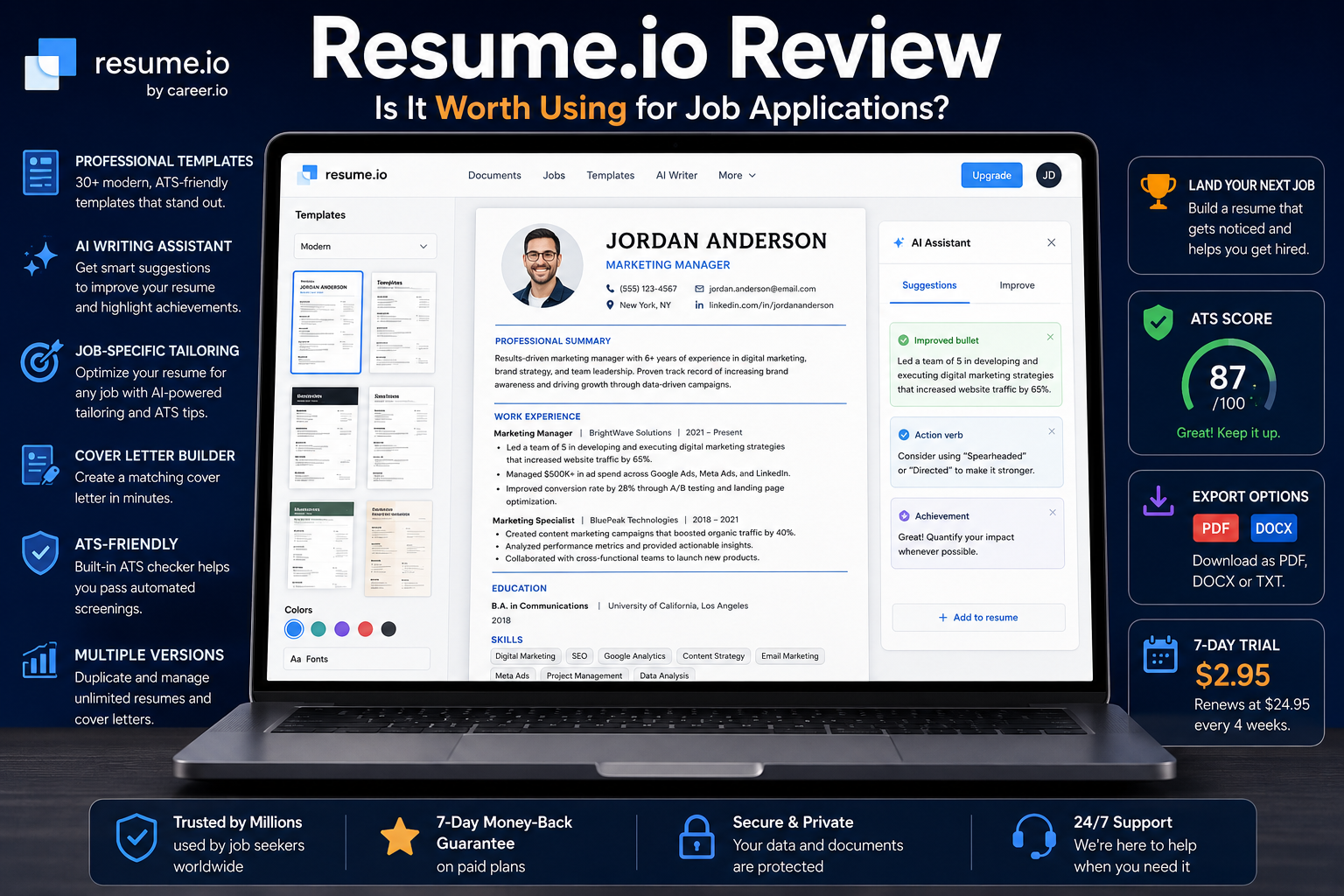
The main weakness is the payment model. The current US offer starts with a $2.95 seven-day trial and automatically renews at $29.95 every four weeks unless cancelled. That four-week cycle can produce thirteen charges over a full year. Resume.io is therefore easier to justify for a concentrated week of document creation than as a subscription left running indefinitely.
Best for: quickly producing polished resumes and matching cover letters.
Less suitable for: users who need only one simple document or may forget to cancel a trial.
Main advantage: a guided builder with professional templates and convenient exports.
Main risk: automatic renewal every four weeks after the trial.
Toolytica rating: 4.2 out of 5.
If you decide to use it, build most of the document for free, verify the format available for your chosen template, activate paid access only when the content is nearly finished, download every required version and keep the cancellation confirmation.
Resume.io Review Summary
| Area | What we verified | Practical conclusion |
| Free plan | One resume and one cover letter; TXT officially listed; some templates displayed as FREE PDF | Useful for building and testing, but free PDF availability is not documented consistently |
| Trial | $2.95 for seven days in the current US offer | Good short-term value only if the renewal deadline is managed |
| Renewal | $29.95 every four weeks | More expensive over time than a conventional monthly plan may appear |
| Quarterly | $49.95 every three months | Better value than repeated four-week renewals if several months are genuinely needed |
| Exports | PDF broadly supported; DOCX available on templates marked DOCX; TXT available | Check the template label before committing |
| Cancellation | Account settings or public cancellation page, followed by email confirmation | Save the confirmation email and verify the account status |
Why People Use Resume.io
Most people do not open a resume builder because they want to experiment with document software. They use one because an application deadline is approaching, an old resume looks dated or a small edit has broken the layout. Resume.io removes much of that friction by separating career content from design.
The editor organizes information into familiar sections such as professional summary, employment history, education, skills, courses, languages, internships and custom sections. Changes appear in the preview while the user works. A different template, color or spacing option can be applied without re-entering the career history.
You need a presentable resume quickly.
You find Word formatting frustrating.
You want coordinated resume and cover-letter designs.
You need several versions for related positions.
You have useful experience but need help structuring it clearly.
The builder cannot decide which achievements genuinely matter, prove that a claim is true or guarantee that an employer will select the application. Its value lies in turning good source material into a readable document efficiently.
Resume.io Pricing in 2026
Resume.io localizes its offers. Prices, currencies and available plans may differ by country or account, so the checkout screen is the final source for any purchase. On October 21, 2026, the official US pricing page displayed the following options.
| Plan | Current US price | How it works |
| Free | $0 | One resume and one cover letter with restricted downloads |
| Seven-day trial | $2.95 | Full premium access; renews at $29.95 every four weeks unless cancelled |
| Quarterly | $49.95 | Renews at $49.95 every three months |
The trial and quarterly plan both advertise unlimited resumes and cover letters, premium templates and colors, unlimited PDF downloads and a seven-day money-back guarantee. Resume.io also says the trial includes access to all resume tools, templates, cover letters and available download formats. Verify these details on the live pricing page before paying because the company states that pricing can vary by location.
The Trial Is Not a One-Time Purchase
The $2.95 payment begins a seven-day premium trial. If it is not cancelled, the current US offer becomes a recurring $29.95 subscription billed every four weeks. A four-week cycle lasts 28 days, not a calendar month. Resume.io’s billing help explicitly describes the monthly subscription as a 28-day cycle starting at the exact time of the original payment.
Finish the writing before starting the trial.
Record the exact signup date and time.
Check the currency and renewal amount at checkout.
Download PDF and DOCX versions while premium access is active.
Cancel early enough to complete the email-confirmation step.
Keep the cancellation confirmation and check the next expected billing date.
What Can You Do With Resume.io Free
The free plan lets users create one resume and one cover letter, edit the content and share an online link. The confusing part is export availability because Resume.io’s own pages are not fully consistent.
The official pricing page describes the free plan as TXT-only. The official help center says the Vancouver template can be downloaded as a free PDF as well as TXT. During our public interface check on October 21, 2026, the template selector visibly marked five designs as FREE PDF: Copenhagen, Boston, Geneva, Vancouver and Cape Town.
The workflow then requested an email address before the resume could be completed. We did not create an account, so we cannot confirm that every free account, country or one of those five templates successfully produces a no-cost PDF at the final download step. The most defensible conclusion is that TXT is the consistently documented free export, while selected templates may offer a free PDF depending on the current interface and account.
A TXT file keeps the written content but removes the visual design. It can be copied into Microsoft Word or Google Docs and formatted manually. That makes the free plan useful for drafting, but less useful when the main reason for choosing Resume.io is its polished template design.
Resume.io Templates and ATS Compatibility
Resume.io promotes more than 30 templates across simple, professional, modern, creative and ATS-oriented categories. Its public selector identifies the formats available for individual designs. Many templates were marked PDF and DOCX, while others were marked PDF only. Users who need a Microsoft Word file should choose a template carrying the DOCX label before investing time in the layout.
The most reliable resume designs usually use a clear reading order, standard section headings, restrained colors, readable fonts and limited decoration. Two-column or highly visual templates can look attractive, but they may be harder for some applicant tracking systems to parse.
No resume builder can guarantee that a document will pass every ATS. Employers use different systems, filters and decision rules. A clean template reduces avoidable parsing problems, but it cannot compensate for missing qualifications, an unsuitable location, insufficient experience or weak evidence.
For a closer comparison of template design and ATS-focused writing, read Toolytica’s Rezi vs Resume.io comparison.
Resume.io AI Writing Tools
Resume.io markets AI-assisted writing, suggested phrases, job-description tailoring and ATS guidance. These features can help users turn rough notes into clearer professional language, especially when they know what they did but struggle to describe it concisely.
AI-generated wording still requires human verification. A suggestion can sound confident while being generic, exaggerated or simply untrue. Never add an invented percentage, responsibility, qualification, software skill or management achievement. Every claim on a resume may become an interview question.
A weak sentence such as ‘Helped customers and solved problems’ can be made clearer, but the best version includes real context: the number of enquiries handled, the communication channels used, the type of problem resolved or a result that can be defended. The AI can improve the phrasing; the candidate must supply the evidence.
Tailoring Resumes for Different Jobs
Paid access is most valuable when a job seeker needs several related versions. A project coordinator application may emphasize planning, deadlines, reporting and stakeholder communication, while a business analyst version may prioritize requirements gathering, process analysis, testing and documentation. The underlying experience can remain the same while the order and emphasis change.
Tailoring does not mean inventing a new professional history for each vacancy. It means making the most relevant true evidence easier to find. Job seekers who need deeper keyword analysis should also read the full Rezi review, which examines a more ATS-focused workflow.
Cover Letter Builder
Resume.io includes a cover-letter builder with designs that can match the selected resume. Resume.io’s help documentation says cover letters can be downloaded in PDF or DOCX depending on the template. Matching visual styles create a consistent application package, but the generated text still needs personalization.
A useful cover letter should explain why the role makes sense, which part of the candidate’s experience is most relevant, why the organization is of interest and what problem the candidate can help solve. A generic AI letter that could be sent to any employer adds little value.
PDF DOCX TXT and Shareable Links
PDF is normally the best option when the document must retain its exact layout across devices. Premium plans advertise unlimited PDF downloads. Selected templates were also labelled FREE PDF in the public selector, although final free download eligibility could not be confirmed without creating an account.
DOCX
DOCX is useful when a recruiter or application portal requests a Microsoft Word file. The public template selector showed DOCX support on many, but not all, designs. Check the format label before choosing a template if Word export is mandatory.
TXT
TXT preserves the words without fonts, colors, columns or other template formatting. It is useful as a content backup, for copying information into long application forms or for rebuilding the resume elsewhere. It is the safest consistently documented free download option.
Shareable Link
Resume.io allows online sharing of resume links. This can be convenient in email or professional profiles, but a forwarded link may reach people beyond the intended recipient. A locally stored PDF gives the user more direct control for traditional applications.
Cancellation and Refunds
Resume.io documents two main cancellation routes. A subscriber can use Account Settings inside the app, or visit the public Cancel Subscription page without logging in. The public route searches for the account using the registration email address.
After the cancellation button is used, Resume.io sends an email containing additional confirmation steps. The company states that if no confirmation email is received, the cancellation may not have been completed. Checking the spam folder is therefore not optional; it is part of verifying that the process finished.
After a confirmed cancellation, Resume.io says premium access normally remains available for seven days from the trial payment or 30 days from the latest four-week payment. The account then returns to the free plan. Cancelling is different from deleting the account: stored resumes and cover letters remain associated with the downgraded account, while permanent deletion removes the data and cannot be reversed.
The refund rule is stricter than the pricing-page summary may suggest. Resume.io’s billing help says eligibility is limited to the first seven days after account creation. The company also states that forgetting to cancel, not using premium features or unsuccessfully attempting to cancel does not extend that period. Review the official payments and refund guidance before relying on a refund.
Cancel before the trial deadline rather than waiting for the final hour.
Complete the email-confirmation step.
Keep the confirmation message and a screenshot of the account status.
Verify that the account shows the free plan or an end date.
Check the payment method after the date on which renewal would have occurred.
We verified the published cancellation workflow but did not purchase a subscription, submit a real subscriber’s email or observe a post-cancellation billing cycle. We therefore cannot confirm that every cancellation or refund request is completed without technical or billing problems.
Is Resume.io Legit
Resume.io is a real commercial resume-building service rather than an anonymous download page. The current Terms of Use identify Talent Worldwide, Inc. and its subsidiaries and affiliates as the company behind the Resume.io and Career.io platforms. The Privacy Policy also identifies Resume.io / Imkey BV in Breda, Netherlands, with a Dutch Chamber of Commerce and VAT number.
Legitimate does not automatically mean suitable or good value for every user. The product functions as a subscription service, and the low-cost trial converts into a recurring four-week plan. The main consumer risk is therefore misunderstanding or forgetting the renewal rather than receiving no product at all.
When checked on October 21, 2026, Trustpilot displayed a 4.2 out of 5 rating from more than 56,000 reviews. Many reviewers praised usability and templates, while some reported unexpected renewals, unsuccessful cancellation attempts or refund disputes. The Better Business Bureau complaint profile for Talent Worldwide also contained billing-related complaints. These reports describe individual experiences; they do not establish how often a problem occurs across all customers.
Our conclusion is that Resume.io is legitimate, but users should treat the renewal date and confirmation email as important parts of the purchase.
Privacy Considerations
A resume normally contains a name, contact details, employment history, education, location and professional links. Users should avoid adding information an employer does not need, such as national identification numbers, banking details, a complete home address, identity-document copies or private credentials.
Resume.io’s privacy policy describes the use of service providers, analytics, advertising technologies and, where legally permitted, data sharing or sale for targeted advertising and related purposes. Available rights and opt-out methods depend on jurisdiction. Review the privacy policy and cookie controls, keep local copies of completed documents and remove shareable links that are no longer needed.
Who Gets the Most Value From Resume.io
A job seeker facing an application deadline who needs a polished document quickly.
A student or graduate building a first professional resume.
A professional with strong content who dislikes formatting in Word.
Someone creating several tailored versions during an intensive job search.
A user who wants matching resume and cover-letter designs.
Who Should Probably Skip It
Someone who needs only one simple resume and is comfortable with Word or Google Docs.
A user who already has a professionally formatted document and needs only minor edits.
Someone seeking specialized keyword matching and detailed ATS comparison for every vacancy.
A person likely to forget trial renewals or uncomfortable with recurring subscriptions.
A long-term job seeker who would obtain better value from a free tool or a clearly priced longer-term plan.
For a wider workflow covering resume tools, job tracking and research, see Toolytica’s guide to the best tools for job seekers.
Resume.io Alternatives
Rezi
Rezi focuses more heavily on ATS-oriented writing, keyword targeting, resume scoring and repeated optimization. Compare the two directly in Rezi vs Resume.io.
Teal
Teal connects resume work with saved jobs, application tracking and broader career organization. It may be more useful when managing a long search rather than producing documents during one short period.
Jobscan
Jobscan specializes in comparing an existing resume with a specific job description. It is more narrowly focused on matching and optimization than on visual document creation.
Canva
Canva provides greater visual freedom, but complex layouts can be harder for an ATS to interpret. It is better suited to design-sensitive roles when the employer also accepts a conventional text-based version.
Word and Google Docs
A simple Word or Google Docs template may be enough for users with strong content and basic formatting skills. This route avoids a subscription and leaves the source file fully editable.
For more options, see Toolytica’s comparison of the best AI resume builders for job seekers.
Is Resume.io Worth Paying For
Resume.io is worth paying for when it helps a user finish several professional application documents during a concentrated period. The editor, templates and matching cover letters can save significant formatting time, and the seven-day trial can be useful when the content is already almost complete.
It is less convincing as an ongoing subscription. Once the resume and cover letter are complete, the job seeker’s time may be better spent finding suitable vacancies, contacting recruiters, improving LinkedIn, researching employers and preparing interview examples.
Choose the free plan to test the editor, structure the content and obtain a TXT backup.
Choose the trial when the content is nearly ready and several premium downloads are needed within one week.
Choose the quarterly plan only when several months of active document creation justify the recurring cost.
Choose an alternative when advanced ATS matching, application tracking or full design control matters more than speed.
Final verdict: Resume.io is one of the easier ways to turn solid career information into a credible application. Its value is highest when used deliberately, with the renewal terms understood and the cancellation confirmation saved.
Frequently Asked Questions
Is Resume.io free?
Resume.io has a free plan for one resume and one cover letter. TXT is the consistently documented free export. Resume.io’s help center also mentions a free Vancouver PDF, while the public selector displayed five FREE PDF templates during our check. We cannot confirm that every account or region can download all five without payment.
How much does Resume.io cost?
As of October 21, 2026, the official US page lists a $2.95 seven-day trial that renews at $29.95 every four weeks unless cancelled. A recurring $49.95 quarterly plan is also displayed. Prices can vary by location and account.
Does the Resume.io trial automatically renew?
Yes. Resume.io states that the seven-day trial converts into a premium subscription billed every four weeks if it is not cancelled.
How do I cancel Resume.io?
Cancel from Account Settings or use Resume.io’s public cancellation page without logging in. The public route requires the registration email and a further confirmation step by email.
How do I know the cancellation worked?
Resume.io says a successful cancellation produces a confirmation email. If that message does not arrive, the cancellation may not be complete. Check spam, verify the account status and contact support if necessary.
Can Resume.io export to Word?
Many templates support DOCX, but not every design does. Choose a template labelled DOCX if Microsoft Word format is required.
Can Resume.io create a PDF?
Premium plans include unlimited PDF downloads. Selected templates are displayed as FREE PDF, but availability at the final free download step may vary by interface, account or country.
Is Resume.io legitimate?
Yes. Its legal documents identify the operating companies, and the platform provides a functioning resume builder and support documentation. Users should still pay close attention to the automatic renewal and refund deadline.
Are Resume.io resumes ATS friendly?
Resume.io offers ATS-oriented templates and guidance, but no builder can guarantee acceptance by every applicant tracking system or employer.
Is Resume.io better than Rezi?
Resume.io is generally stronger for fast document creation, polished templates and matching cover letters. Rezi is more specialized around ATS-focused writing, keyword targeting and resume scoring.