Todoist vs TickTick: Smart Task App Comparison
Quick Verdict
Todoist and TickTick are two of the best task management apps for people who want to organize work, personal tasks, reminders, routines, and daily priorities.
But they are not built for exactly the same type of user.
Todoist is better if you want a clean, reliable, simple task manager with strong recurring tasks, natural language input, projects, filters, labels, reminders, and a focused productivity workflow.
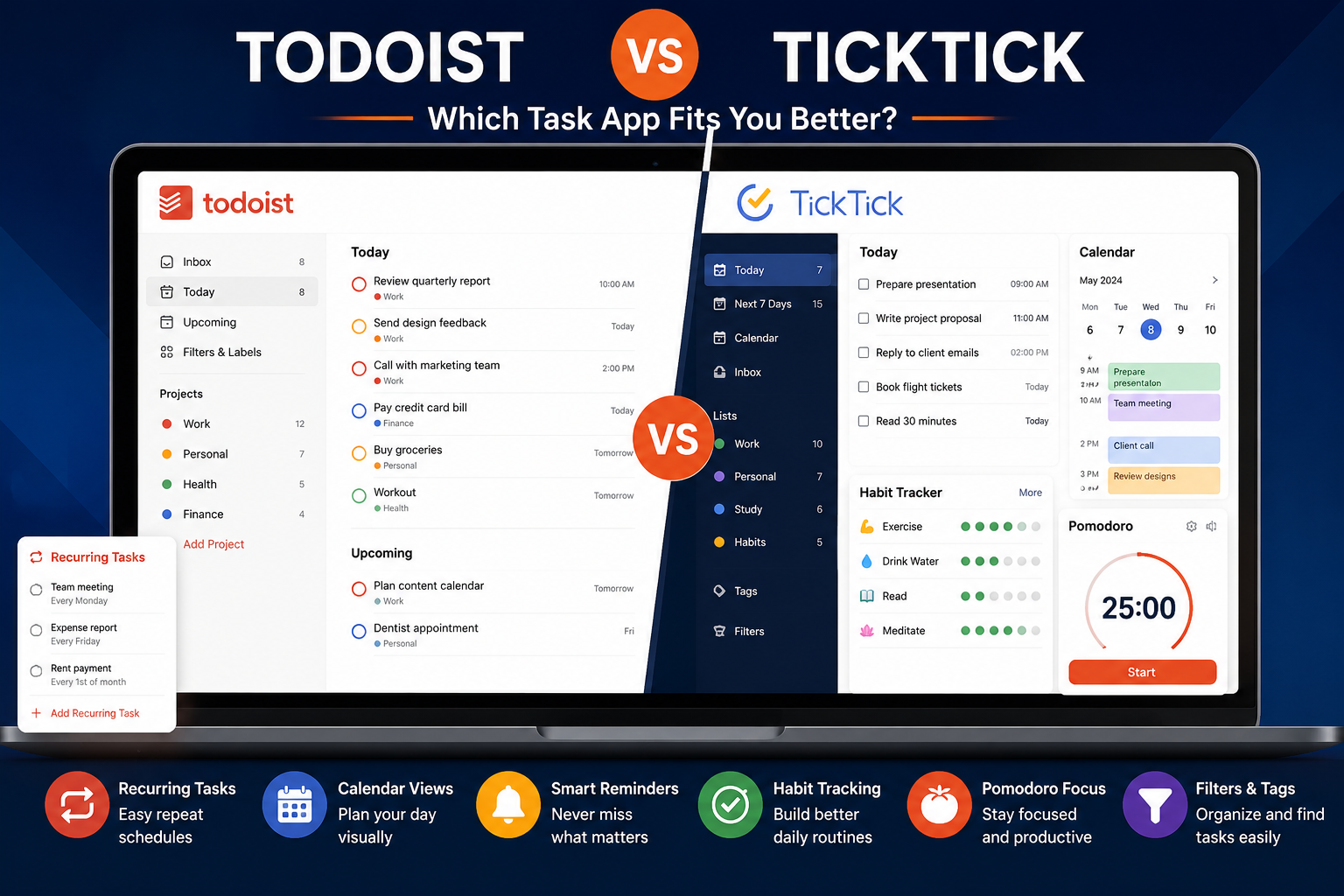
TickTick is better if you want a more feature-rich productivity app with tasks, calendar views, habits, Pomodoro, reminders, filters, and more built-in tools in one place.
If you want the simplest answer:
- Choose Todoist if you want a clean and focused task app.
- Choose Todoist if you like simplicity, recurring tasks, fast task capture, and a polished user experience.
- Choose TickTick if you want more features in one app.
- Choose TickTick if you care about habits, Pomodoro, calendar planning, and advanced reminders.
- Choose Todoist if you want less complexity.
- Choose TickTick if you want more control.
For most people who want a simple and elegant to-do list app, Todoist is the safer choice.
For users who want an all-in-one productivity system, TickTick offers more built-in functionality.
Todoist vs TickTick At A Glance
| Criteria | Better Choice | Why |
|---|---|---|
| Best for simplicity | Todoist | Cleaner and easier to use daily |
| Best for all-in-one productivity | TickTick | Includes tasks, calendar, habits, and Pomodoro |
| Best for recurring tasks | Todoist | Very strong natural language recurring task support |
| Best for habit tracking | TickTick | Built-in habit tracking |
| Best for Pomodoro focus | TickTick | Built-in Pomodoro/focus features |
| Best for calendar-heavy planning | TickTick | More calendar-focused workflow |
| Best for clean task management | Todoist | More focused and less cluttered |
| Best for advanced reminders | TickTick | Strong reminder options and constant reminders |
| Best for teams | Todoist | Stronger business/team structure |
| Best for beginners | Todoist | Easier to understand quickly |
| Best for power users | TickTick | More features in one app |
| Best overall for simple productivity | Todoist | Reliable, clean, and focused |
| Best overall for advanced personal productivity | TickTick | More tools included |
What Is Todoist?
Todoist is a task management app designed to help users organize work, personal tasks, projects, deadlines, and recurring routines.
Its biggest strength is simplicity.
Todoist does not try to become a full workspace like Notion or an all-in-one productivity suite. It focuses on helping you capture tasks quickly, organize them into projects, assign due dates, create recurring tasks, use filters and labels, and stay clear on what needs to be done next.
Todoist is especially useful for people who want a clean daily task system without too many distractions.
Todoist Is Best For
- Daily task management;
- Recurring tasks;
- Simple project organization;
- Work and personal task planning;
- Reminders;
- Labels and filters;
- Team tasks;
- Clean productivity workflows;
- Users who want less complexity;
- People who need a reliable task app across devices.
Where Todoist Feels Strong
Todoist feels strong when you want to capture and organize tasks quickly.
For example, you can use Todoist for:
- “Pay rent every month”;
- “Submit report every Friday”;
- “Call supplier tomorrow at 10 AM”;
- “Review job applications next Monday”;
- “Plan content calendar every Sunday.”
Todoist is great for people who want to stop forgetting things without building a complicated productivity system.
What Is TickTick?
TickTick is a task management and productivity app that combines to-do lists with extra features like calendar views, habit tracking, Pomodoro/focus tools, reminders, filters, and planning features.
Compared with Todoist, TickTick feels more complete out of the box.
It is not only a task manager. It can also help users manage habits, plan their calendar, run Pomodoro sessions, organize routines, and track productivity.
This makes TickTick attractive for users who want more than a simple to-do list.
TickTick Is Best For
- Task management;
- Calendar planning;
- Habit tracking;
- Pomodoro sessions;
- Advanced reminders;
- Personal productivity routines;
- Time blocking;
- Filters and tags;
- Users who want more features in one app;
- People who like customizing their productivity system.
Where TickTick Feels Strong
TickTick is strong because it brings several productivity tools together.
Instead of using one app for tasks, one app for habits, one app for Pomodoro, and one app for planning, TickTick tries to combine them.
This is useful if you want one app for:
- Tasks;
- Routines;
- Habits;
- Reminders;
- Calendar planning;
- Focus sessions;
- Simple productivity tracking.
TickTick is better for users who want a more advanced personal productivity dashboard.
Main Difference Between Todoist And TickTick
The main difference is simple:
Todoist is cleaner and more focused.
TickTick is more feature-rich and flexible.
Todoist is the better choice if you want a simple task app that does not feel overloaded.
TickTick is the better choice if you want one app that can handle tasks, habits, Pomodoro, calendar planning, and more advanced reminders.
This difference matters because adding more features can be useful, but it can also create more complexity.
If you want a task manager that gets out of your way, Todoist is better.
If you want a productivity app with more built-in tools, TickTick is better.
Pricing Comparison: Which App Offers Better Value?
Pricing can change over time and may vary depending on country, platform, taxes, billing cycle, promotions, or app store rules. Always verify current pricing directly on the official website before subscribing.
| Tool | Free Plan | Paid Plan Shown | Key Strengths | Best For | Value Rating |
| Todoist | Yes | Pro from around $5/month when billed yearly | Clean task management, reminders, calendar layout, filters, task duration, reporting history | Simple and reliable task management | ★★★★☆ 4.5/5 |
| TickTick | Yes | Premium annual plan shown at US$35.99/year | Calendar views, start/end dates, filters, habits, Pomodoro, reminders, all-in-one productivity features | Feature-rich personal productivity | ★★★★☆ 4.6/5 |
Premium Plans Compared
Todoist Plans
| Plan | Best For | Main Features |
| Beginner | Basic personal task management | 5 personal projects, Smart Quick Add, reminders, list and board layouts, limited filters, activity history |
| Pro | Serious personal productivity | More projects, calendar layout, task duration, custom reminders, more filters, full reporting history, Task Assist, deadlines |
| Business | Teams and shared workspaces | Shared team workspace, team projects, roles, permissions, team activity logs, shared templates, centralized billing |
TickTick Plans
| Plan | Best For | Main Features |
| Free | Basic personal task management | Tasks, lists, reminders, calendar features, and basic productivity tools |
| Premium | Advanced personal productivity | More calendar functionality, start and end dates, calendar subscriptions, custom filters, advanced planning, and premium features across platforms |
Pricing Verdict
TickTick is usually stronger for users who want more features for the price.
Its Premium plan is attractive because it combines tasks, calendar planning, reminders, habits, Pomodoro, and filters in one app.
Todoist is not necessarily the cheapest if you compare feature by feature, but it is extremely polished and simple.
That matters because the best productivity app is not always the one with the longest feature list. It is the one you actually use every day.
Choose Todoist Pro if you want a clean, reliable task manager with advanced personal features.
Choose TickTick Premium if you want more built-in productivity tools at a strong price.
Todoist: Strengths And Weaknesses
Todoist Strengths
Todoist’s biggest strength is focus.
It does not feel overloaded. The interface is clean, the workflow is easy to understand, and adding tasks is fast.
Todoist is especially good for recurring tasks.
For example:
- “Every Monday”;
- “Every weekday”;
- “Every first day of the month”;
- “Every Friday at 9 AM”;
- “Every 3 months.”
This makes Todoist a strong app for recurring personal and professional responsibilities.
Todoist is also good for people who want a task app that works across devices without requiring too much setup.
Todoist Weaknesses
Todoist is less complete than TickTick if you want built-in habit tracking, Pomodoro, or a more advanced calendar workflow.
You can still create recurring tasks for habits, but Todoist is not a dedicated habit tracker.
You can also connect calendar tools, but TickTick feels more like an all-in-one productivity app for users who want to plan inside the same system.
Todoist is better for task management than full productivity tracking.
TickTick: Strengths And Weaknesses
TickTick Strengths
TickTick’s biggest strength is versatility.
It gives users more productivity tools in one place.
You can manage tasks, plan with calendar views, track habits, use Pomodoro, create reminders, use filters, and organize routines without needing too many separate apps.
TickTick is especially useful for users who want a personal productivity command center.
It can replace several small tools:
- A task app;
- A habit tracker;
- A Pomodoro timer;
- A simple calendar planning tool;
- A reminder app.
TickTick Weaknesses
TickTick can feel more crowded than Todoist.
Because it offers more features, it may take more time to configure properly.
Some users may love that flexibility. Others may find it distracting.
If your main goal is simply to manage tasks and deadlines, Todoist may feel cleaner.
TickTick is better for people who want more control, but Todoist is better for people who want simplicity.
Feature Comparison
| Feature | Todoist | TickTick |
| Task management | Strong | Strong |
| Recurring tasks | Excellent | Very good |
| Natural language input | Strong | Strong |
| Reminders | Strong | Stronger for advanced reminders |
| Calendar view | Good | Strong |
| Habit tracking | Limited workaround | Built-in |
| Pomodoro | Not built-in as a core feature | Built-in |
| Filters | Strong | Strong |
| Tags / labels | Strong | Strong |
| Team features | Stronger | More personal-focused |
| Simplicity | Stronger | Good, but more feature-rich |
| Customization | Good | Stronger |
| Best for beginners | Todoist | Good |
| Best for power users | Good | TickTick |
| Best all-in-one system | Limited | TickTick |
Recurring Tasks
Todoist is one of the best apps for recurring tasks.
Its natural language input makes it easy to create tasks that repeat without opening multiple menus.
This is useful for:
- Bills;
- Weekly reviews;
- Work routines;
- Personal reminders;
- Admin tasks;
- Health routines;
- Content planning.
TickTick also supports recurring tasks and reminders, but Todoist feels slightly more polished for fast recurring task capture.
If recurring tasks are your main need, Todoist is the safer choice.
Calendar Planning
TickTick is stronger if you want a calendar-heavy task workflow.
It is better for users who like seeing tasks in a visual calendar and planning their time more directly.
Todoist also offers calendar features and calendar integrations, but TickTick feels more naturally built for users who want to combine tasks and calendar planning.
Choose TickTick if you want more calendar control.
Choose Todoist if you want calendar support without turning your task app into a full planning system.
If neither task manager provides the calendar experience you need, compare the best calendar apps for personal use before choosing a separate planning tool.
Habits And Routines
TickTick clearly wins for habits.
It includes habit tracking as part of the app, which makes it useful for people who want to build routines such as:
- Reading daily;
- Exercising;
- Drinking water;
- Learning a language;
- Writing every morning;
- Meditating;
- Cleaning routines.
Todoist can handle habits as recurring tasks, but it does not feel like a true habit tracker.
If habits matter to you, TickTick is the better choice.
Pomodoro And Focus
TickTick also wins for Pomodoro and focus sessions.
If you like working in focused time blocks, TickTick can be useful because it includes Pomodoro-style productivity features.
Todoist is better for telling you what to do.
TickTick is better for helping you manage how you work through tasks.
This makes TickTick more attractive for students, freelancers, creators, and people who need help staying focused.
Simplicity And User Experience
Todoist wins for simplicity.
The app is clean, fast, and easy to understand.
You can start with Todoist quickly without building a complicated system.
TickTick is still user-friendly, but it has more sections and features. That is good if you use them, but unnecessary if you only want a simple task app.
If you are easily distracted by too many features, Todoist is better.
If you enjoy customizing your productivity system, TickTick is better.
Platforms And Sync
Both Todoist and TickTick are available across major platforms and are designed for cross-device productivity.
For most users, either app will work across desktop, mobile, and web.
The more important question is not platform availability. It is workflow preference.
Todoist is better if you want the same clean task workflow everywhere.
TickTick is better if you want more built-in tools across devices.
Best App By Use Case
| Use Case | Best Choice |
| Simple daily task management | Todoist |
| Recurring tasks | Todoist |
| Minimal productivity system | Todoist |
| Team task management | Todoist |
| Personal task planning | Both |
| Calendar-heavy planning | TickTick |
| Habit tracking | TickTick |
| Pomodoro/focus sessions | TickTick |
| Advanced reminders | TickTick |
| All-in-one productivity app | TickTick |
| Beginners who want simplicity | Todoist |
| Power users who want more features | TickTick |
| Students | TickTick |
| Professionals | Todoist |
| Freelancers | Depends |
| Creators | TickTick |
| Families/personal routines | TickTick |
Who Should Choose Todoist?
Choose Todoist if:
- You want a clean task app;
- You care about recurring tasks;
- You want simple project organization;
- You dislike overloaded productivity tools;
- You need a reliable app for work and personal tasks;
- You want fast task capture;
- You want filters, labels, and reminders;
- You want a polished experience;
- You work with teams;
- You want a task manager that is easy to maintain.
Todoist is the better choice if you want a simple system you can actually use every day.
Who Should Choose TickTick?
Choose TickTick if:
- You want tasks, habits, calendar, and Pomodoro in one app;
- You like visual planning;
- You want built-in habit tracking;
- You want stronger focus tools;
- You need advanced reminders;
- You want more features for personal productivity;
- You enjoy customizing your workflow;
- You want an all-in-one productivity system;
- You do not mind a slightly more feature-rich interface.
TickTick is the better choice if you want one app to manage more than just tasks.
Common Mistakes When Choosing Between Todoist And TickTick
Mistake 1: Choosing The App With The Most Features
More features do not always mean better productivity.
If you only need tasks and reminders, Todoist may be better even if TickTick offers more tools.
Mistake 2: Ignoring Your Real Workflow
Some users need a simple task list.
Others need habits, focus sessions, and calendar planning.
Choose based on your daily behavior, not only on the feature list.
Mistake 3: Trying To Track Everything
Productivity apps can become overwhelming if you turn every small action into a task.
Start simple, then add features only when needed.
Mistake 4: Using Habit Tracking When A Task Is Enough
Not every routine needs a habit tracker.
Some routines work better as recurring tasks.
Use TickTick habits for routines you want to measure. Use Todoist recurring tasks for responsibilities you simply need to remember.
Mistake 5: Paying Before Testing The Free Plan
Both tools are worth testing before upgrading.
Use the free plan first. Upgrade only when you know which workflow you prefer.
Final Recommendation
Choose Todoist if you want the cleaner and simpler task management app.
Choose TickTick if you want the more complete all-in-one productivity app.
For most users who want a focused to-do list, Todoist is the better choice.
For users who want tasks, habits, calendar planning, reminders, and Pomodoro in one place, TickTick is the better choice.
The practical recommendation is simple:
Use Todoist if your main problem is remembering and completing tasks.
Use TickTick if your main problem is managing your whole productivity routine.
FAQ
Is Todoist Better Than TickTick?
Todoist is better if you want a clean, simple, reliable task management app. TickTick is better if you want more built-in features like habits, Pomodoro, calendar views, and advanced reminders.
Is TickTick Better Than Todoist?
TickTick is better for users who want an all-in-one productivity app. It is stronger for habits, Pomodoro, calendar planning, and advanced personal routines.
Which App Is Better For Recurring Tasks?
Todoist is especially strong for recurring tasks because its natural language input makes repeat schedules easy to create and manage.
Which App Is Better For Habits?
TickTick is better for habits because it includes built-in habit tracking. Todoist can manage habits as recurring tasks, but it is not a dedicated habit tracker.
Which App Is Better For Calendar Planning?
TickTick is generally better for calendar-heavy planning. Todoist has useful calendar features, but TickTick feels more built around visual planning.
Which App Is Better For Students?
TickTick may be better for students because it combines tasks, habits, calendar planning, and Pomodoro. Todoist is better for students who want a simpler task list.
Which App Is Better For Professionals?
Todoist is often better for professionals who want a clean system for tasks, deadlines, projects, and recurring responsibilities. TickTick is better if they also want habits and focus tools.
Which App Is Easier To Use?
Todoist is easier to use because it is cleaner and more focused. TickTick is still user-friendly, but it includes more features.
Can TickTick Replace Todoist?
Yes, TickTick can replace Todoist if you want more features in one app. However, Todoist may still feel better if you prefer a simpler and cleaner task management experience.
Should I Pay For Todoist Or TickTick?
Pay for Todoist if you want a polished task manager with advanced reminders, filters, calendar layout, and more project limits. Pay for TickTick if you want more all-in-one productivity features like calendar planning, habits, and Pomodoro.
Todoist review, TickTick review, best task app, best to-do list app