Best Resume Builders for Students in 2026: 4 Tools Compared
Quick Verdict
- Best overall for students: Kickresume. It combines an unusually useful free plan, coordinated resume and cover-letter templates, beginner-friendly editing, and a verified student Premium offer.
- Best for ATS-first applications: Rezi. Its conservative templates, job-description keyword tools, and structured feedback reduce formatting decisions and keep the focus on relevance.
- Best for beginners and template choice: Resume.io. The editor is approachable and the site provides dedicated student and internship examples, but free users can download only TXT files.
- Best for resume design: Enhancv. Its flexible sections and stronger visual hierarchy suit project-led or less conventional profiles, but free access lasts only seven days and builder exports are PDF-only.
If you are eligible for Kickresume’s education offer, try that before buying anything. If verification is unavailable and ATS simplicity matters more than design, start with Rezi Free. Students who only need one conventional resume should also compare both results with a free Google Docs or Word template before subscribing.
Best Resume Builders for Students Compared
| Resume builder | Best for | Free access | Current paid price checked | Main student advantage | Main limitation |
|---|---|---|---|---|---|
| Kickresume | Best overall | Permanent Free plan; four resume and four matching cover-letter templates; unlimited documents and downloads | Page displayed €24 monthly, €54 quarterly, or €96 yearly | Eligible students and teachers can receive up to 180 days of Premium | Full AI writer and ATS checker are shown as Premium in the live plan table |
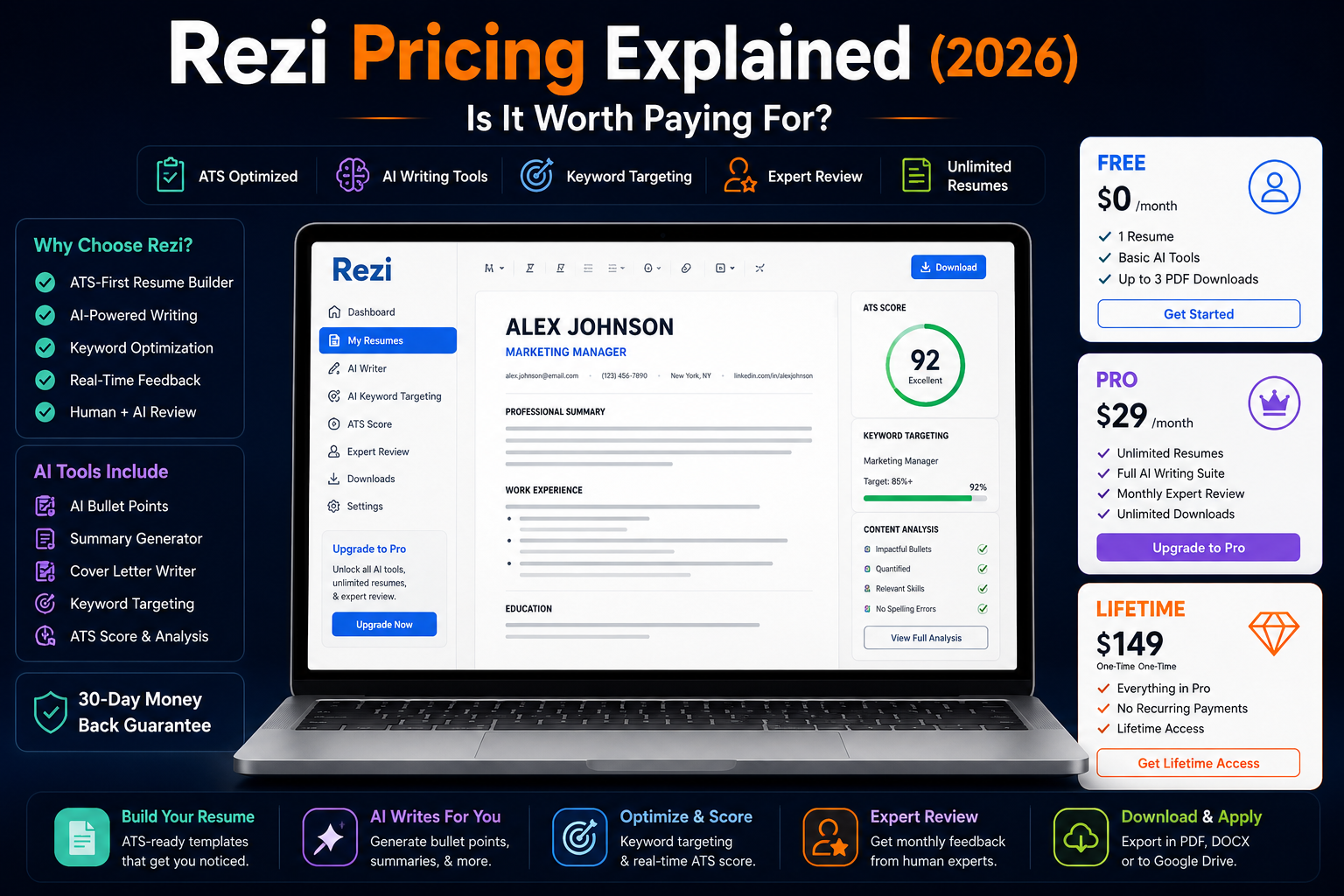
| Rezi | ATS-first internships and first jobs | One resume, three PDF downloads, standard templates, AI writing, and limited optimization tools | $29/month or $149 Lifetime | Strong structure, keyword targeting, Rezi Score, DOCX and Google Drive export | Free plan becomes restrictive when creating several tailored resumes |
| Resume.io | Fast setup and template choice | One resume and cover letter; TXT download only | $2.95 for seven days, then $29.95 every four weeks; or $49.95 quarterly | Dedicated student and internship examples; broad template library | Trial renews automatically; free plan does not provide a designed PDF |
| Enhancv | Design flexibility and project-led profiles | Seven days without a card; all templates, basic sections, branding, and 12 section items | Latest reproducible official figures: $24.99 monthly, $49.97 quarterly, or $79.94 for six months | Flexible sections and visual hierarchy help present projects and nontraditional experience | No permanent free tier; PDF-only builder export; live price module did not render correctly |
The prices above are not currency-normalized because the vendors localize their pages differently. Kickresume rendered euro prices during this review, Rezi and Resume.io displayed US dollars, and Enhancv’s live pricing module produced invalid localized values. The Enhancv amounts come from its own comparison article, updated August 28, 2026. Always check the currency, tax, total charge, and renewal date shown to you.
How We Chose the Best Resume Builders for Students
This is a documentation-based editorial comparison. Toolytica did not submit applications to employers or measure interview rates, so the article does not present vendor scores as proof of hiring outcomes.
The comparison prioritizes the questions that matter to a student building an internship or first-job resume:
- Can a student produce and download a credible application for free? A free editor is not especially useful if the final PDF sits behind a paywall.
- Does the structure work with limited experience? Projects, relevant coursework, student organizations, volunteering, and part-time work need enough room to carry the application.
- How much control does the user have? Some students benefit from strict ATS-oriented guardrails; others need flexible sections for portfolios, research, publications, or creative work.
- What does the AI actually do? We distinguish writing assistance, keyword comparison, resume scoring, and job-specific tailoring instead of grouping everything under an “AI” label.
- What file can the student keep? PDF, DOCX, TXT, and platform-only documents do not offer the same portability.
- What happens after the introductory price? Renewal terms and the amount charged matter more than an attractive monthly equivalent.
- Are ATS claims presented responsibly? No builder can guarantee that every template will parse correctly in every employer system.
The factual plan details were checked on the official Kickresume pricing, Kickresume student, Rezi pricing, Resume.io pricing, Enhancv pricing, and Enhancv free-plan pages on September 3, 2026.
What a Student Resume Builder Should Help You Do
A first resume is not an empty professional resume waiting for more jobs. It needs a different hierarchy.
Education may sit above experience. A relevant university project can deserve more space than an unrelated weekend job. A student society role can demonstrate budgeting, event coordination, or team leadership. Coursework can be useful when it provides evidence for a technical requirement, but a long list of module names rarely helps by itself.
The builder should therefore make it easy to create sections for:
- Education and expected graduation date;
- Internships, part-time work, and volunteering;
- Academic, personal, or team projects;
- Relevant coursework when it strengthens the application;
- Technical tools, languages, and certifications;
- Student organizations, leadership, competitions, or publications;
- A portfolio, LinkedIn profile, GitHub account, or other relevant work sample.
Good software can organize that evidence and help improve weak wording. It cannot invent evidence. If an AI suggestion adds a number, responsibility, tool, or outcome that is not true, delete it—even when the sentence sounds impressive.
1. Kickresume — Best Resume Builder for Students Overall
Kickresume is the most balanced choice in this comparison because it solves the two problems students commonly face at the same time: not knowing how to structure a first application and not wanting to pay before downloading it.
The Free plan currently includes four resume templates, four coordinated cover-letter templates, one website template, more than 20,000 pre-written phrases, more than 1,500 examples, unlimited resumes and cover letters, and unlimited downloads. Design controls are restricted, but the available templates are sufficient for a conventional internship application.
That permanent free access would already make Kickresume competitive. The education offer is what moves it to first place. Kickresume says eligible students and teachers can obtain up to 180 days of Premium after verification through ISIC, ITIC, or UNiDAYS. When the period ends, the account returns to Free rather than automatically becoming a paid subscription, and existing documents remain in the account. Eligibility and the exact duration still need to be confirmed during verification.
Why Kickresume Works Well for a First Resume
The editor sits between rigid form-filling and open-ended design software. Students can start with recognizable sections, use examples when they do not know what belongs in a bullet, and produce a matching cover letter without rebuilding the visual style.
Premium adds more than 40 resume templates, more than 40 matching cover-letter templates, all colors and typefaces, AI writing, the ATS Resume Checker, Career Map, LinkedIn and PDF import, mobile apps, and more website templates. Those features are useful during an active internship search, particularly when several tailored versions are needed.
The free and paid boundaries are not described consistently across every Kickresume page. Several product pages present AI functions as free to try, while the live pricing comparison marks the AI Resume and Cover Letter Writer and ATS Resume Checker as paid. The safest conclusion is that a free account may expose individual trials or basic previews, but ongoing AI writing and complete ATS feedback should be treated as Premium.
Kickresume Pricing and Student Access
The official page rendered these euro amounts during the September 3 check:
- Free: €0;
- Monthly: €24 each month;
- Quarterly: €54 charged every three months, advertised as €18 per month;
- Yearly: €96 charged every 12 months, advertised as €8 per month.
The quarterly and yearly figures are monthly equivalents, not monthly payment options. Prices can be localized, so a student outside the eurozone should verify the checkout currency rather than convert these figures manually.
Where Kickresume Falls Short
Four free designs are enough for a straightforward application but leave little room for experimentation. The platform is also an all-rounder rather than an ATS specialist; Rezi provides a more focused keyword and scoring workflow.
Export documentation requires care. Kickresume’s current student page explicitly lists PDF and TXT downloads. Other parts of its documentation have referred to Word or DOCX in inconsistent ways, so this article does not promise a designed DOCX export.
Choose Kickresume if: you want one beginner-friendly place for a resume, matching cover letter, basic website, and optional AI support—and especially if you can claim the education offer.
Skip it if: you want strict ATS-first guardrails above everything else, need an editable designed Word file, or already have a strong resume that only needs occasional manual edits.
For a deeper look at the pricing contradictions, exports, mobile apps, and privacy terms, read the full Kickresume review.
2. Rezi — Best for ATS-First Student Applications
Rezi is the better fit when the priority is a conservative resume that can be tailored to a specific job description without turning into a design project.
Its templates deliberately limit visual experimentation. The editor uses structured fields, the Rezi Score checks the document against multiple criteria, and Keyword Targeting compares the resume with a vacancy. For a student applying to large graduate programs or corporate internships, those guardrails can be more useful than dozens of creative layouts.
What Rezi Free Includes
Rezi’s current Free plan allows:
- One resume;
- Three PDF downloads;
- Standard-format templates;
- AI Resume Writer and AI Resume Editor access;
- One AI interview;
- Limited Rezi Score, keyword targeting, and real-time content analysis;
- Cover-letter and resignation-letter builders.
The official comparison table also lists Microsoft Word DOCX and Google Drive export. That makes Rezi more portable than a PDF-only builder, although the one-resume and three-PDF limits make the free plan less comfortable for a long internship search.
Rezi Pro and Lifetime Pricing
Rezi Pro costs $29 per month and includes unlimited resumes, PDF downloads, AI interviews, complete optimization tools, all templates, and one human resume review per month. Rezi describes that review as performed by a resume and hiring expert.
The $149 Lifetime plan provides the Pro feature set through a one-time purchase but does not include the recurring monthly expert review. At the current list prices, Lifetime equals slightly more than five months of Pro. It only makes sense if the student expects to revisit the platform across several internship cycles, graduation, and later job searches.
Rezi also publishes a 30-day money-back guarantee for Pro and Lifetime purchases. A cancellation and a refund request are not the same action, so a user who wants money returned should follow the stated refund process rather than only turning off renewal.
Why Rezi Is Not the Overall Winner
Rezi is excellent at keeping a resume conventional, but early-career candidates sometimes need more control over hierarchy. A student with substantial research, hackathon work, creative projects, or leadership may find the layouts visually restrained. The free plan also allows only one resume, which makes separate internship versions harder to manage.
The scoring tools need judgment. A higher Rezi Score can reveal weak bullets or missing job-description language, but it does not tell a student whether an example is genuinely persuasive. Never insert a keyword simply because software found it; the resume must show truthful evidence that the student has the skill.
Choose Rezi if: you are applying through large employer portals, want a simple layout, and prefer structured feedback over design freedom.
Skip it if: you want several permanently free resume versions or need a distinctive layout for a portfolio-led application.
Toolytica’s Rezi review examines the builder in more detail. The Rezi vs Resume.io comparison is useful if your decision is specifically ATS structure versus template variety.
3. Resume.io — Best for Beginners and Template Choice
Resume.io is the easiest option here to understand at first glance. The site provides a large template library, more than 500 resume examples, and dedicated examples for students, high-school applicants, internships, and entry-level roles. Its AI builder can suggest content, skills, keywords, and cover-letter drafts.
That guidance helps when a student is staring at an empty page. It also creates the risk of accepting generic text too quickly. The builder’s suggestions should be treated as prompts to remember real work—not as ready-made evidence.
The Free Plan Is Mainly a Drafting Space
Resume.io Free supports one resume and one cover letter, but the current pricing page restricts downloads to TXT. It also limits sharing and analytics.
TXT is useful as a portable copy of the words. It is not a finished application with the template’s design. A student who builds the entire resume before checking the export screen may discover that the polished PDF requires payment.
Resume.io Trial, Renewal, and Quarterly Plan
The current international pricing page lists:
- A $2.95 seven-day trial with unlimited resumes and cover letters, all Premium templates and colors, and unlimited PDF downloads;
- Automatic renewal after seven days at $29.95 every four weeks unless canceled;
- A $49.95 quarterly plan, renewed every three months;
- A seven-day money-back guarantee.
“Every four weeks” is not the same as calendar-month billing. Thirteen four-week periods fit into 52 weeks, so leaving the plan active for a year can create 13 renewal charges rather than 12 monthly charges. The introductory price is reasonable for finishing and exporting one application package, but only when the renewal date is understood.
Resume.io says the trial provides full access to its resume tools, templates, cover letters, and download formats. Its public pricing page clearly confirms unlimited PDF downloads but does not provide one simple quota for every AI function. Toolytica could not confirm a universal free or paid AI-generation allowance from the public pricing page. Check the counter shown in the account if AI volume is important.
Where Resume.io Fits
Resume.io is a good short-term choice for a student who wants to browse many designs, follow examples, and finish one resume quickly. The dedicated internship and student content is more approachable than a tool built mainly for experienced professionals.
It is a weaker value for students who need a permanent free PDF, forget to cancel trials, or expect to return to the same builder every semester. Kickresume Free is more forgiving for that stop-and-start pattern, while Rezi provides a clearer ATS-first workflow.
Choose Resume.io if: you value a simple editor and broad template inspiration, and you are prepared to pay briefly for PDF exports.
Skip it if: you need a designed file at no cost or do not want a trial that converts into a recurring four-week subscription.
For a product-specific analysis, see the Resume.io review.
4. Enhancv — Best for Design and Project-Led Profiles
Enhancv gives the student more control over what the resume emphasizes. Sections can be moved, spacing and layout can be adjusted, and less conventional material—projects, achievements, publications, certificates, strengths, or references—can be integrated without starting from a blank canvas.
That flexibility is valuable for a student whose best evidence does not come from formal employment. A final-year design project, research paper, student association, coding portfolio, freelance assignment, or competition can become a central part of the page instead of an afterthought beneath an almost empty experience section.
Free Access Is a Seven-Day Test
Enhancv provides seven days of free access without requiring a card. The current free documentation includes all resume templates, basic sections, access to the design tools, Enhancv branding, and a maximum of 12 section items. Users can also test most Pro features.
This is enough to evaluate the editor and produce a draft, but it is not a permanent free tier. That matters for students because a first resume often needs to be updated after each course project, internship, or semester.
Enhancv Pro Features and Pricing Caveat
Pro includes 300 resumes and cover letters, all templates, real-time content suggestions, an ATS check against a job offer, Pro sections, removal of Enhancv branding, unlimited items within sections, and thousands of design combinations. The help center says subscriptions are available monthly, quarterly, and semiannually, renew automatically, and charge the full billing period at its beginning.
The live pricing page did not produce a trustworthy localized amount during this review. It displayed broken values such as €NaN and €0. Enhancv’s own Rezi comparison, updated August 28, 2026, lists $24.99 monthly, $49.97 quarterly, and $79.94 every six months.
Those are the latest reproducible official figures Toolytica found, but they are not a checkout quote. We cannot confirm one universal Enhancv price for every country from the current live pricing module. Verify the actual total and renewal schedule inside the account before purchasing.
The ATS and Export Tradeoff
Enhancv says its templates are designed for ATS readability and provides an integrated ATS check. However, the additional layout freedom gives users more opportunities to create complexity. A restrained one-column version is the safer choice for large application portals; a more expressive version can be reserved for direct email, networking, or portfolio-led roles.
The builder downloads the completed resume as PDF, not an editable Word document. Enhancv offers separate Word and Google Docs templates elsewhere, but those are not DOCX exports of the document created in its editor.
Choose Enhancv if: projects and visual hierarchy need to carry your profile, or you want more design control without using a general graphics editor.
Skip it if: you need a permanent free workspace, a designed DOCX export, or the most conservative possible application format.
Read the complete Enhancv review for a deeper analysis of its design system, PDF exports, ATS claims, and pricing caveats.
Which Resume Builder Is Best for Free?
Kickresume is the best free resume builder for most students. The standard Free plan allows unlimited resumes, cover letters, and downloads, even though it restricts the designs and full AI/ATS features. Eligible students can then add up to 180 days of Premium without automatic conversion into a paid plan at the end of that education period.
Rezi Free is the better no-cost choice when ATS-oriented structure is more important than the number of versions. One resume and three PDF downloads can be sufficient for a student targeting one type of internship, but those limits become restrictive when adapting the document across several roles.
Resume.io’s free tier is useful for drafting because TXT preserves the words, but it does not provide a designed PDF. Enhancv’s free access is a seven-day evaluation window rather than a long-term workspace.
Before paying, also check whether your university career service provides approved templates, reviews, or institutional access to a resume platform. A human advisor who understands the local recruiting market can add more value than another automated score.
Are These Resume Builders Really ATS-Friendly?
All four vendors market ATS-related templates or checking tools. That does not create a universal guarantee.
An applicant tracking system may store a submitted resume, extract its text, fill profile fields, or rank/search applications depending on the employer’s configuration. Different products and implementations do not process every document identically.
Greenhouse’s current support documentation lists several causes of unsuccessful or incomplete parsing, including graphics, photos, WordArt, image-based files, complex tables, headers and footers, contact details placed in text boxes, column layouts, unclear sections, and files larger than its 2.5 MB parsing limit. That does not mean every column will always fail. It means complexity creates a risk worth testing.
A Five-Minute ATS Check Before Submitting
- Download the final file in the format requested by the employer.
- Confirm that the text can be selected and copied.
- Paste the full document into a plain-text editor and inspect the reading order.
- Check that the name, email, phone number, dates, employers, school, and section headings remain intact.
- Upload the file to the employer’s portal and review every auto-filled field before completing the application.
If the portal extracts the wrong information, simplify the layout or use a one-column alternative. Keep a plain master copy in Word or Google Docs so you are not trapped inside one builder when an employer requests another format.
For a broader comparison of optimization products, see Toolytica’s guide to the best ATS resume scanners.
How Students Should Use AI Resume Writing
AI is most useful when it helps a student retrieve, organize, and edit real evidence. It is least useful when it fills an empty resume with polished but unsupported claims.
Start by writing down the raw facts before asking for help:
- What was the project, job, course, or activity?
- What problem or goal existed?
- What did you personally do?
- Which tools or methods did you use?
- What changed, improved, or was delivered?
- Can the result be quantified honestly?
Then use the builder to shorten repetition, improve the verb, or align the vocabulary with the job description. Compare every generated line with the raw notes. Remove any skill, metric, responsibility, or result you cannot defend in an interview.
Keyword tools need the same discipline. If a posting asks for SQL and you used SQL in a course project, make that evidence visible. If you have never used SQL, inserting the term into a skills list does not solve the gap.
The broader best AI resume builders for job seekers guide compares writing, scoring, and tailoring workflows beyond the four student-focused choices here. Students creating a matching letter can also consult the best AI cover letter generators.
Best Resume Builder by Student Scenario
You Need a First Internship Resume at No Cost
Start with Kickresume Free. Use one of the simplest templates, emphasize relevant education and projects, and download a PDF. Claim the student Premium offer first if you qualify.
You Are Applying to Large Graduate Programs
Choose Rezi for the main application version. Its strict structure and job-description comparison are well suited to repeat applications through corporate portals. Keep the design conservative and verify the extracted fields every time.
You Want the Easiest Possible Guided Process
Choose Resume.io, particularly if examples help you understand what to write. Decide before starting whether a TXT-only free download is sufficient, and set a reminder to cancel if you use the paid trial.
Your Projects Matter More Than Your Work History
Choose Enhancv when presentation and section order are part of the problem. Use the free week to build a project-led version, but keep a simple ATS version elsewhere for portals that parse the layout poorly.
You Expect to Update the Resume for Several Years
Use Kickresume Free for low-cost continuity or consider Rezi Lifetime if its ATS-first workflow genuinely fits you. The $149 purchase is not automatically good value for a student; it becomes reasonable only when the same tools will be used across several recruiting cycles.
You Only Need One Basic Resume
Do not assume a subscription is necessary. A university template, Google Docs, or Word may be enough. A builder is worth paying for only when its writing, tailoring, design, or export workflow solves a specific problem.
How to Build a Strong Student Resume in Any Tool
The software choice matters less than the evidence inside the document. A practical first-resume process looks like this:
1. Create a Master Evidence File
List every relevant course project, part-time role, internship, volunteer activity, student society, award, certification, language, and technical tool. This file can be messy. Its purpose is to prevent useful evidence from disappearing when tailoring a one-page resume.
2. Read the Internship Description Before Choosing a Template
Mark the required skills, responsibilities, and outcomes. Separate requirements you can demonstrate from those you cannot. This prevents a visually attractive template from dictating the content before you understand the role.
3. Select the Simplest Layout That Supports the Evidence
For most online applications, begin with one column, familiar headings, selectable text, and restrained color. Add visual complexity only when it improves understanding or the role values presentation.
4. Put the Strongest Relevant Section Near the Top
For one student, that may be an internship. For another, it may be education plus a substantial capstone project. Do not copy the hierarchy of an experienced professional when it hides the evidence that makes you credible.
5. Write Bullets From Actions and Outcomes
“Helped with a university event” is vague. “Coordinated speaker schedules and attendee registration for a 120-person student conference” is clearer—provided every detail is accurate. Numbers help only when they are true and meaningful.
6. Tailor Without Rewriting Your History
Change the order and emphasis of truthful evidence for each role. Do not change what happened. Save a clearly named version for each application so that the document you bring to an interview matches the one the employer received.
7. Export, Parse, Proofread, and Keep a Copy
Inspect the PDF at 100% zoom, copy it into plain text, and ask another person to read it. Keep the final PDF and an editable master file outside the builder. A subscription should never be the only place where your career history exists.
Final Recommendation
Kickresume is the best resume builder for most students in 2026 because its free plan produces downloadable documents, its coordinated resume and cover-letter workflow is easy to learn, and its verified education offer can unlock Premium for up to 180 days. It solves the broadest set of early-career needs without requiring an immediate subscription.
Rezi is the stronger specialist. Choose it when you want conservative templates, structured feedback, and keyword targeting for corporate internship or graduate-program applications. Resume.io is approachable and rich in examples, but the TXT-only free export and automatic four-week renewal make the upgrade terms unusually important. Enhancv is the design leader, especially for project-led profiles, yet its seven-day access and PDF-only export make it less practical as a long-term free home for a student resume.
The sensible sequence is simple: claim any verified student access, build one real application, export it, test the reading order, and ask a human to review the result. Pay only when the missing feature removes a real obstacle. No template, AI writer, or ATS score can replace truthful evidence and careful tailoring.
Frequently Asked Questions
What is the best resume builder for students?
Kickresume is the best overall choice for most students. Its Free plan includes four resume templates, four matching cover-letter templates, unlimited documents, and unlimited downloads. Eligible students and teachers can also receive up to 180 days of Premium after verification.
What is the best free resume builder for students?
Kickresume is the strongest permanent free option in this comparison because it permits unlimited resumes and downloads. Rezi Free is better for an ATS-first workflow but limits users to one resume and three PDF downloads.
Can students get Kickresume Premium for free?
Kickresume says verified students and teachers can receive up to 180 days of Premium through ISIC, ITIC, or UNiDAYS. Eligibility and duration should be confirmed during verification. The account returns to Free when the period ends rather than automatically converting to paid.
Is Rezi free for students?
Rezi has a Free plan available to any user, not a separate public individual student tier on the pricing page reviewed. It includes one resume, three PDF downloads, standard templates, AI writing, and limited optimization features.
Is Resume.io really free?
Resume.io lets free users create one resume and one cover letter, but the current free plan downloads only in TXT. A designed PDF requires the paid trial or another paid plan.
How much does the Resume.io trial cost?
The current international pricing page lists $2.95 for seven days. Unless canceled, it then renews at $29.95 every four weeks. The page also lists a $49.95 quarterly plan.
Is Enhancv free for students?
Enhancv offers every new account seven days of free access without a card, but it is not a permanent free plan. The free version includes all templates and design tools with branding, basic sections, and a maximum of 12 section items.
Which resume builder is best for ATS applications?
Rezi is the best ATS-first choice among these four because its templates, score, content analysis, and keyword targeting are central to the workflow. No builder can guarantee parsing in every ATS, so verify the final document in plain text and check the employer portal’s extracted fields.
Which resume builder has the best templates for students?
Kickresume offers the best balance of student-friendly templates and free downloads. Resume.io provides broader template and example browsing, while Enhancv offers the most layout control. The best design depends on the application route: conservative for portals, more expressive only when the role and delivery method justify it.
Should a student use AI to write a resume?
AI can help reorganize true experience, improve clarity, and compare a resume with a job description. Students should reject any generated skill, metric, responsibility, or achievement that they cannot verify and explain in an interview.
Should a student submit PDF or DOCX?
Follow the employer’s requested format. If no format is specified, a text-based PDF often preserves the design, but some systems or recruiters may prefer DOCX. Keep both an editable master and a tested PDF whenever possible.
Can a resume builder guarantee an interview?
No. A builder can improve structure, consistency, and tailoring, but it cannot control the applicant pool, employer criteria, recruiter judgment, or ATS configuration. Vendor interview-rate claims should not be treated as a guarantee for an individual student.