Best Password Managers for Individuals (2026)
Quick Verdict
Most people looking for a password manager are not trying to build an enterprise security stack. They want to stop reusing the same password everywhere, stop typing credentials from memory, and stop panicking every time a data breach makes the news.
For ordinary personal use, our recommendations are:
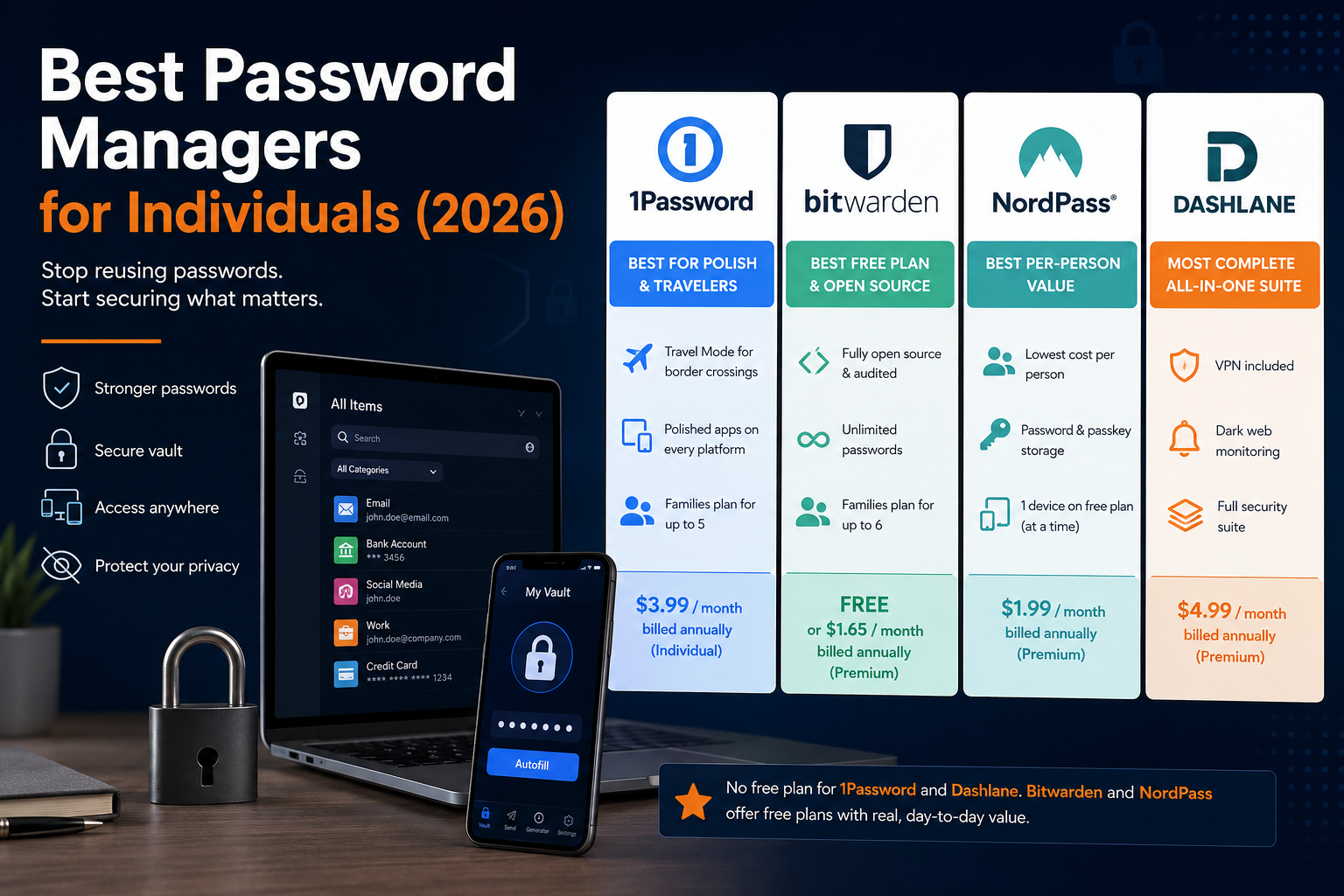
| What You Need | Best Choice |
|---|---|
| The most polished app and Travel Mode for border crossings | 1Password |
| A genuinely useful free plan, open-source code | Bitwarden |
| Best per-person value for a household | NordPass |
| A bundled VPN and the most complete all-in-one suite | Dashlane |
1Password is the most refined experience here, with unique features like Travel Mode, though it no longer offers any free tier.
Bitwarden remains the strongest free option and the only fully open-source, independently audited choice of the four — though its free tier lost some features in 2026.
NordPass offers the best per-person price for a family sharing one plan, with a free tier generous enough for genuine daily use.
Dashlane is the most complete suite, bundling a VPN and dark web monitoring, but it discontinued its free plan in September 2025 and costs more than the other three.
Storing Passwords Isn’t the Same as Improving Them
This is the distinction that “just get a password manager” advice usually skips.
Storing your existing passwords in a vault protects them better than a browser autofill or a notes app. It does not, by itself, fix the actual problem: reused, weak, or old passwords sitting behind that vault.
Improving your passwords means going through the accounts that matter — email, banking, your password manager’s own master password — and actually replacing weak or reused ones, one at a time, using the tool’s built-in generator. This is the slower, less glamorous step most people skip after signing up, and it’s where features like Bitwarden’s vault health reports, NordPass’s Password Health checker, and 1Password’s Watchtower actually earn their place.
A password manager you never migrate into is a slightly safer notes app. A password manager you actually use to replace weak passwords is a real security upgrade.
Best Password Managers for Individuals: The Fast Decision
Choose 1Password if you want the most polished app and don’t mind paying from day one — there’s no free tier, only a 14-day trial.
Choose Bitwarden if you want a genuinely capable free plan indefinitely, or you value open-source, independently audited code.
Choose NordPass if you’re sharing a plan across a household and want the lowest per-person cost.
Choose Dashlane if you want dark web monitoring and a VPN bundled into the same subscription and don’t mind paying the most of the four.
1Password: Best for Polish and Frequent Travelers
1Password no longer offers a free plan — only a 14-day trial before you need to pick a paid tier.
Following a price increase effective March 27, 2026, the Individual plan costs $3.99/month when billed annually ($47.88/year); paying month-to-month without an annual commitment runs closer to $5/month. Families costs $5.99/month billed annually ($71.88/year) for up to 5 members. That’s a roughly 33% jump from the prior pricing, which 1Password attributed to years of unchanged rates alongside new features.
Its standout feature is Travel Mode, which temporarily removes sensitive vaults from your devices before crossing a border.
1Password Is Best For
- Users who want the most polished, consistent app experience across platforms
- Frequent travelers concerned about device inspections at borders
- Households of up to 5 who don’t mind paying from the start
Bitwarden: Best Free Plan, Fully Open Source
Bitwarden’s free plan remains genuinely usable: unlimited passwords, unlimited devices, a password generator, one-to-one secure sharing, and basic two-factor login support.
Worth knowing before you rely on it long-term: as part of a broader pricing and feature update in January 2026, the free tier lost its built-in TOTP authenticator, file attachments, and emergency access — those moved to paid tiers only. The same update roughly doubled the Premium price, from $9.99/year to $19.80/year ($1.65/month, annual billing only — no monthly option). Families now runs $3.99/month billed annually ($47.88/year) for up to 6 users.
Bitwarden is also the only one of the four that’s fully open source, with its code independently audited — relevant if you specifically value being able to verify how your vault is actually secured, rather than only being told.
Bitwarden Is Best For
- Anyone who wants a genuinely free plan with no time limit
- Users who value open-source, independently auditable code
- Households of up to 6 on a tight budget
NordPass: Best Per-Person Value for a Household
NordPass’s free plan is free forever and includes unlimited password and passkey storage — but it limits you to being logged into one device at a time, which is the main thing that pushes people toward a paid tier.
NordPass doesn’t offer month-to-month billing for personal plans — only 1-year or 2-year terms. For the 1-year term, Premium costs $1.99/month ($23.88 for the first year) and Family costs $3.69/month ($44.28 for the first year) for up to 6 members, each with a fully independent, private vault. NordPass itself references a higher $2.99/$5.99 rate when describing these as discounted prices, and it does not publish what you’ll pay at renewal after your first term — user reports suggest it’s noticeably higher, so check the renewal rate in your account before your first term ends.
NordPass Is Best For
- Households that want the lowest first-year cost per person
- Anyone comfortable with the single-device limitation on the free tier
- Users who want passkey support without paying anything
Dashlane: Most Complete Suite, No Longer Free
If you remember Dashlane having a free plan, that’s no longer accurate — it was discontinued in September 2025. Existing free accounts became read-only, with password export as the only remaining option.
Premium now costs $4.99/month billed annually ($59.88/year) and bundles dark web monitoring and a VPN alongside standard password management — the only one of the four to include a VPN in the base subscription. Friends & Family runs $7.49/month billed annually ($89.88/year) for up to 10 members, the most generous member count of any plan compared here.
Dashlane Is Best For
- Anyone who wants a VPN and dark web monitoring bundled with password management
- Larger households or friend groups (up to 10 people) sharing one plan
- Users willing to pay a premium for an all-in-one suite
Passkeys: What They Actually Change
All four tools here support storing and using passkeys, a login method that replaces a typed password with a device-based cryptographic key. In practice, that means fewer accounts vulnerable to phishing pages that trick you into typing a password, since there’s no password to type on the fake page in the first place.
Passkeys are not yet universal. Plenty of everyday sites still only offer traditional password login, which is why a password manager that handles both passkeys and conventional passwords well matters more right now than one that only does passkeys.
Pricing at a Glance
Figures verified in July 2026. Several providers only publish first-term pricing and don’t disclose renewal rates — confirm the actual renewal price in your account before your first term ends, and check current terms on each provider’s official pricing page before subscribing.
| Tool | Free Plan | Individual | Family |
|---|---|---|---|
| 1Password | None (14-day trial only) | $3.99/mo billed annually ($47.88/yr) | $5.99/mo billed annually ($71.88/yr), up to 5 |
| Bitwarden | Yes, limited features | $1.65/mo billed annually ($19.80/yr) | $3.99/mo billed annually ($47.88/yr), up to 6 |
| NordPass | Yes, 1 device at a time | $1.99/mo, 1-year term ($23.88 first year) | $3.69/mo, 1-year term ($44.28 first year), up to 6 |
| Dashlane | None (discontinued Sept 2025) | $4.99/mo billed annually ($59.88/yr) | $7.49/mo billed annually ($89.88/yr), up to 10 |
Common Mistakes When Choosing a Password Manager
Signing Up and Never Migrating Old Passwords
The vault only protects what you actually put in it. An account still using a password from 2019 isn’t safer just because the manager could generate a better one.
Assuming Free Means Feature-Complete Forever
Bitwarden’s 2026 changes are a reminder that free-tier features can shrink. Check what’s currently included, not what a plan included when you first signed up.
Picking Based on Brand Recognition Alone
Dashlane no longer has a free plan; some older comparisons online haven’t caught up to that. Verify current plans directly rather than relying on outdated “best free password manager” lists.
Assuming the First-Year Price Is the Ongoing Price
NordPass in particular advertises a first-term rate without publishing the renewal rate. Check your account before renewal to avoid a surprise increase.
Reusing the Master Password Somewhere Else
Your master password is the one password protecting all the others. Reusing it anywhere else defeats the purpose of the entire vault.
Ignoring Family Plan Math
Buying individual plans for a household of 5 or 6 almost always costs more than a single family plan from the same provider — check the per-person math before defaulting to individual accounts.
What a Password Manager Can’t Do For You
No tool here removes every risk, and it’s worth being specific about what a password manager does and doesn’t cover.
It doesn’t protect you if you’re tricked into typing your master password into a convincing fake login page — this is part of why passkeys, which can’t be typed into the wrong place, are a meaningful upgrade where they’re supported.
It doesn’t replace two-factor authentication on your most important accounts (email especially), since a compromised email can be used to reset almost everything else.
And it doesn’t secure a device that’s already compromised by malware capable of reading your screen or memory. A password manager reduces a large, specific category of risk — reused and weak passwords — rather than eliminating risk generally.
Setups I Would Actually Recommend
For Budget-Conscious Individuals
Use Bitwarden Free or NordPass Free. Both cover the core job — unique passwords, autofill, generation — at no cost, with different trade-offs (Bitwarden’s missing built-in TOTP vs. NordPass’s one-device limit).
For a Family of 5 or 6
Compare NordPass Family ($3.69/month first year, independent vaults) against Bitwarden Families ($3.99/month) or 1Password Families ($5.99/month, most polished app) based on how much the interface quality matters to your household.
For Frequent International Travelers
Use 1Password, specifically for Travel Mode.
For Households Wanting a Bundled VPN
Use Dashlane Friends & Family, accepting the higher price for the added VPN and monitoring rather than paying separately for a standalone VPN service.
Final Recommendation
There isn’t one correct password manager for individuals — the right one depends on whether you value polish, price, openness, or an all-in-one bundle most.
Choose 1Password for the most refined experience and Travel Mode.
Choose Bitwarden for the strongest genuinely free plan and open-source code.
Choose NordPass for the best per-person first-year value in a household.
Choose Dashlane if a bundled VPN and dark web monitoring justify the higher price for you.
My recommendation for most individuals starting from zero: Bitwarden or NordPass free tier first. Actually migrate your weak and reused passwords into it. Upgrade only once a specific paid feature — emergency access, breach monitoring, multi-device login — solves a problem you’ve actually run into.
A password manager should ideally be combined with stronger account authentication. Our guide to the best 2FA apps for personal security compares practical authenticator options and their backup features.
FAQ
What Is the Best Password Manager for Individuals in 2026?
There’s no single best option. Bitwarden offers the strongest free plan, NordPass offers the best per-person value for households, 1Password offers the most polished experience, and Dashlane offers the most complete bundle with a VPN included.
Is Dashlane Still Free?
No. Dashlane discontinued its free plan in September 2025. Existing free accounts were converted to read-only, with password export as the only option.
Do I Need a Paid Plan to Use Passkeys?
No. Both Bitwarden and NordPass support passkey storage on their free tiers.
Which Password Manager Has the Best Free Plan?
Bitwarden and NordPass both offer genuinely usable free plans. Bitwarden’s free tier lost built-in TOTP, file attachments, and emergency access in 2026, while NordPass free limits you to one logged-in device at a time.
Is 1Password Worth It Without a Free Plan?
It can be, mainly for Travel Mode and interface polish. If budget is the primary concern, Bitwarden or NordPass’s free tiers cover the core functionality at no cost.
Why Does NordPass Show Two Different Prices Everywhere?
NordPass advertises a discounted first-term rate ($1.99/month Premium, $3.69/month Family on the 1-year plan) alongside a higher reference rate ($2.99/$5.99) used for comparison. It doesn’t publish the renewal rate after your first term, so check your account before it renews.
Are Family Plans Worth It Over Individual Plans?
Usually, yes, once you have 3 or more people needing accounts. Compare the family plan’s flat price against the cost of that many individual plans before deciding.
Can a Password Manager Be Hacked?
No security tool removes all risk. These four providers use strong, industry-standard encryption and, in Bitwarden’s case, independently audited open-source code — but a password manager only protects what happens inside the vault, not what happens if you’re phished into revealing your master password directly.


