NordPass vs 1Password: Which Is Better in 2026?
NordPass vs 1Password: Quick Verdict
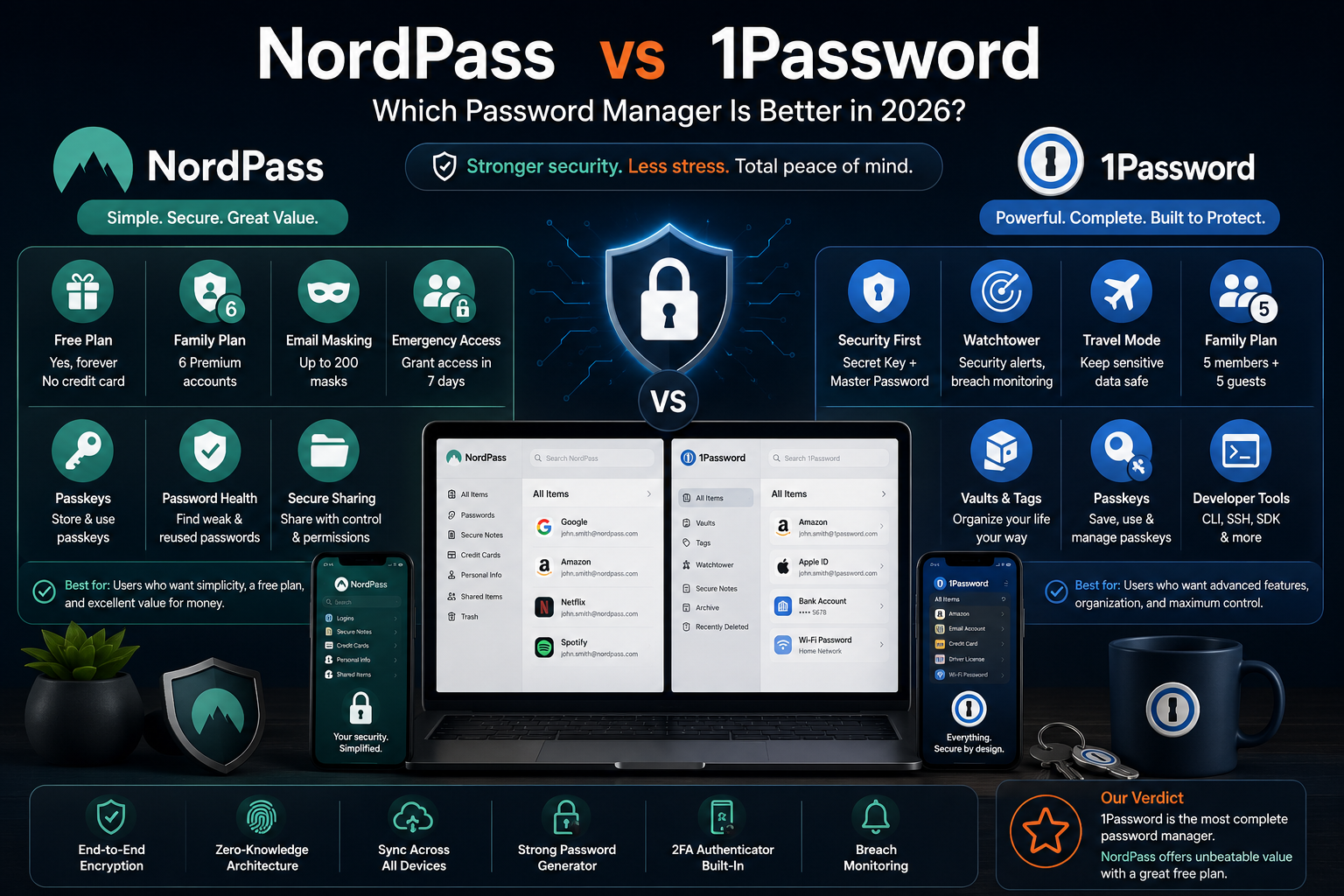
NordPass and 1Password solve the same basic problem: creating strong passwords, remembering them, filling them automatically, and synchronizing them across your devices.
The difference appears once you move beyond that basic job.
NordPass is the better value-focused choice. It offers a permanent free plan, a clean interface, six separate Premium accounts with its Family subscription, email masking, emergency access, passkey support, breach monitoring, and relatively inexpensive long-term promotions.
1Password is the more complete password-management system. Its vault organization, Watchtower security dashboard, Travel Mode, Secret Key protection, account-recovery options, family administration, developer tools, and business controls give it more depth. The trade-off is that there is no permanent free plan.
For most people willing to pay:
1Password is the better overall product.
For someone who wants a functional free option or a cheaper long-term subscription:
NordPass is the more practical choice.
| Situation | Better Choice |
|---|---|
| Best overall paid password manager | 1Password |
| Best permanent free option | NordPass |
| Simplest interface for beginners | NordPass |
| Best vault organization | 1Password |
| Best security dashboard | 1Password |
| Best travel-specific protection | 1Password |
| Best direct emergency-access feature | NordPass |
| Best family capacity | NordPass: 6 accounts |
| Best family administration and recovery | 1Password |
| Best for developers | 1Password |
| Best for a small budget | NordPass |
| Best for larger businesses | 1Password, in most cases |
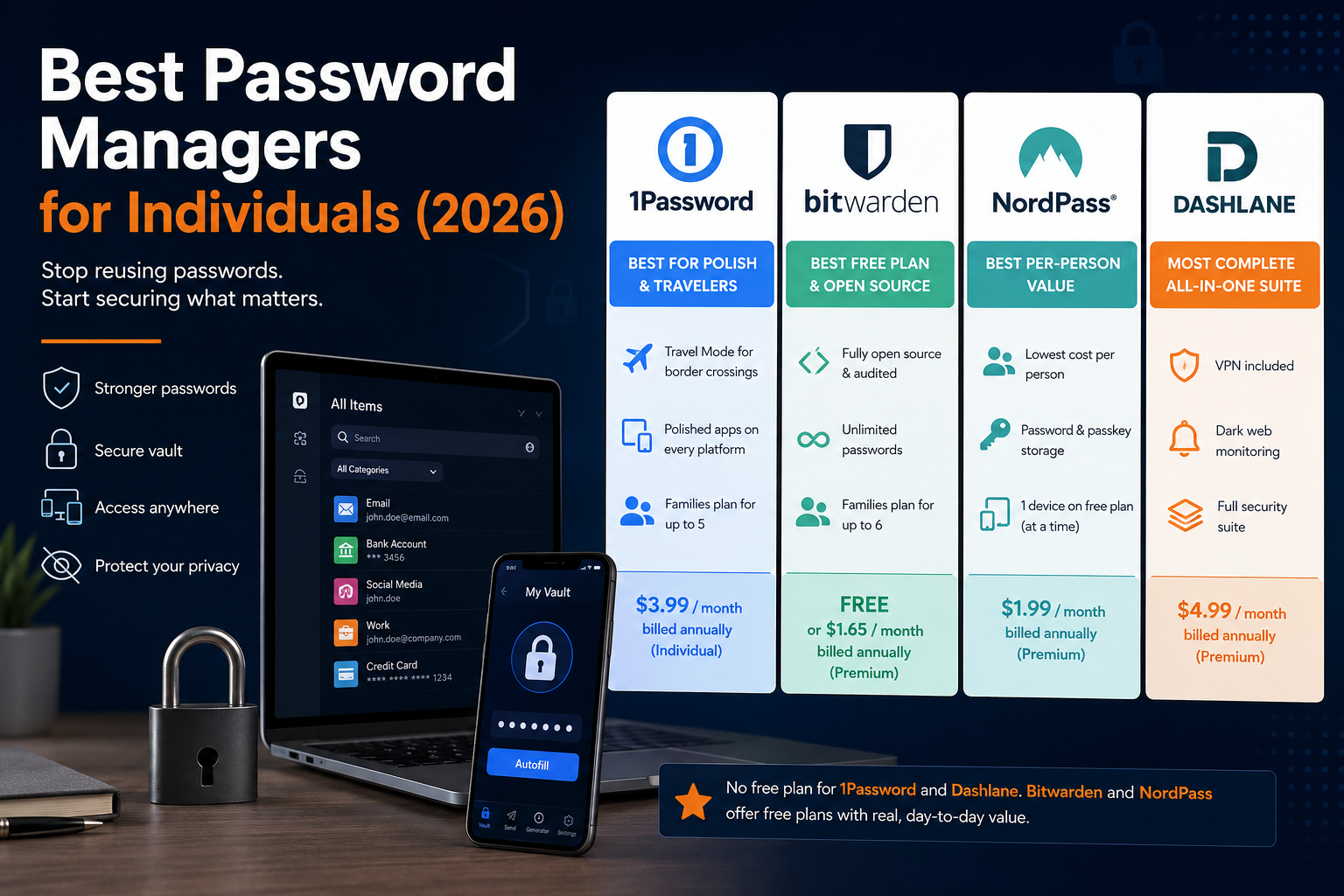
People still deciding whether either service fits their needs should start with our broader Best Password Managers for Individuals comparison.
The Everyday Difference Is Not Encryption — It Is Friction
Most password-manager comparisons begin with encryption algorithms. That matters, but it is rarely what determines whether someone continues using the product after the first week.
The real test is more ordinary:
- Does the extension recognize the correct login?
- Can you find a password quickly?
- Is switching between your phone and computer painless?
- Can another person access a shared subscription without seeing your private accounts?
- What happens if you forget the main password?
- Can you move away from the service later?
NordPass is designed to reduce the number of decisions presented to the user. Its vault feels relatively simple: passwords, secure notes, cards, personal information, passkeys, folders, and security tools.
1Password presents a more developed system of accounts, vaults, collections, tags, item types, shared spaces, Watchtower alerts, recovery tools, and administrative roles.
That extra structure is useful, but it creates slightly more to understand.
NordPass asks you to learn a password manager.
1Password asks you to build a small security system around your digital life.
NordPass vs 1Password Feature Comparison
| Feature | NordPass | 1Password |
|---|---|---|
| Permanent free plan | Yes | No |
| Free trial | Premium trial may be offered | 14 days |
| Unlimited password storage | Yes | Yes |
| Unlimited devices on paid plan | Yes | Yes |
| Free-plan device behavior | One active session at a time | Not applicable |
| Passkey storage | Yes | Yes |
| Password health reports | Premium | Watchtower |
| Breach monitoring | Premium | Watchtower |
| Built-in authenticator codes | Yes | Yes |
| Secure sharing | Paid plans | Included |
| Email masking | Up to 200 masks on Premium/Family | Not a core equivalent feature |
| Emergency access | Yes | Recovery tools instead |
| Family membership | 6 accounts | 5 members included |
| Travel Mode | No direct equivalent | Yes |
| Secret Key | No | Yes |
| File attachments | Premium | Supported |
| Developer tools | Limited compared with 1Password | CLI, SSH, SDK and developer workflows |
| Business SSO | Available on selected plans | Available on business plans |
| Linux support | Yes | Yes |
NordPass Free and Premium users can install the service on multiple devices and synchronize their vault. The important limitation is that Free users may keep only one active device session at a time, while Premium users can remain signed in on unlimited devices simultaneously.
1Password subscriptions cover its applications across macOS, iOS, watchOS, Windows, Android, and Linux, along with extensions for major browsers. It does not provide a permanent free password-manager plan, only a 14-day trial.
NordPass Free Is Useful, but Its Device Limit Changes the Experience
NordPass’s free plan is one of its strongest arguments against 1Password.
It includes password storage, automatic saving and filling, password generation, synchronization, biometric unlocking, and the same underlying encrypted-vault architecture used by paying customers. There is no advertised limit on the number of passwords you can save.
However, “syncs across devices” does not mean “stays active everywhere.”
You can install NordPass Free on your phone, computer, and browser, but only one session can remain active. Moving to another device may therefore involve signing in or unlocking the service again.
That distinction matters more in daily use than it appears on a pricing table.
Someone who primarily uses one laptop may barely notice it. Someone who moves constantly between a work computer, personal laptop, tablet, and phone may find the repeated session switching annoying enough to upgrade.
The Premium plan removes this limitation and adds features including:
- Password Health;
- Data Breach Scanner;
- Email Masking;
- Secure item sharing;
- File attachments;
- Emergency Access;
- A built-in authenticator;
- Unlimited simultaneous device sessions.
1Password avoids this tier distinction because every active subscription includes use across all supported devices. The downside is simpler: once the 14-day trial ends, you must pay or stop using the service as a normal password manager.
Which One Is Easier to Use?
NordPass Feels Simpler at the Beginning
NordPass is easier to understand during the first hour.
The interface is clean, the number of menus is restrained, and importing passwords from a browser or another password manager is straightforward. Users who only want to save, generate, and autofill passwords are unlikely to feel that they have purchased an enterprise security product for a personal problem.
That simplicity is particularly valuable when introducing a password manager to someone who is not technically confident.
The disadvantage appears later. NordPass gives you fewer ways to organize a complex digital life. Its folder-based approach works well for ordinary personal use but is less flexible than 1Password’s combination of vaults, collections, tags, accounts, and specialized item types.
1Password Takes Longer to Learn, but Scales Better
1Password’s structure becomes more useful as the vault grows.
You can keep personal items in a private vault, household logins in a shared family vault, work credentials in another account, and sensitive travel information in a vault that can be removed from your devices temporarily.
This is more organization than most beginners need. It is also why 1Password becomes harder to replace once it has been configured properly.
For a person with 40 logins, NordPass may feel cleaner.
For a household managing hundreds of accounts, subscriptions, payment methods, documents, Wi-Fi credentials, software licences, recovery codes, and shared services, 1Password’s structure starts earning its complexity.
Autofill and Login Accuracy
Autofill is the feature users interact with most, yet it is difficult to declare a universal winner.
Performance can change according to:
- The website’s login design;
- The browser;
- The operating system;
- Whether the username and password appear on separate pages;
- Whether several accounts use the same domain;
- Whether an application supports the operating system’s native autofill framework.
Both services save and fill usernames, passwords, payment details, personal information, and authentication codes.
1Password gives users more control when several saved accounts or vaults could match the same website. Its richer item structure and ability to associate information with different accounts can reduce confusion in more complicated setups.
NordPass keeps the interaction lighter. It generally suits users who have one or two accounts per service and want the correct credential to appear without navigating a larger vault system.
Neither service should be judged from one troublesome website. Banks, government portals, embedded login windows, and sites with unusual JavaScript can cause autofill problems for any password manager.
A fair trial should include:
- A normal email login;
- A two-page Google or Microsoft login;
- A banking or administrative website;
- A mobile application;
- A website where you maintain several accounts;
- A checkout form containing an address and payment card.
Passkeys: Both Are Ready, but Portability Still Needs Work
Both NordPass and 1Password can save and use passkeys, allowing users to sign in to compatible services without typing a traditional password.
NordPass treats passkeys as vault items and allows them to be shared. Its current support documentation states that passkeys cannot be imported into or exported from password managers, which creates an important migration consideration.
1Password can save, use, move, edit, and share passkeys. It also uses Watchtower to identify saved websites that now support passkeys.
Portability is not yet completely frictionless on 1Password either. Its current documentation says passkey exporting is available through its iOS and Android applications, while desktop data exports do not automatically provide the same complete migration route.
The practical conclusion is that passkey support is no longer a reason to reject either product.
However, anyone planning to store dozens of passkeys should examine the export process before committing. Passwords are relatively easy to move between services; passkeys can still create stronger ecosystem lock-in.
Security: Two Strong Designs With Different Priorities
It would be misleading to call either service insecure based solely on the encryption algorithm it uses.
NordPass Security
NordPass encrypts its vaults using XChaCha20 and operates with a zero-knowledge architecture. Its desktop application and browser extension have also undergone an independent Cure53 assessment.
Users have a Nord Account password for accessing Nord’s broader account system and a separate Master Password for unlocking the NordPass vault. NordPass also provides a 24-character recovery code that can be used to reset the Master Password.
This setup is secure, but the presence of both a Nord Account password and a vault Master Password may initially confuse users who expect to remember only one credential.
1Password Security
1Password uses end-to-end AES-GCM-256 encryption combined with a two-key design.
The vault is protected by:
- The password chosen by the user;
- A machine-generated 34-character Secret Key.
The Secret Key is created on the user’s device and is not stored by 1Password in a form the company can recover. Both components are used to protect and encrypt the account.
This gives 1Password an additional defence against a hypothetical attack in which encrypted vault data is stolen from its servers. An attacker would need more than the user’s account password to attempt to decrypt the data.
The inconvenience is that setting up a new device requires the Secret Key or Setup Code. 1Password reduces that friction with QR-based setup and an Emergency Kit PDF, but users still need to store that recovery material safely.
Which Security Model Is Better?
1Password has the more distinctive and transparent security model because the Secret Key supplements the human-created account password.
NordPass uses a strong modern encryption design and zero-knowledge architecture, but XChaCha20 should not be interpreted as automatically safer or weaker than 1Password’s AES-based approach.
Security depends on the entire system:
- Encryption implementation;
- Key derivation;
- Authentication;
- Device security;
- Recovery procedures;
- Browser extensions;
- Audit practices;
- The strength of the user’s main password.
For most consumers, the largest remaining risk is still a weak Master Password, an unprotected email account, phishing, or an unlocked device—not someone mathematically breaking either vault’s encryption.
Whichever password manager you choose, a separate authenticator can provide another layer of account protection. Compare the best 2FA apps for personal security.
Watchtower vs Password Health
Both services identify security problems, but 1Password’s Watchtower feels more integrated into the product.
Watchtower can flag:
- Weak passwords;
- Reused passwords;
- Vulnerable passwords exposed in breaches;
- Websites affected by reported breaches;
- Accounts that support two-factor authentication;
- Accounts that can be upgraded to passkeys;
- Other saved-item security issues.
1Password performs several Watchtower checks locally. For password-breach checks, only a partial hash is sent to the Pwned Passwords service, rather than the password itself.
NordPass Premium offers Password Health and a Data Breach Scanner. These cover the most important consumer tasks: finding weak or reused passwords and checking whether personal data has appeared in known breaches.
For someone who wants a detailed, ongoing security dashboard, 1Password has the advantage.
For someone who wants to be told which passwords need attention without spending much time inside the manager, NordPass provides the essential information.
A NordPass Feature 1Password Does Not Match Directly: Email Masking
NordPass Premium and Family include email masking.
This creates alternative email addresses that forward messages to your real inbox. The purpose is to reduce the number of websites that know your primary email address and limit exposure to spam, phishing, and data leaks.
Each Premium or Family account can currently create up to 200 email masks, with a daily creation limit of 30.
This is genuinely useful rather than a decorative feature.
A password manager protects the password attached to an account. Email masking also limits how widely the account identifier is distributed.
1Password can store masked email addresses created elsewhere, but it does not provide a directly equivalent built-in personal email-alias service in its standard password-manager plans.
Users already paying for services such as Apple Hide My Email, Firefox Relay, SimpleLogin, or another alias provider may not care. For everyone else, NordPass bundles one more privacy tool into the subscription.
Emergency Access and Account Recovery Are Not the Same Thing
This is one of the most meaningful differences in the entire comparison.
NordPass Emergency Access
NordPass Premium and Family users can nominate another NordPass user to receive emergency access to their passwords and secure notes.
When the trusted person requests access, the owner has seven days to approve or reject the request. If the owner does nothing, access is automatically granted after that period.
This is useful for:
- A spouse who may need access after an emergency;
- Estate planning;
- Family financial accounts;
- Recovering essential information after incapacity;
- Giving a trusted person a controlled route into the vault.
It is a direct inheritance-style access feature.
1Password Recovery
1Password takes a different approach.
Individual and family users can generate recovery codes. Family organizers can also recover another family member’s account if that person forgets the account password or loses the Secret Key. The recovered person receives a new Secret Key and creates a new account password while retaining access to the previous vault data.
1Password also provides an Emergency Kit containing the account details and Secret Key, with space to record the account password. The company recommends keeping it somewhere secure or giving a copy to a trusted person.
This is strong account recovery, but it is not identical to NordPass’s timed emergency-access workflow.
NordPass wins for direct emergency delegation.
1Password wins for structured family account recovery.
Travel Mode Gives 1Password a Unique Advantage
1Password’s Travel Mode temporarily removes selected vaults from its applications, browser extension, and web account.
You mark certain vaults as safe for travel. When Travel Mode is activated, all other vaults are removed from the devices you are carrying. They return after Travel Mode is disabled and the device reconnects.
This can be useful for people crossing borders with:
- Confidential work credentials;
- Client information;
- Financial accounts;
- Administrative documents;
- Personal data they do not need during the trip.
Travel Mode is included with every 1Password subscription. Business administrators can also manage it for team members.
NordPass does not provide a directly comparable consumer feature.
Not everyone needs Travel Mode, but it is more than a marketing checkbox. It changes what sensitive information physically remains available on a device during travel.
Families: Six Accounts or Better Administration?
NordPass Family
NordPass Family includes six separate Premium accounts.
Each person receives an independent encrypted vault with the Premium feature set. The accounts can be shared with relatives or friends rather than being limited to one traditional household.
This is excellent value when six people genuinely need a password manager.
It also avoids placing everyone’s private credentials inside one shared space. Each person controls their own vault and shares only the items they choose.
1Password Families
1Password Families currently includes five family members and five guests. Additional family members can be added and billed on a prorated basis. The account supports unlimited shared vaults and administrative controls.
Guests are useful when someone needs access to one specific shared vault without becoming a full family member.
Family organizers can:
- Invite and remove members;
- Create and manage shared vaults;
- Recover members’ accounts;
- Assign another family organizer;
- Manage billing and permissions.
The distinction is therefore not simply six people versus five.
NordPass Family provides more full Premium accounts in the base package.
1Password Families provides a stronger administration and recovery system.
For a household already storing passports, insurance files, contracts, and account recovery documents, our Best Tools to Organize Personal Documents guide can help separate secure credential storage from general document archiving.
Secure Sharing
Both products let users share passwords and sensitive information without sending the raw credential through email or messaging applications.
NordPass sharing is reserved primarily for Premium and Business users. Paid users can assign permissions and expiration times, while Free users can receive shared information with more limited control. NordPass also currently requires participants to use accounts located in the same data region for its account-based sharing workflow.
1Password allows users to share copies of saved items securely, including with people who do not use 1Password. Family and business accounts can also share entire vaults with defined access permissions.
1Password’s vault-based model is better for ongoing collaboration.
NordPass is perfectly suitable when the task is simply sharing a Wi-Fi password, streaming login, insurance portal, or household account with another person.
A password manager should not replace a proper signing workflow. When the task involves approving contracts rather than sharing login credentials, see our Best E-Signature Tools for Personal Documents comparison.
NordPass vs 1Password Pricing
Pricing varies by region, tax, billing period, and temporary promotions. The figures below reflect official public offers verified in July 2026.
Personal Pricing
| Plan | Current Public Pricing | Important Detail |
|---|---|---|
| NordPass Free | €0 | One active device session at a time |
| NordPass Premium | From approximately €1.23/month | Long-term promotional price; total and renewal vary |
| NordPass Family | Dynamic regional pricing | Six Premium accounts |
| 1Password Individual | $2.99/month, paid annually | Promotional first-year annual price |
| 1Password Individual Monthly | $3.99/month | No long commitment |
| 1Password Families | $4.49/month, paid annually | Promotional first-year annual price |
| 1Password Families Monthly | $5.99/month | Five members included |
NordPass currently advertises Premium from €1.23 per month on its public French product page. Its checkout pricing depends on the selected country, one- or two-year term, taxes, and the promotion active at the time. NordPass also warns that renewal pricing may differ from the initial subscription price.
NordPass provides a 30-day money-back guarantee for the initial personal subscription purchase. Renewals are not normally covered by that guarantee unless local law requires otherwise.
1Password’s current pricing page displays $2.99 per month for Individual and $4.49 per month for Families when paid annually. It identifies these as limited-time first-year discounts for new customers. Monthly billing is displayed at $3.99 and $5.99 respectively.
The current 1Password FAQ lists regular annual pricing from approximately $48 for Individual and $72 for Families, so users should check the renewal total rather than evaluating only the introductory monthly equivalent.
Which One Is Cheaper?
NordPass usually wins on headline price, especially when a two-year promotion is available.
The comparison becomes less dramatic when considering:
- The full upfront payment;
- VAT;
- Renewal pricing;
- Whether you need six accounts;
- Whether you would separately pay for an email-alias service;
- Whether 1Password’s Travel Mode, Watchtower, and organization tools matter to you.
A low first-term monthly equivalent is not the same thing as a permanently fixed monthly price.
Business Use
Both companies offer plans for teams and larger organizations, but their strengths are different.
NordPass for Business
NordPass offers Teams, Business, and Enterprise plans.
Depending on the tier, features include:
- Shared credentials;
- Activity monitoring;
- Organization-wide security policies;
- Google Workspace SSO;
- Group and folder sharing;
- Password Health;
- Data breach monitoring;
- Vanta integration;
- Entra ID, ADFS, and Okta SSO;
- Automated provisioning;
- Microsoft Sentinel and Splunk integrations.
NordPass Teams is sold as a ten-user package, while Business and Enterprise begin at five users. Pricing changes according to the selected term and promotion.
It is attractive to small organizations that want central password control without adopting the widest possible identity and developer ecosystem.
1Password for Business
1Password’s current public page lists:
- Teams Starter Pack at $24.95 per month for ten members when billed annually;
- Business at $8.99 per user per month when billed annually;
- Custom enterprise options.
Its business offering includes role-based vault permissions, identity-provider integrations, security policies, Watchtower reporting, audit capabilities, guests, developer tooling, CLI access, SSH workflows, SDKs, and broader access-management products.
For a small team mainly sharing marketing, accounting, or operational credentials, either can work.
For a software company, security team, or organization with complex identity and developer requirements, 1Password is usually the stronger long-term platform.
Device Support and Older Hardware
Both services cover the main desktop and mobile platforms.
One current detail may affect NordPass users with older Apple devices: NordPass ended support for iOS 15 and iOS 16 on June 15, 2026, and now requires iOS 17 or later for continued supported use. It also requires current Android and desktop application versions.
1Password supports macOS, iOS, watchOS, Windows, Android, and Linux, along with Chrome, Safari, Edge, Firefox, and Brave extensions.
Users with an older phone should verify operating-system compatibility before migrating an entire vault.
What I Would Choose for Different Users
Someone Who Has Never Used a Password Manager
Start with NordPass Free.
It provides enough functionality to learn the habit of generating and saving unique passwords without immediately committing to a subscription.
The one-session limit becomes a natural test: when switching devices becomes inconvenient, you know that paying for Premium would solve a problem you actually have.
A Paying Individual With Several Devices
Choose 1Password Individual.
Once both products require payment, 1Password’s better organization, Secret Key, Watchtower, Travel Mode, recovery tooling, and broader platform make it worth the higher price for many users.
A Family of Six
Choose NordPass Family when maximizing the number of full accounts is the priority.
Choose 1Password Families when recovery, shared vault administration, guest access, and detailed permissions matter more than including a sixth full member in the base subscription.
Someone Planning for Emergencies or Digital Inheritance
Choose NordPass for its direct timed Emergency Access feature.
1Password can still support a strong emergency plan through its Emergency Kit, recovery code, trusted family organizers, and shared vaults, but it requires more deliberate setup.
A Frequent International Traveller
Choose 1Password because Travel Mode can remove non-essential vaults from carried devices.
A Developer or Technical Team
Choose 1Password.
Its CLI, SSH agent, SDKs, secret-management tooling, and broader developer ecosystem make it more suitable for workflows extending beyond browser autofill.
Someone Who Mainly Wants the Lowest Price
Choose NordPass, but check the full checkout total and renewal terms rather than relying only on the advertised monthly equivalent.
What Neither Product Does Perfectly
NordPass’s free plan is generous, but the single active-session rule makes it less seamless than the word “sync” suggests.
Its long-term discounts also require careful reading because the first subscription price and renewal price may differ.
1Password is richer, but it can feel like too much product for someone who only wants twenty passwords filled inside Chrome.
The Secret Key strengthens account security but introduces another critical piece of recovery information to protect.
Passkey portability remains imperfect on both platforms. Before building a large passkey collection, users should understand how each service exports or transfers those credentials.
Neither product removes the need to secure:
- The email address attached to the account;
- The phone or computer where the vault is unlocked;
- The main account or Master Password;
- Recovery codes;
- Two-factor authentication;
- Printed or digital emergency information.
Alternatives to NordPass and 1Password
Neither product has to be the final choice.
Users who want more options can compare Bitwarden, Dashlane, and other services in our Best Password Managers for Individuals guide.
The relevant alternative depends on what is missing:
- A permanent free plan without NordPass’s session limitation;
- Open-source software;
- A different family structure;
- Built-in VPN services;
- More extensive identity monitoring;
- Local or self-hosted deployment;
- A one-time purchase instead of a subscription.
Do not migrate based only on the feature count. Export quality, passkey portability, browser behavior, mobile autofill, and account recovery matter more once the vault contains years of data.
Final Verdict
NordPass wins on accessibility.
It provides a real free plan, a clean interface, competitive long-term pricing, six Family accounts, email masking, breach monitoring, passkeys, secure sharing, and one of the clearest direct Emergency Access systems available.
1Password wins on depth.
Its Secret Key, Watchtower dashboard, Travel Mode, vault organization, family recovery, sharing controls, developer tools, and business ecosystem make it the more complete password manager.
My recommendation is:
- Choose NordPass Free when you are building the password-manager habit.
- Choose NordPass Premium when price, simplicity, email masking, or emergency access matter most.
- Choose NordPass Family when six full accounts provide the best household value.
- Choose 1Password Individual when you want the strongest all-round paid experience.
- Choose 1Password Families when household administration and recovery matter more than raw account count.
- Choose 1Password Business for technical teams and organizations with more complex access requirements.
The best password manager is not the one with the longest feature list.
It is the one that reliably appears when you need it, encourages a unique password for every account, and has a recovery plan you understand before something goes wrong.
For most paying individuals, that product is 1Password.
For budget-conscious users and larger families, NordPass remains one of the strongest alternatives.
Frequently Asked Questions
Is NordPass Better Than 1Password?
NordPass is better for people who want a permanent free plan, simpler interface, lower promotional pricing, six Family accounts, email masking, or direct Emergency Access.
1Password is better for vault organization, security monitoring, travel protection, family recovery, developer tools, and more complex business use.
Does NordPass Have a Free Plan?
Yes. NordPass Free includes unlimited password storage, synchronization, saving, autofill, and core vault protection.
It allows installation on multiple devices but only one active device session at a time.
Does 1Password Have a Free Plan?
No. 1Password provides a 14-day free trial, after which an active subscription is required.
Which Is Cheaper, NordPass or 1Password?
NordPass generally offers the lower introductory price, particularly with a two-year subscription.
Its public pricing currently advertises Premium from approximately €1.23 per month, while 1Password Individual currently starts at a promotional $2.99 per month when paid annually. Regional taxes, billing terms, discounts, and renewal prices must be checked at checkout.
Which Is Better for Families?
NordPass provides six full Premium accounts.
1Password Families includes five members, five guests, unlimited shared vaults, and stronger family recovery and administrative controls.
Can NordPass and 1Password Store Passkeys?
Yes. Both can save and use passkeys on supported platforms.
1Password also uses Watchtower to identify services where a saved password can be replaced or supplemented with a passkey.
Which Is More Secure?
Both use strong end-to-end encrypted, zero-knowledge-style designs.
NordPass uses XChaCha20. 1Password uses AES-GCM-256 and combines the account password with a separate Secret Key. The complete security architecture and the user’s own account practices matter more than comparing cipher names alone.
Does 1Password Have Emergency Access?
It does not use the same timed vault-access system as NordPass.
1Password instead provides an Emergency Kit, recovery codes, shared vaults, and account recovery through family organizers or team administrators.
Can I Import Passwords From Another Manager?
Both services support importing credentials from common browsers and password managers.
Users should verify the import and export process before cancelling the old service, especially when passkeys and file attachments are involved.
Which Is Better for Business?
NordPass can suit smaller teams seeking straightforward credential sharing, policies, breach monitoring, and common SSO integrations.
1Password is generally more suitable for developers and larger organizations because of its granular vault controls, developer tools, identity integrations, Watchtower reporting, and broader access-management ecosystem.