ChatPDF Alternatives: Better AI PDF Tools to Consider
Quick Verdict
ChatPDF is one of the simplest ways to upload a PDF, ask questions, generate summaries, and navigate long documents.
But it is not automatically the best AI PDF tool for every workflow.
Some users need stronger OCR for scanned documents.
Others need to analyze multiple PDFs together, research academic papers, work with very large files, combine AI chat with actual PDF editing, or use a platform with more advanced document management and security controls.
Our main ChatPDF alternatives are:
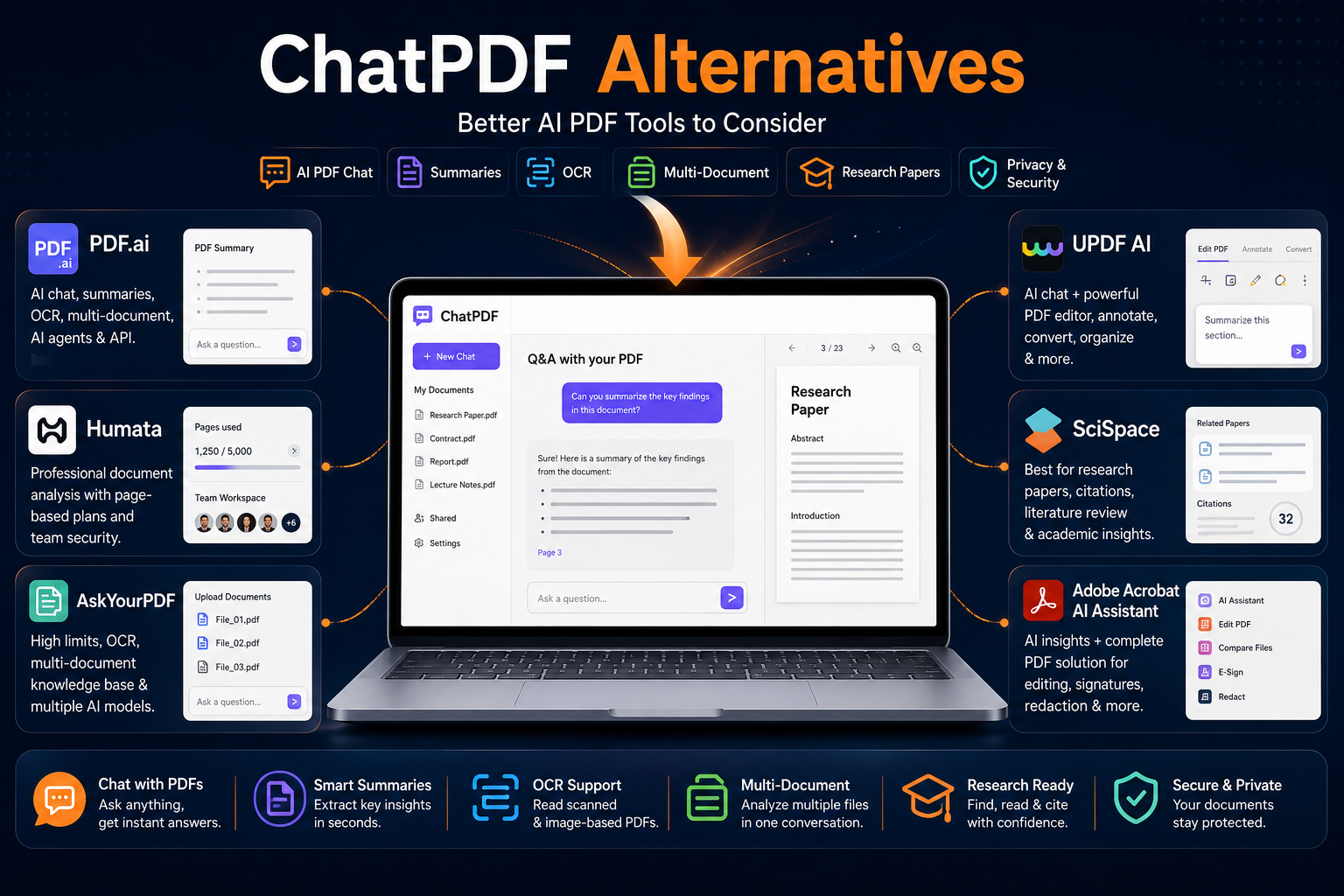
- PDF.ai — Best overall alternative for users who want a broader AI PDF workflow.
- Humata — Best for document-heavy professional and team workflows.
- AskYourPDF — Best for high document limits, multi-document knowledge bases, and model choice.
- UPDF AI — Best for users who want AI PDF chat combined with an actual PDF editor.
- SciSpace — Best for researchers and academic literature.
- Adobe Acrobat AI Assistant — Best for professional PDF editing plus AI analysis.
The practical recommendation is simple:
Choose ChatPDF if you want a straightforward PDF chat experience with minimal complexity.
Choose PDF.ai if you want more advanced document workflows, AI plans, and a broader PDF-focused ecosystem.
Choose Humata if you work with large quantities of professional documents or need team-oriented security features.
Choose AskYourPDF if large uploads, OCR, model selection, and multi-document analysis matter.
Choose UPDF AI if you need to analyze PDFs and also edit, annotate, convert, or organize them.
Choose SciSpace if research papers, citations, literature discovery, and academic workflows are your priority.
Choose Adobe Acrobat AI Assistant if AI document analysis is only one part of a larger professional PDF workflow.
ChatPDF Alternatives at a Glance
| Tool | Best For | Free Access | Main Advantage | Toolytica Rating |
|---|---|---|---|---|
| PDF.ai | Broad AI PDF workflows | Yes | Multi-level AI PDF ecosystem | ★★★★☆ 4.6/5 |
| Humata | Professional document analysis | Yes | Page-based plans and team security | ★★★★☆ 4.5/5 |
| AskYourPDF | Large files and power users | Yes | High limits, OCR, multiple AI models | ★★★★☆ 4.7/5 |
| UPDF AI | AI analysis + PDF editing | Yes, limited | Combines AI chat and real PDF tools | ★★★★☆ 4.6/5 |
| SciSpace | Academic research | Yes | Research papers, literature, citations | ★★★★☆ 4.7/5 |
| Adobe Acrobat AI Assistant | Professional document workflows | Trial / limited access | AI + advanced PDF ecosystem | ★★★★☆ 4.5/5 |
Why Look for a ChatPDF Alternative?
ChatPDF succeeds because it makes document conversation simple.
Its official platform allows users to upload PDFs, summarize content, ask questions, and navigate document information conversationally. It also supports research-related functionality and document references.
That simplicity is a strength.
But different users quickly develop different needs.
You may need an alternative because you want:
- Larger upload limits;
- More pages per document;
- OCR for scanned PDFs;
- Multiple documents in one conversation;
- Academic research features;
- Multiple AI model options;
- Better integration with PDF editing;
- Team document management;
- More transparent usage limits;
- API access;
- Stronger privacy controls for professional workflows.
The best ChatPDF alternative depends on which limitation actually affects your workflow.
Do not switch simply because another tool has more features.
Switch when another tool solves a specific problem better.
ChatPDF Pricing and Limits: The Baseline
Before comparing alternatives, it helps to establish the baseline.
Based on the ChatPDF pricing information previously reviewed for Toolytica, the Plus offer was shown at approximately:
- €17.99/month with monthly billing;
- €7.17/month equivalent with annual billing.
Pricing can vary by region, currency, and current offers, so verify the latest price directly before subscribing.
ChatPDF currently allows free users to try PDF AI workflows without creating an account, with daily limits. Its official pages also state that free users can upload up to two PDFs daily for selected PDF AI and summarization workflows.
ChatPDF also offers more than basic PDF chat. Its ecosystem now includes research paper discovery, AI writing, flashcards, presentation generation, YouTube transcript chat, and an API.
That means ChatPDF has become broader over time.
However, specialized alternatives can still be better for particular workflows.
How We Chose These ChatPDF Alternatives
The alternatives in this guide were selected based on different reasons someone may want to leave or supplement ChatPDF.
We looked at:
- PDF chat;
- Summarization;
- Question answering;
- File size limits;
- Page limits;
- OCR;
- Multi-document analysis;
- Research features;
- Model selection;
- PDF editing integration;
- Pricing;
- Free access;
- Privacy controls;
- Professional and team functionality.
The goal is not to declare one universal winner.
The goal is to identify the best alternative for each type of user.
1. PDF.ai — Best Overall ChatPDF Alternative
PDF.ai is the most direct alternative in this comparison.
Like ChatPDF, its core proposition is interacting conversationally with PDF documents.
But PDF.ai extends the concept into a broader product structure that includes individual AI PDF plans and separate developer API products.
Its official pricing page currently lists individual paid plans beginning with:
- Pro: $10/month
- Ultimate: $20/user/month
- Enterprise: $30/user/month
These figures are from the current pricing page and may differ from older promotional or monthly billing configurations previously displayed.
PDF.ai also operates a separate API pricing system for developers, beginning with a free allowance of 200 credits per month before paid API tiers.
Why PDF.ai Is a Strong ChatPDF Alternative
PDF.ai is attractive for users who want:
- Document chat;
- PDF summaries;
- OCR on relevant plans;
- Higher-level AI models on premium tiers;
- Multi-document workflows;
- AI Agents;
- Chrome extension access;
- Audio features on higher plans;
- Team options;
- Developer APIs.
The important distinction is that regular user pricing and developer API pricing are separate.
That matters because someone looking for a PDF summarizer should not accidentally compare a personal ChatPDF subscription with developer API pricing.
PDF.ai Strengths
- Focused entirely on document AI workflows;
- Free entry point;
- Several individual plan levels;
- OCR capabilities;
- Multi-document features on higher plans;
- AI Agents;
- Developer API available separately;
- Suitable for individual and more advanced workflows.
PDF.ai Weaknesses
- Plan structure can be confusing at first;
- Advanced functionality requires higher plans;
- API pricing is separate from normal user pricing;
- Casual users may not need the broader feature set.
Who Should Choose PDF.ai?
Choose PDF.ai if:
- You like the idea of ChatPDF but want a broader PDF AI system;
- You need OCR;
- You want higher plan options;
- You want advanced document workflows;
- You may later need API integration;
- You analyze PDFs regularly.
We have a complete breakdown in our PDF.ai Review.
Toolytica Verdict: ★★★★☆ 4.6/5
2. Humata — Best for Professional and Document-Heavy Workflows
Humata takes a more document-management-oriented approach.
Its pricing system is based partly around monthly page allowances and additional page usage.
Humata’s official pricing page currently shows:
| Plan | Price | Included Monthly Pages |
| Free | $0 | 60 pages |
| Expert | $9.99/month | 500 pages |
| Team | $49/user/month | 5,000 pages |
| Enterprise | Custom | Custom |
The Expert plan supports up to three users, while Team supports up to ten. Additional pages are currently priced at $0.02 per page on Expert and $0.01 per page on Team.
Why Humata Is Different
Humata is better suited to workflows where the important question is: How much document material do we process?
rather than: How many simple PDF chats do I start?
That makes it more attractive for:
- Analysts;
- Researchers;
- Consultants;
- Professional teams;
- Organizations processing large document collections.
Humata also publishes a security program that includes encryption at rest and in transit and SOC 2 Type II compliance.
Humata Strengths
- Clear page-based pricing logic;
- Free entry point;
- Professional document orientation;
- Team plans;
- GPT-5 support listed in current plans;
- Security and enterprise controls;
- Useful for high-volume reading and analysis.
The current pricing page lists GPT-5 support in its core feature table and distinguishes more advanced security and administrative capabilities across higher plans.
Humata Weaknesses
- Page-based pricing requires monitoring;
- Expert users can pay extra when page allowances are exceeded;
- Team pricing is much higher than casual consumer tools;
- OCR is associated with higher-tier functionality in the current plan comparison.
Who Should Choose Humata?
Choose Humata if:
- You analyze many professional documents;
- You want page-based usage visibility;
- You work in a small team;
- Security documentation matters;
- You need more than casual PDF summarization.
Toolytica Verdict: ★★★★☆ 4.5/5
3. AskYourPDF — Best for Large Documents and Power Users
AskYourPDF is one of the strongest alternatives for users who find basic document limits restrictive.
Its current official pricing page shows:
Free
- $0;
- 100 pages per document;
- 15 MB maximum upload;
- 1 document per day;
- 50 questions per day;
- 3 conversations per day.
Premium
$11.99/month billed yearly
Includes:
- Up to 2,500 pages per document;
- 31 MB uploads;
- 50 documents per day;
- 1,200 questions per day;
- 50 conversations per day;
- OCR;
- Multi-document Knowledge Base;
- Multiple AI model options.
Pro
$14.99/month billed yearly
Includes:
- Up to 6,000 pages per document;
- 877 MB maximum upload;
- 150 documents per day;
- 100,000 questions per day;
- 10,000 conversations per day;
- OCR;
- Multi-document Knowledge Base;
- Longer responses;
- Priority support.
Why AskYourPDF Is a Strong Alternative
AskYourPDF is particularly compelling when the problem with your current tool is limits.
The difference between a 15 MB free limit and an 877 MB Pro limit is significant.
The same applies to:
- Page counts;
- Daily document allowances;
- Questions;
- Conversation limits.
AskYourPDF also currently lists multiple AI models on paid plans, including several GPT, Gemini, and Claude options, although some models require additional credits.
AskYourPDF Strengths
- High document limits on Pro;
- Large upload capacity;
- OCR;
- Multi-document knowledge base;
- Multiple AI models;
- Chrome extension;
- Research-oriented tools;
- Mobile apps and integrations.
The platform also offers a Zotero plugin, Chrome extension, mobile applications, and research-oriented utilities.
AskYourPDF Weaknesses
- Limits and credits require careful comparison;
- Some premium models use additional credits;
- Pro may be unnecessary for occasional users;
- Large headline limits do not automatically guarantee better answer quality.
Who Should Choose AskYourPDF?
Choose AskYourPDF if:
- You work with very long PDFs;
- Your documents are large;
- You want multi-document analysis;
- OCR matters;
- You want several model choices;
- You are a researcher or power user.
Toolytica Verdict: ★★★★☆ 4.7/5
4. UPDF AI — Best for AI PDF Chat Plus Real PDF Editing
One weakness of many AI PDF chat tools is that they help you understand a document but do not help much when you need to change it.
UPDF takes a different approach.
UPDF AI provides:
- PDF summaries;
- Question answering;
- Translation;
- Multi-document chat;
- AI chat;
- Image interaction.
At the same time, the broader UPDF application provides traditional PDF functionality including editing, annotation, conversion, organization, and other document workflows.
UPDF AI Pricing
The current official UPDF AI pricing result shows a 7-day trial followed by $69/year for the AI Assistant. Pricing and promotions can vary between regions and product bundles.
UPDF also sells the core PDF editor separately and through different yearly, lifetime, and bundle configurations.
Always check whether the offer includes:
- UPDF Pro;
- AI Assistant;
- Both products;
- Cloud storage;
- A promotional bundle.
UPDF AI Free Limits
UPDF’s official product information currently describes free AI PDF chat limits including:
- Up to 5 PDFs;
- 10 MB per PDF;
- 100 pages per PDF;
- Up to 100 questions;
- Multi-file chat for up to 5 PDFs.
Why UPDF AI Is a Good ChatPDF Alternative
UPDF makes sense when your workflow is:
- Read a PDF.
- Ask questions about it.
- Summarize it.
- Edit the document.
- Annotate sections.
- Convert it.
- Reorganize pages.
- Export the final version.
A pure chat tool may handle steps one to three.
UPDF is more attractive when you also need the rest.
UPDF AI Strengths
- AI summaries;
- PDF questions and answers;
- Multi-document support;
- Real PDF editing ecosystem;
- OCR and conversion in the broader product;
- Desktop and mobile workflow;
- Strong privacy statements.
UPDF states that AI document content is not shared with third parties or used to train its AI models.
UPDF AI Weaknesses
- AI and PDF editor pricing can be separate;
- Bundles and promotions require careful checking;
- Users who only need simple PDF chat may not need the broader editor.
Who Should Choose UPDF AI?
Choose UPDF AI if:
- You want AI analysis and document editing together;
- You annotate PDFs;
- You convert documents;
- You reorganize pages;
- You want desktop software as part of the workflow;
- A pure chat interface is not enough.
Toolytica Verdict: ★★★★☆ 4.6/5
5. SciSpace — Best ChatPDF Alternative for Research
SciSpace is the most specialized alternative in this comparison.
It is built around academic research rather than general document administration.
Its platform includes:
- Chat with PDF;
- Literature Review;
- Academic search;
- AI Writer;
- Citation tools;
- Data extraction;
- Research Agent functionality;
- Paper discovery.
These tools are presented directly across SciSpace’s current product ecosystem.
Why Researchers May Prefer SciSpace
A student reading one textbook chapter may be satisfied with ChatPDF.
A researcher doing a literature review has a different problem.
They may need to:
- Find relevant papers;
- Compare studies;
- Understand complex methodology;
- Trace citations;
- Extract evidence;
- Build a literature review;
- Identify related research.
SciSpace is much better aligned with that workflow.
For a category-wide comparison covering tools for paper discovery, citation checking, literature reviews, and academic PDFs, read our guide to the best AI tools for research papers.
Its current plans also use Agent credits, with the official help center listing:
- Free: 100 credits;
- Premium: 1,200 credits;
- Advanced: 10,000 credits;
- Max: 40,000 credits.
SciSpace Pricing
SciSpace’s current pricing information presents monthly and annual options, with yearly billing offering a stated 40% saving.
Current official SciSpace comparison information describes Premium at $20 monthly or approximately $12 per month with annual billing, with higher Advanced and Max tiers for heavier Agent usage.
SciSpace Strengths
- Built specifically for research;
- Literature discovery;
- PDF chat;
- Academic writing tools;
- Citation workflows;
- Data extraction;
- Research Agent;
- Strong fit for students and researchers.
SciSpace Weaknesses
- Overkill for simple business PDFs;
- Credit-based Agent usage requires monitoring;
- Higher tiers become expensive;
- General users may not need academic functionality.
Privacy Consideration
SciSpace states that PDFs uploaded to a user’s Library are private, accessible only to that user, securely stored, and not used to train its AI models.
Who Should Choose SciSpace?
Choose SciSpace if:
- You read research papers;
- You are writing a thesis;
- You conduct literature reviews;
- You need citation-related workflows;
- Academic research is your primary use case.
Toolytica Verdict: ★★★★☆ 4.7/5
For research that begins with source discovery rather than an existing PDF, compare our guide to the broader AI research tools.
6. Adobe Acrobat AI Assistant — Best for Professional PDF Workflows
Adobe Acrobat AI Assistant is the best alternative for users who do not only want to talk to PDFs.
Adobe combines AI analysis with a broader PDF environment covering:
- Editing;
- Conversion;
- Organization;
- Protection;
- E-signatures;
- Redaction;
- Document comparison;
- Forms;
- AI summaries;
- Document questions and answers.
Adobe’s current Acrobat Studio package includes AI Assistant, PDF Spaces, Acrobat Pro functionality, and Adobe Express Premium. The US pricing page currently shows Acrobat Studio at $24.99/month, annual and billed monthly.
Why Adobe Is Different
Adobe is not the cheapest ChatPDF replacement.
That is not the point.
The value is integration.
Consider a professional workflow:
- Open a contract.
- Ask AI for key obligations.
- Extract important dates.
- Compare document versions.
- Redact confidential information.
- Edit content.
- Add signatures.
- Protect and share the final PDF.
A basic PDF chatbot covers only part of that process.
Adobe covers much more of the document lifecycle.
Adobe Acrobat AI Strengths
- AI document summaries;
- Question answering;
- Complete PDF editing environment;
- Redaction;
- Forms;
- Document comparison;
- Electronic signatures;
- Strong professional ecosystem.
Adobe’s AI Assistant supports document questions, summaries, insights, and content generation workflows across supported Acrobat environments.
Adobe Acrobat AI Weaknesses
- Expensive for casual users;
- More complex than ChatPDF;
- Overkill if you only summarize occasional PDFs;
- Annual commitment terms require attention.
Who Should Choose Adobe Acrobat AI?
Choose Adobe if:
- PDFs are central to your professional work;
- You edit and analyze the same documents;
- You manage contracts or forms;
- You need redaction;
- You compare document versions;
- AI chat is only one part of your document workflow.
Toolytica Verdict: ★★★★☆ 4.5/5
ChatPDF Alternatives Pricing Comparison
| Tool | Free Access | Paid Pricing Reviewed | Best Pricing Fit |
| ChatPDF | Yes | Plus pricing varies by billing cycle and region | Simple PDF chat |
| PDF.ai | Yes | Pro $10/month; Ultimate $20/user/month | General AI PDF users |
| Humata | Yes, 60 pages | Expert $9.99/month | Professional document analysis |
| AskYourPDF | Yes | Premium $11.99/month yearly; Pro $14.99/month yearly | High-volume document users |
| UPDF AI | Limited | AI Assistant currently shown at $69/year | AI + PDF editing users |
| SciSpace | Yes | Premium around $12/month yearly or $20 monthly | Researchers |
| Adobe Acrobat Studio | Trial / limited | $24.99/month annual billed monthly in US pricing | Professional workflows |
Pricing can change and may vary by region, taxes, currency, promotions, and billing cycle. The pricing table above reflects the current official pages and previously reviewed pricing information.
Best ChatPDF Alternative by Use Case
| Use Case | Best Choice |
| Best overall direct alternative | PDF.ai |
| Best for professional document analysis | Humata |
| Best for large documents | AskYourPDF |
| Best for multi-document knowledge bases | AskYourPDF |
| Best for AI + PDF editing | UPDF AI |
| Best for research papers | SciSpace |
| Best for literature reviews | SciSpace |
| Best for professional PDF workflows | Adobe Acrobat AI |
| Best for team-oriented document security | Humata |
| Best for casual simple PDF chat | ChatPDF |
| Best for API-focused PDF applications | PDF.ai |
| Best for students and academic researchers | SciSpace or AskYourPDF |
Which ChatPDF Alternative Is Best for Students?
Students do not all have the same needs.
Choose ChatPDF If You Want Simplicity
ChatPDF is good for quickly uploading:
- Course PDFs;
- Chapters;
- Lecture notes;
- Reports.
It is simple and easy to understand.
Choose AskYourPDF for Large Study Documents
AskYourPDF is better when:
- Files are large;
- You analyze multiple documents;
- OCR is needed;
- You need higher question limits.
Choose SciSpace for Academic Research
SciSpace is better when your work involves:
- Research papers;
- Citations;
- Literature reviews;
- Scientific concepts;
- Thesis research.
For a wider comparison of document summarization tools, read our Best AI Tools to Summarize PDFs guide.
Which ChatPDF Alternative Is Best for Professionals?
For individual professionals, the decision depends on the workflow.
Choose Humata for document-heavy analysis.
Choose UPDF AI when editing and document analysis happen in the same workflow.
Choose Adobe Acrobat AI Assistant for advanced professional PDF management.
Choose AskYourPDF when file limits and multi-document analysis matter most.
The important question is whether you primarily need to:
Understand documents
or:
Understand and modify documents
For editing-focused workflows, our Best PDF Editors for Personal Use guide is a better starting point.
Accuracy: Can You Trust AI PDF Answers?
AI PDF tools can save significant time, but their answers should not be treated as automatically correct.
Possible problems include:
- Missing context;
- Misreading a complex table;
- OCR errors;
- Confusing similar sections;
- Overgeneralizing conclusions;
- Producing a confident answer unsupported by the document.
For important work, use a simple rule:
Ask the AI for the answer, then verify it against the original source.
Citation and source-reference features are especially valuable because they make verification faster.
This is particularly important for:
- Legal documents;
- Medical information;
- Financial reports;
- Academic research;
- Contracts;
- Compliance documents.
The right tool should help you reach the source faster.
It should not replace source verification.
OCR: When ChatPDF Alternatives Matter Most
OCR is important when the PDF does not contain normal machine-readable text.
Examples include:
- Scanned paperwork;
- Photograph-based PDFs;
- Old documents;
- Receipts;
- Printed forms;
- Archived records.
A PDF can visually contain text but still behave like an image.
In that case, an AI tool without suitable OCR support may struggle to understand the content.
AskYourPDF currently includes OCR on its paid Premium and Pro tiers.
For users who regularly process scanned documents, OCR should be one of the first comparison criteria.
Privacy: What Should You Check Before Uploading Documents?
Do not upload sensitive documents simply because a tool has an attractive interface.
Before using any AI PDF platform for confidential information, check:
- Whether uploaded documents are private by default;
- Whether they are used for AI training;
- Whether you can delete them;
- Storage and retention rules;
- Encryption practices;
- Data location;
- Compliance requirements relevant to your organization.
ChatPDF states that documents are private by default and that users control sharing access.
Humata publishes security controls including encryption and SOC 2 Type II compliance.
AskYourPDF states that it is GDPR compliant.
UPDF says uploaded document content is not shared with third parties or used to train AI models.
SciSpace states that uploaded Library PDFs are private and are not used to train its AI models.
For highly sensitive documents, always review the current full privacy and security policies before uploading files.
Common Mistakes When Choosing a ChatPDF Alternative
Mistake 1: Choosing the Tool With the Highest Limits
A 6,000-page document limit sounds impressive.
But if you only read 40-page reports, it may provide no practical benefit.
Choose based on your real workload.
Mistake 2: Ignoring OCR
If your documents are scans, upload limits mean little if the tool cannot correctly recognize the text.
Mistake 3: Paying for Research Tools for Basic PDFs
SciSpace is excellent for academic research.
It may be unnecessary for reading:
- Invoices;
- User manuals;
- Administrative documents;
- Simple reports.
Mistake 4: Paying for a PDF Editor When You Only Need Summaries
Adobe Acrobat and UPDF can be valuable.
But do not pay for advanced editing tools if you only need to understand documents.
Mistake 5: Comparing Monthly Prices Without Comparing Limits
Two tools priced at $10 per month may offer very different:
- File sizes;
- Page limits;
- Question limits;
- OCR access;
- Model access;
- Multi-document functionality.
Mistake 6: Trusting Every AI Answer
Always verify important information against the source document.
Mistake 7: Uploading Confidential Files Without Reviewing Privacy Terms
Convenience should not replace proper data-handling decisions.
Final Recommendation
ChatPDF remains a good choice for users who want a simple, straightforward way to summarize PDFs and ask questions about documents.
But several alternatives are stronger for specific workflows.
Choose PDF.ai if you want the most direct broader alternative to ChatPDF.
Choose Humata if professional document analysis, teams, and security controls matter.
Choose AskYourPDF if large document limits, OCR, multi-document knowledge bases, and model choice are priorities.
Choose UPDF AI if you need both AI understanding and actual PDF editing.
Choose SciSpace if your workflow is built around research papers and academic literature.
Choose Adobe Acrobat AI Assistant if you need AI insights inside a broader professional document environment.
Our final breakdown:
Best overall direct alternative: PDF.ai
Best for large documents: AskYourPDF
Best for professional document analysis: Humata
Best for AI + editing: UPDF AI
Best for research: SciSpace
Best for professional PDF workflows: Adobe Acrobat AI Assistant
Best for simplicity: ChatPDF
The best alternative is not the tool with the longest feature list.
It is the tool that removes the specific limitation that made you search for a ChatPDF alternative in the first place.
FAQ
What Is the Best ChatPDF Alternative?
PDF.ai is our best overall direct alternative for users who want a broader AI PDF workflow.
AskYourPDF is stronger for large documents and high limits, while SciSpace is better for academic research.
Is There a Free Alternative to ChatPDF?
Yes.
PDF.ai, Humata, AskYourPDF, UPDF AI, and SciSpace all provide some form of free access, although their limits differ.
Humata, for example, currently includes 60 free pages, while AskYourPDF Free allows one document per day with limits on file size, pages, questions, and conversations.
Is PDF.ai Better Than ChatPDF?
PDF.ai is better for users who want a broader AI PDF ecosystem, additional plan levels, advanced workflows, and separate API products.
ChatPDF may be better for users who prioritize simplicity.
Read our full PDF.ai Review for a deeper analysis.
Which ChatPDF Alternative Is Best for Research Papers?
SciSpace is the strongest choice in this comparison for academic research.
It combines PDF conversation with literature review tools, academic discovery, writing support, citations, and research-oriented Agent workflows.
Which Alternative Supports Large PDF Files?
AskYourPDF is especially strong for large files.
Its current Pro plan allows up to 6,000 pages per document and a maximum upload size of 877 MB.
Which ChatPDF Alternative Has OCR?
AskYourPDF includes OCR on paid Premium and Pro plans. UPDF and Adobe also provide OCR-related workflows in their broader PDF ecosystems.
Check the current plan requirements before subscribing.
Is Humata Better Than ChatPDF?
Humata is better for users who need page-based professional document analysis, team workflows, and stronger organizational security features.
ChatPDF is simpler for casual use.
Should I Use UPDF AI Instead of ChatPDF?
Use UPDF AI if you want to analyze and then edit, annotate, convert, or organize the same document.
Use ChatPDF if you only need a simple document conversation workflow.
Which Tool Is Best for Multiple PDFs?
AskYourPDF is one of the strongest options because its paid plans include a multi-document Knowledge Base.
UPDF AI also supports multi-PDF project chat.
Are AI PDF Tools Accurate?
They can be useful, but no AI document tool should be treated as perfectly accurate.
Important conclusions should be checked against the original document, especially for legal, financial, academic, medical, and compliance-related material.