Quick Verdict
PDF.ai is a useful AI PDF tool if you want to chat with PDFs, ask questions about documents, summarize files, use OCR, or work with PDF-based AI workflows.
However, it is important to understand that PDF.ai appears to have two different pricing approaches:
- A regular user pricing model for chatting with PDFs, asking questions, OCR, Chrome extension access, AI models, and document-based features.
- An API pricing model based on monthly credits, designed more for developers, businesses, or document-processing workflows.
For everyday users, the regular PDF.ai plans are much more relevant than the API pricing.
For developers or businesses, the API plans may be useful if you need PDF parsing, extraction, automation, or document-processing credits.
If you want the simplest answer:
- Choose PDF.ai if you regularly work with PDFs and want a dedicated AI PDF assistant.
- Choose PDF.ai Pro if you need up to 100 PDF uploads, 1,000 monthly questions, OCR, Chrome extension access, and basic AI support.
- Choose PDF.ai Ultimate if you need unlimited PDF uploads, unlimited questions, advanced AI, AI agents, team members, and stronger document workflows.
- Choose PDF.ai Enterprise if you need larger file limits, higher OCR limits, white-labeled PDF embed, and early feature access.
- Choose PDF.ai API plans only if you need developer access, credit-based PDF processing, or document automation.
For casual users who only summarize one or two PDFs occasionally, PDF.ai may be more than necessary. For users who work with documents often, it becomes more interesting.
PDF.ai At A Glance
| Criteria | PDF.ai Review |
|---|---|
| Best For | PDF summaries, document Q&A, OCR, AI PDF workflows, and API-based PDF processing |
| Free Plan | Yes |
| Starting User Paid Plan | Pro from $10/month billed yearly or $17/month billed monthly |
| Best User Plan | Ultimate for heavy PDF users |
| API Pricing | Starts with 200 free credits/month, then paid plans from $49/month |
| Best For Everyday Users | Pro or Ultimate |
| Best For Developers | API Starter, Pro, Scale, or Growth plans |
| Main Strength | Dedicated PDF chat and document AI features |
| Main Limitation | Pricing and plan structure can be confusing because user plans and API plans are different |
| Value Rating | ★★★★☆ 4.1/5 |
What Is PDF.ai?
PDF.ai is an AI tool designed to help users interact with PDF documents.
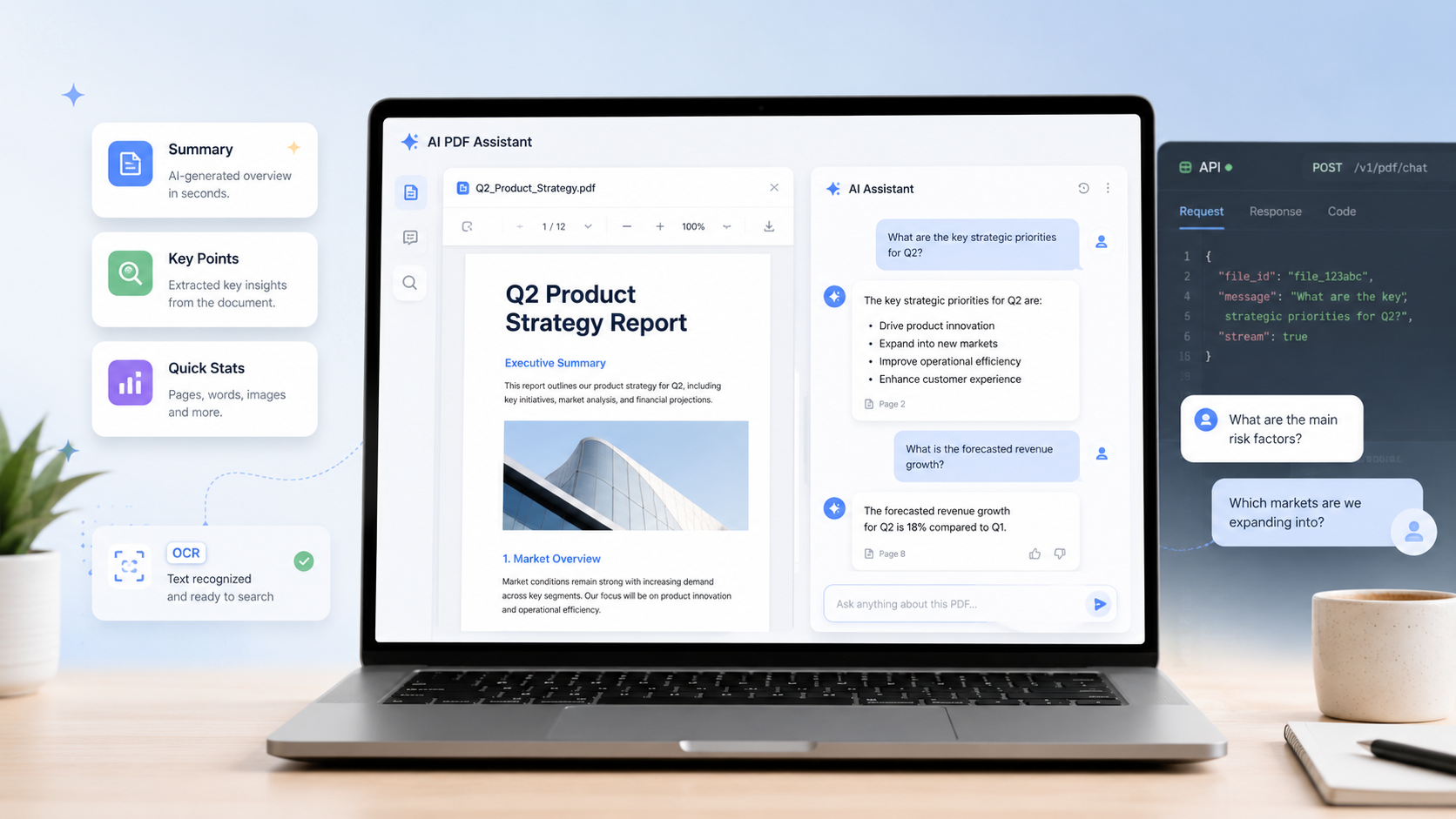
Instead of reading a long PDF manually, users can upload a document and ask questions, request summaries, extract insights, or use AI to understand the content faster.
PDF.ai is useful for people who work with reports, manuals, study documents, business files, research material, internal documentation, or PDF-heavy workflows.
It can also be relevant for developers and businesses because PDF.ai offers API access and credit-based plans for document-processing workflows.
What PDF.ai Is Good At
PDF.ai is useful for:
- Chatting with PDFs;
- Summarizing PDF documents;
- Asking questions about uploaded files;
- Extracting information from PDFs;
- Working with scanned PDFs through OCR;
- Using a Chrome extension;
- Chatting with multiple PDFs depending on plan;
- Using AI agents on higher plans;
- Handling API-based PDF workflows;
- Automating document processing.
Its biggest strength is focus. Unlike general AI chatbots, PDF.ai is built around documents.
PDF.ai Pricing: User Plans Explained
Pricing can change over time, so readers should always verify the latest prices, features, and limits directly on PDF.ai before subscribing.
Based on the pricing reviewed during this article update, PDF.ai offers the following user plans:
| Plan | Monthly Pricing Shown | Annual Pricing Shown | Best For | Key Limits And Features |
| Hobby | $0 | $0 | Testing PDF.ai | 1 PDF upload, 100 monthly questions, OCR for 2 pages/file, Chrome extension, basic AI model, 10 MB max file size |
| Pro | $17/month | $10/month billed yearly | Regular individual users | 100 PDF uploads, 1,000 monthly questions, OCR for 10 pages/file, Chrome extension, basic AI model, chat with all PDFs, 50 MB max file size |
| Ultimate | $27/user/month | $20/user/month billed yearly | Heavy PDF users and small teams | Unlimited PDF uploads, unlimited questions, OCR for 50 pages/file, advanced AI model, chat with all PDFs, AI agents, 50 MB max file size, invite team members, capture & ask |
| Enterprise | $37/user/month | $30/user/month billed yearly | Businesses and advanced teams | Unlimited uploads and questions, OCR for 100 pages/file, advanced AI, 100 MB max file size, white-labeled PDF embed, early feature access, team features |
PDF.ai API Pricing Explained
PDF.ai also shows API pricing, which is different from the user plans above.
This pricing is more relevant for developers, businesses, agencies, or teams that want to process PDFs through API access.
| API Plan | Price | Monthly Credits | Cost Per Credit | Best For |
| Free API Plan | $0 | 200 credits/month | Not specified | Testing, hobby projects, quick proof of concepts |
| Starter | $49/month | 3,000 credits/month | $0.016 per credit | Small API workflows |
| Pro | $99/month | 10,000 credits/month | $0.010 per credit | Regular API usage |
| Scale | $249/month | 30,000 credits/month | $0.008 per credit | Larger document-processing workflows |
| Growth | $599/month | 100,000 credits/month | $0.006 per credit | High-volume API usage |
Pricing Verdict
For most everyday users, the API pricing is not the main thing to look at.
If you only want to summarize PDFs, ask questions, or review documents, the Hobby, Pro, Ultimate, and Enterprise plans are more relevant.
The API plans make sense if you need to build PDF workflows into an app, website, product, or internal system.
In simple terms:
- Hobby is good for testing.
- Pro is the best starting point for regular individual users.
- Ultimate is better for heavy PDF users who need unlimited uploads, unlimited questions, advanced AI, AI agents, and team features.
- Enterprise is for companies that need larger file limits, white-labeled PDF embed, and advanced controls.
- API plans are for developers and businesses, not casual users.
PDF.ai Value Rating
| Use Case | Rating | Explanation |
| Everyday PDF summaries | ★★★★☆ 4.1/5 | Useful, but casual users may not need a paid plan immediately |
| Document Q&A | ★★★★☆ 4.3/5 | Strong fit for asking questions about PDFs |
| OCR support | ★★★★☆ 4.0/5 | Useful, but OCR limits vary strongly by plan |
| Free plan value | ★★★☆☆ 3.6/5 | Good for testing, but limited to 1 PDF upload and 100 questions |
| Pro plan value | ★★★★☆ 4.2/5 | Good entry paid plan for regular users |
| Ultimate plan value | ★★★★☆ 4.4/5 | Stronger for heavy users because of unlimited uploads and questions |
| API value | ★★★★☆ 4.0/5 | Relevant for developers, but not necessary for casual users |
| Privacy transparency | ★★★★☆ 4.0/5 | PDF.ai provides a privacy policy and FAQ notes about encryption and storage |
| Overall rating | ★★★★☆ 4.1/5 | Strong PDF AI tool, but the plan structure needs careful reading |
PDF.ai Features
1. Chat With PDFs
PDF.ai allows users to upload PDFs and ask questions about their documents.
This is useful when you do not want to read a long file manually or when you need to find specific information quickly.
For example, you can ask:
- What is this document about?
- What are the main points?
- What are the risks mentioned?
- What does this section mean?
- Can you summarize this PDF?
- What are the key deadlines or requirements?
This feature is especially useful for students, professionals, researchers, and people who work with long documents.
2. PDF Summaries
PDF.ai can help summarize PDFs into shorter explanations.
This is useful for reports, manuals, research documents, guides, business files, and study material.
However, like all AI PDF tools, the summaries should be treated as reading assistance, not as final truth.
For important documents, users should always verify the original PDF.
3. OCR Support
PDF.ai includes OCR support, but the limit depends on the plan.
Based on the pricing reviewed:
- Hobby includes OCR for 2 pages/file.
- Pro includes OCR for 10 pages/file.
- Ultimate includes OCR for 50 pages/file.
- Enterprise includes OCR for 100 pages/file.
OCR matters if you work with scanned PDFs, image-based documents, old files, contracts, or forms.
If most of your PDFs are scanned documents, check OCR limits carefully before choosing a plan.
If you need to edit, convert, sign, or organize PDFs rather than simply chat with them, our Smallpdf vs Adobe Acrobat comparison examines both options.
4. Chrome Extension
PDF.ai includes Chrome extension access across its plans.
This can be useful for users who want to interact with PDFs more directly while browsing or working online.
5. AI Models
The Hobby and Pro plans show a basic AI model, while Ultimate and Enterprise show an advanced AI model.
This matters because heavier users may need better reasoning, stronger document understanding, and more reliable responses.
6. Chat With All PDFs
The Pro, Ultimate, and Enterprise plans include chat with all PDFs.
This is useful if you work with multiple documents and want to ask questions across your uploaded files.
7. AI Agents
AI agents appear on Ultimate and Enterprise plans.
This feature is more advanced and may be useful for users who want more automated document workflows.
For casual users, AI agents may not be necessary.
8. API Access
PDF.ai also offers API access through separate credit-based plans.
This is useful for developers or businesses that want to build PDF processing into their own systems.
Examples include:
- Document parsing;
- PDF extraction;
- PDF splitting;
- Automated document review;
- Custom PDF workflows;
- Internal tools;
- SaaS integrations.
This is not the main use case for everyday users, but it is important for technical users.
PDF.ai Privacy And Security Notes
PDF.ai provides a privacy policy and FAQ information related to uploaded files.
Based on the FAQ reviewed, PDF.ai states that uploaded documents are encrypted during storage and transfer, and that documents are stored by a data storage provider that holds a SOC 2 Type II certification.
PDF.ai also mentions an option related to preventing ChatGPT from accessing PDF documents, where documents do not come into contact with their cloud storage when that option is selected.
This is useful, but users should still be careful with sensitive documents.
Avoid uploading confidential contracts, financial documents, medical records, identity documents, private business files, or legal documents unless you have reviewed the latest privacy policy, data handling terms, and security details directly on PDF.ai.
PDF.ai Pros And Cons
Pros
- Useful for chatting with PDFs;
- Can summarize long documents;
- Includes OCR support;
- Offers a free plan for testing;
- Pro plan is more accessible than the API pricing;
- Ultimate plan offers unlimited uploads and questions;
- Chrome extension access is included;
- API plans are available for developers;
- Advanced features such as AI agents are available on higher plans;
- Good fit for PDF-heavy workflows.
Cons
- Pricing can feel confusing because user plans and API plans are separate;
- The free plan is limited;
- OCR limits vary significantly by plan;
- Pro uses a basic AI model, not the advanced model;
- Ultimate is more useful than Pro for heavy users, but costs more;
- API plans are too expensive for casual users;
- Not always the cheapest option for simple PDF summaries;
- Users still need to verify important answers against the original PDF.
Who Should Use PDF.ai?
PDF.ai is a good fit for:
- Students who review PDFs regularly;
- Professionals who read reports and business documents;
- Researchers who want to ask questions about documents;
- Freelancers working with client PDFs;
- Consultants reviewing long documents;
- Teams that need document Q&A;
- Developers who need PDF API workflows;
- Businesses processing PDFs at scale.
PDF.ai makes the most sense if PDFs are a regular part of your work.
Who Should Avoid PDF.ai?
PDF.ai may not be the best fit if:
- You only summarize one PDF occasionally;
- You need a very cheap casual PDF summarizer;
- You want a full PDF editor;
- You need advanced academic research tools;
- You mainly work with short documents;
- You do not want to pay for higher OCR or advanced AI limits;
- You need strong privacy guarantees for sensitive documents but have not reviewed the latest terms.
For casual use, ChatPDF, Humata, AskYourPDF, or UPDF AI may be worth comparing before choosing PDF.ai.
PDF.ai vs Alternatives
| Alternative | Better For | Why |
| ChatPDF | Simple PDF chat | Easier starting point for casual users who want quick summaries and questions |
| Humata | Affordable document Q&A | Strong value for knowledge-heavy PDFs and document analysis |
| UPDF AI | PDF editing plus AI | Better if you need editing, annotation, PDF management, and AI summaries |
| AskYourPDF | Generous PDF Q&A limits | Good alternative for users who ask many questions about documents |
| SciSpace Chat PDF | Academic papers | Better for students and researchers reading scientific papers |
| Adobe Acrobat AI Assistant | Adobe users | Better if you already use Acrobat and want AI inside that ecosystem |
PDF.ai vs ChatPDF
ChatPDF is easier for casual users.
It is a strong choice if you just want to upload a PDF, ask questions, and get quick answers without thinking too much about plan structure.
PDF.ai is more interesting if you want OCR, Chrome extension access, multiple document workflows, advanced AI, AI agents, or API access.
Choose ChatPDF for simplicity.
Choose PDF.ai for more structured PDF AI features.
PDF.ai vs Humata
Humata is strong for document Q&A and knowledge-heavy files.
It can be a better value for users who want affordable document analysis without jumping into technical pricing.
PDF.ai is better if you specifically want its PDF-focused workflow, OCR limits, Chrome extension, AI agents, or developer API options.
Choose Humata for affordable document Q&A.
Choose PDF.ai for a more PDF-specific feature set and API availability.
PDF.ai vs UPDF AI
UPDF AI is better if you want AI inside a broader PDF editor.
If you need to edit, annotate, organize, convert, or manage PDFs, UPDF AI may be more practical.
PDF.ai is better if your main workflow is chatting with PDFs, summarizing documents, using OCR, or integrating PDF AI through API workflows.
Choose UPDF AI for PDF editing plus AI.
Choose PDF.ai for document chat and PDF AI workflows.
PDF.ai vs AskYourPDF
AskYourPDF is a strong alternative for users who want PDF chat, document questions, and generous usage limits.
PDF.ai is more interesting if you need its specific plan features such as AI agents, OCR tiers, Chrome extension, advanced AI models, or API options.
Choose AskYourPDF for simple document Q&A.
Choose PDF.ai for more structured PDF AI and technical options.
Is PDF.ai Good For Students?
PDF.ai can be useful for students who read many PDFs.
It can help summarize study material, ask questions about lecture documents, review notes, and understand long files faster.
However, students should compare the pricing carefully. If they only need occasional summaries, the free plan may be enough for testing, but the Pro or Ultimate plans may be more than necessary.
Students working with academic papers may also want to compare PDF.ai with SciSpace.
Students and researchers who need more than PDF summarization can compare the best AI tools for research papers for source discovery, literature reviews, citation checking, and evidence extraction.
Is PDF.ai Good For Professionals?
PDF.ai can be useful for professionals who review business documents, reports, proposals, manuals, internal files, or client PDFs.
The Pro plan may be enough for regular users. The Ultimate plan is more relevant for users who work with many PDFs and need unlimited uploads, unlimited questions, advanced AI, and team features.
Professionals should be especially careful with sensitive documents and review PDF.ai’s privacy and security terms before uploading confidential files.
Is PDF.ai Good For Developers?
Yes, PDF.ai is especially relevant for developers because it offers API pricing.
The API plans include free credits and paid tiers based on monthly credits.
This makes PDF.ai useful for:
- PDF parsing;
- Data extraction;
- Document automation;
- Internal document tools;
- SaaS features;
- High-volume PDF processing.
For developers, PDF.ai is more interesting than basic PDF chat tools.
Final Recommendation
PDF.ai is worth considering if you regularly work with PDFs and want a dedicated AI tool for document summaries, questions, OCR, and PDF-based workflows.
For most individual users, the Pro plan is the practical starting point because it offers 100 PDF uploads, 1,000 monthly questions, OCR, Chrome extension access, and chat with all PDFs.
For heavy users, the Ultimate plan is more attractive because it adds unlimited PDF uploads, unlimited questions, advanced AI, AI agents, team members, and stronger document features.
For businesses, Enterprise is better if you need larger file limits, more OCR capacity, white-labeled PDF embed, and advanced features.
For developers, the API plans are the most relevant option because they provide credit-based PDF processing.
PDF.ai is not the cheapest casual PDF summarizer, and it may be unnecessary if you only summarize PDFs occasionally. But for users who work with documents often, it offers a strong PDF-focused feature set.
FAQ
Is PDF.ai Free?
Yes. PDF.ai offers a free Hobby plan for regular users and a free API plan with 200 credits/month. The free user plan is useful for testing, but it has limits such as 1 PDF upload and 100 monthly questions.
How Much Does PDF.ai Cost?
Based on the pricing reviewed, PDF.ai user plans include Hobby at $0, Pro at $17/month or $10/month billed yearly, Ultimate at $27/user/month or $20/user/month billed yearly, and Enterprise at $37/user/month or $30/user/month billed yearly. API plans start at $49/month after the free credit plan.
Is PDF.ai Good For PDF Summaries?
Yes. PDF.ai is useful for summarizing PDFs and asking questions about documents. However, users should verify important information directly in the original PDF.
Does PDF.ai Support OCR?
Yes. PDF.ai includes OCR, but limits depend on the plan. Hobby includes OCR for 2 pages/file, Pro for 10 pages/file, Ultimate for 50 pages/file, and Enterprise for 100 pages/file.
Is PDF.ai Good For Developers?
Yes. PDF.ai is relevant for developers because it offers API plans with monthly credits for PDF processing workflows.
Is PDF.ai Better Than ChatPDF?
PDF.ai is better if you need OCR, advanced plan features, AI agents, or API access. ChatPDF may be better if you want a simpler and more casual PDF chat experience.
Is PDF.ai Safe To Use?
PDF.ai provides a privacy policy and FAQ notes about encryption and document storage. However, users should still review the latest privacy terms before uploading sensitive documents.
Who Should Use PDF.ai?
PDF.ai is best for users who regularly work with PDFs, including students, professionals, researchers, consultants, teams, and developers who need PDF AI or API workflows.