Best AI Tools for Students in 2026
Best AI Tools for Students: Quick Verdict
The best student AI setup is probably smaller than TikTok makes it look.
You do not need seven chatbots, three paraphrasers, an AI note-taker, an essay generator, a flashcard subscription, and a separate tool that promises to turn a 200-page textbook into knowledge while you sleep.
You need a few tools that solve clearly different problems.
For most students, I would divide them like this:
| What You Need Help With | Best Choice |
|---|---|
| Best overall AI assistant | ChatGPT |
| Studying from your own course material | Gemini Notebook |
| Editing essays and academic writing | Grammarly |
| Paraphrasing, rewriting, and summarizing | QuillBot |
| Asking questions directly from PDFs | PDF.ai |
| Organizing notes and assignments | Notion, but mainly as a workspace rather than an AI tool |
| Best free study combination | ChatGPT + Gemini Notebook + Grammarly Free |
| Best paid writing value for students | QuillBot Premium with student discount |
| Best advanced all-purpose upgrade | ChatGPT Plus |
My overall recommendation is ChatGPT because it can move between explanations, brainstorming, file analysis, web research, images, data, study questions, and writing support rather than solving only one part of student life. ChatGPT Free already includes web search, file uploads, data analysis, image generation, and access to GPTs, though with lower usage limits than paid plans.
But if an exam is based on six lecture PDFs and three assigned papers, Gemini Notebook may be the more useful tool for that specific job because it is designed around the sources you give it rather than around a general conversation. Google renamed NotebookLM to Gemini Notebook in July 2026; existing notebooks remain available and the product continues to work on web and mobile.
For essays, I would not automatically choose either chatbot.
That is where Grammarly and QuillBot become more practical.
The important question is therefore not:
Which AI is smartest?
It is:
Which part of my actual study workflow is wasting time?
That produces much better buying decisions.
The Best AI Tool Should Not Do the Learning for You
There is an uncomfortable distinction that AI-product marketing rarely emphasizes.
An AI tool can make an assignment easier while making the student worse at the subject.
Ask a chatbot to write a complete answer and the immediate problem disappears.
Ask it to challenge your explanation, generate practice questions, identify what you misunderstand, or explain the same concept from another angle, and the tool becomes part of the learning process.
Those are very different uses.
For example, instead of:
Write my essay explaining the causes of the 2008 financial crisis.
try:
I need to write an essay on the causes of the 2008 financial crisis. Ask me five questions that test whether I understand the major causes. After I answer, identify gaps in my reasoning. Do not write the essay for me.
The second prompt takes slightly more effort.
It also leaves you with something useful in your head.
That should be the standard against which student AI tools are judged.
1. ChatGPT: Best Overall AI Tool for Students
ChatGPT is the tool I would choose if a student wanted to install only one general AI assistant.
That is not because it is automatically the best at every individual task.
It is because the range of tasks it can handle is unusually broad.
The current Free plan supports web search, file and image uploads, data analysis, GPT usage, image generation, and a file Library with limited storage. Free usage is subject to tighter limits than the paid plans.
That makes a surprisingly capable student toolkit without paying anything.
Where ChatGPT Is Actually Useful for Studying
Suppose you do not understand a statistics lecture.
A useful workflow is not:
Explain statistics.
It is:
I understand averages and standard deviation, but I do not understand why we use a confidence interval. Explain it without formulas first, using a realistic example. Then show me the formula. Finally, give me three questions that test whether I understood the difference between confidence level and interval width.
That takes advantage of what a conversational AI does well.
It can adapt.
If the first explanation does not work, you can say:
I still don’t get the second part. Explain only that using an analogy.
A textbook cannot react to confusion.
A recorded lecture cannot notice that one assumption is blocking everything else.
A conversational assistant can.
File Analysis Makes ChatGPT More Useful Than a Generic Homework Bot
Students can also upload supported files and ask questions about them. ChatGPT Free includes limited file-upload and analysis capabilities, while paid tiers increase access.
That creates workflows such as:
Read this lecture PDF. Do not summarize it yet. Identify the five concepts I would need to understand before I could explain the lecture without looking at my notes.
Or:
Compare the attached marking rubric with my essay. Do not rewrite the essay. Tell me which criteria are currently weakest and cite the paragraph that creates the problem.
This is where AI becomes much more useful than simply generating paragraphs.
Research Requires a Different Prompt
ChatGPT can search the web on the Free plan and provides more advanced research capabilities on eligible paid plans. Plus expands access to file analysis, advanced reasoning, Deep Research, image generation, and other tools.
For academic work, however, never ask:
Give me five academic sources proving my argument.
That invites the model to begin with your conclusion.
A better prompt is:
Find primary or academic sources addressing this question. Include evidence that challenges my argument as well as evidence supporting it. Separate what each source actually says from your interpretation.
Then open the sources.
AI is useful for finding and understanding evidence.
It should not become your evidence.
Students deciding between general-purpose assistants can read our ChatGPT vs Claude comparison, where we look more closely at prompt following, document work, research, and writing.
ChatGPT Pricing for Students
ChatGPT Free remains $0. ChatGPT Plus currently costs $20 per month and provides broader access to models, advanced reasoning, files, images, voice, Deep Research, and custom GPT creation.
OpenAI also offers ChatGPT Go, with an indicative US price of $8 per month, although local pricing varies by market. Go increases usage of core chat, image, upload, data-analysis, and memory features compared with Free, while Plus is positioned for users needing more advanced models and tools.
There is currently no universal “student ChatGPT Plus” price that every college student can claim. OpenAI does offer some student-specific programs — for example, verified university students in the US and Canada can currently receive Codex credits — but that is not the same thing as a worldwide discounted Plus subscription.
My Student Verdict on ChatGPT
Start with Free.
Upgrade only when you are repeatedly hitting limits or genuinely using advanced research, reasoning, and file workflows.
If all you do is ask occasional study questions, $20 per month is difficult to justify.
2. Gemini Notebook: Best AI for Studying Your Own Sources
This may be the most interesting student tool in the article.
Google renamed NotebookLM to Gemini Notebook in July 2026, but it remains the same source-centered research and study product, with existing notebooks preserved.
The distinction between Gemini Notebook and a general chatbot is important.
ChatGPT starts with a conversation and can then work with sources.
Gemini Notebook starts with your sources.
You create a notebook and add material such as lecture files, documents, notes, and other supported sources. The system then helps you work through that material rather than treating your course documents as incidental attachments.
For exam preparation, that difference is substantial.
Why Source-Grounded Study Feels Different
Imagine your professor assigns:
- 12 lecture PDFs
- 4 research papers
- 2 chapters
- Your own notes
A generic prompt such as:
Explain organizational culture.
may return a perfectly good explanation.
It may also explain a version that differs from the terminology your professor expects.
With Gemini Notebook, the more useful question is:
According to the sources in this notebook, what are the three models of organizational culture I need to distinguish? Show where each model appears in the material.
Now the AI is helping you understand the course you are actually taking.
That is the reason I would use Gemini Notebook for revision rather than simply asking the same question to five chatbots.
It Has Become Much More Than a PDF Chat
Google’s current standard access includes up to 100 notebooks per user, 50 sources per notebook, and 50 chat queries per day. Standard access also includes daily allowances for Audio Overviews, Video Overviews, reports, flashcards, quizzes, and mind maps, with higher limits available through eligible paid Google AI and Workspace plans.
For students, the quiz and flashcard functions are more interesting than they may sound.
Instead of asking AI to summarize a chapter you have not read, you can use it after reading:
Generate ten questions from these sources. Five should test definitions, three should require comparison, and two should require applying the concepts to a new case.
That turns source material into active recall.
Similarly, Audio Overviews can be useful when revisiting material during a commute, though I would treat them as revision rather than a substitute for reading the original source.
Privacy Is Worth Understanding
Google states that, for individual Gemini Notebook users, data is not used for training unless users provide feedback; school and organizational deployments receive different Workspace-level protections depending on the institution’s license.
If your university already uses Google Workspace for Education, check your institutional account before paying for any additional study tool. Most users with a supported work or school Google Account already have some level of Gemini Notebook access.
Gemini Notebook Verdict
For studying your own material, this is my favorite tool in the article.
It does not replace ChatGPT.
It solves a more specific problem better.
3. Grammarly: Best for Turning a Draft Into Something You Can Submit
Grammarly has changed significantly.
It is no longer just the browser extension that underlines a missing comma.
Its current student product includes grammar and spelling assistance, rewriting, AI Chat, citation tools, an AI Grader, Reader Reactions, a Humanizer, proofreading, AI detection, and assistance across applications including Google Docs, Word, Gmail, Canvas, Blackboard, Outlook, and others.
That makes Grammarly more useful after you have something to say.
This distinction is important.
I would not start a research paper inside Grammarly and ask it to invent the argument.
I would write the argument, then use Grammarly to challenge the quality of the communication.
AI Grader Is More Interesting Than Another Essay Generator
Grammarly’s current AI Grader can use rubric and course information to provide feedback and an estimated grade intended to guide revisions. Its Citation Finder can surface sources and generate citations, while Reader Reactions attempts to predict how the writing may land with a reader.
The useful workflow is:
Here is the rubric and my current paper. Do not rewrite it. Identify the two criteria where the evidence is weakest.
Then return to the essay yourself.
That is much more educationally useful than:
Make this an A-grade essay.
Grammarly Is Especially Useful for Students Writing in a Second Language
Grammarly currently provides real-time writing support across more than 25 languages and offers in-line translation and multilingual rewriting functions.
For international students, that can remove a specific kind of cognitive load.
You can focus on whether the argument makes sense instead of losing twenty minutes wondering whether an English sentence is grammatically acceptable.
But the final sentence should still sound like you.
If Grammarly rewrites every paragraph until the entire paper sounds as though it came from the same corporate press release, the tool has gone too far.
Grammarly Free vs Pro
Grammarly Free currently includes core correctness features, tone information, and 100 generative AI prompts per month. Grammarly Pro increases the allowance to 2,000 prompts per month and adds full-sentence rewrites, tone adjustments, plagiarism and AI-content detection, and more advanced writing assistance.
Current standard US pricing for Grammarly Pro is:
- $30 monthly
- $60 every three months
- $144 annually, equivalent to $12 per month
The annual plan is therefore dramatically cheaper than maintaining the monthly subscription for a full year.
Grammarly Now Has a Real Student Discount
Eligible students can currently receive up to 50% off Grammarly Pro through SheerID. The discount applies for one subscription period; renewal returns to the standard price unless another eligible offer applies.
That renewal detail matters.
A “50% student discount” can sound permanent when it is not.
Before paying independently, students should also check whether their university already provides Grammarly for Education. Institutions can license the service, and students at participating schools may receive access through their institutional account or identity provider.
For a direct writing-tool comparison, see our Grammarly vs QuillBot guide.
Grammarly Verdict
Grammarly is the tool I would pay for when the bottleneck is writing quality, not studying.
If you are writing essays every week, especially in English as a second language, it can earn its place.
4. QuillBot: Best for Rewriting, Paraphrasing, and Student Value
QuillBot overlaps with Grammarly but has a different center of gravity.
Grammarly feels like an editor following you through the writing process.
QuillBot feels like a toolbox you deliberately open when you need to transform text.
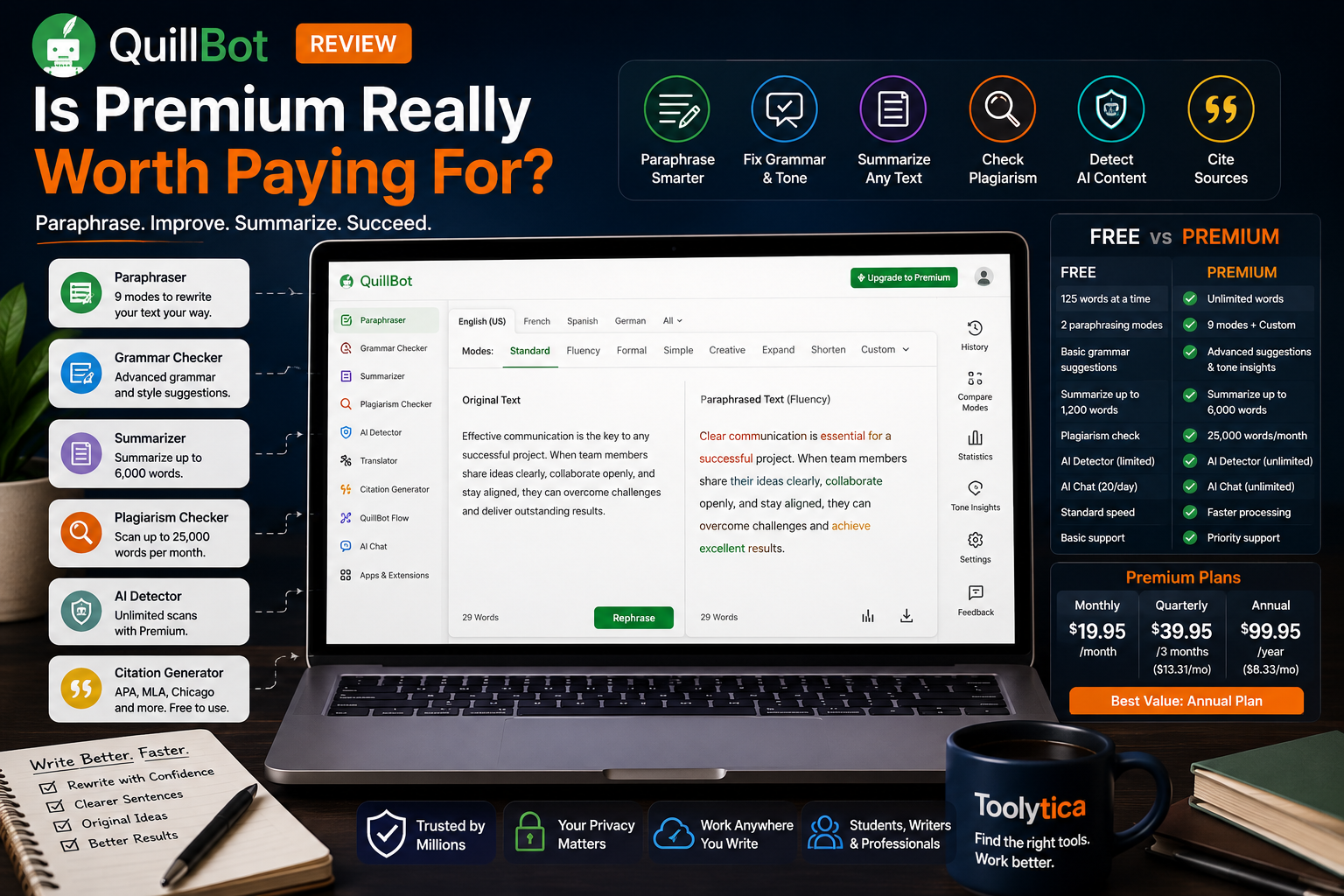
Its current suite includes paraphrasing, grammar checking, summarization, plagiarism checking, AI detection, AI humanization, translation, citations, QuillBot Flow, and AI-assisted writing tools.
The Paraphraser remains the reason most students will first encounter it.
Paraphrasing Is Useful When You Understand What You Are Rewriting
This is where responsible use matters.
Suppose you read:
Cognitive load increases when working memory must process too many novel elements simultaneously.
A bad use of QuillBot is to paste that sentence into a paraphraser and submit whatever comes out without understanding it.
A better use is to write your own explanation first:
Learning becomes harder when you try to process too many unfamiliar things at once.
Then use QuillBot to check whether another wording is clearer or more formal.
The AI becomes an editor.
Not a camouflage machine.
The Free Plan Is Enough to Understand the Product
QuillBot’s current Free plan lets users paraphrase up to 125 words at a time in two modes, generate basic summaries, access basic grammar correction, and use limited AI tools. Current student-facing documentation also lists 50 AI prompts per day on the free tier.
Premium removes the core paraphrasing limit, expands modes, provides custom summaries, advanced grammar recommendations, unlimited AI Detector access, and plagiarism checking for up to 25,000 words per month.
The current regular annual price is $8.33 per month when billed annually.
That is already substantially cheaper than Grammarly Pro’s standard annual equivalent.
QuillBot Has One of the Better Student Discounts in This Category
Verified students currently receive:
- 10% off the monthly plan
- 15% off the intermediate billing plan
- 25% off the annual plan
QuillBot currently displays the annual student price as $6.25 per month equivalent, down from the regular $8.33 annual equivalent. Unlike Grammarly’s one-period student promotion, QuillBot says the discounted renewal continues while the user remains a verified student, subject to periodic re-verification.
That difference is significant for a “student money” guide.
A discount that disappears after the first billing period and one that continues while you remain eligible are not the same deal.
Grammarly or QuillBot?
For continuous proofreading:
Grammarly.
For deliberate paraphrasing and rewriting:
QuillBot.
For citations and general academic-writing support:
Both increasingly overlap.
For value:
QuillBot is easier to justify on a student budget, particularly with the verified annual discount.
Read our full Grammarly vs QuillBot comparison before paying for both. Most students probably do not need both subscriptions.
5. PDF.ai: Best When the Problem Is One Difficult PDF
PDF.ai is much narrower than ChatGPT or Gemini Notebook.
That is not necessarily a weakness.
Sometimes you do not need an AI workspace.
You have a 78-page academic PDF and one question:
What did the authors actually conclude about remote work and productivity?
PDF.ai is built around that interaction.
You upload a PDF, ask questions, request summaries or explanations, and work directly from the document. Current functionality includes selecting text for immediate summarization or explanation, with related pages shown alongside the response.
PDF.ai has also recently added the ability to chat across multiple uploaded PDFs and identify the document used for the answer.
That is useful for literature-heavy courses.
The Free Limit Is Now Very Clear
PDF.ai’s current official free-use documentation, updated in August 2026, says the free version allows one uploaded PDF up to 10 MB.
That makes the Free tier more of a trial or occasional utility than a complete semester-long research system.
The company has also been adding features quickly. Recent updates include Capture & Ask for asking questions about a selected visual area of a document and GPT-4o-based document chat for eligible higher-tier users. Both currently require Ultimate or above.
Why I Am Not Publishing a Precise Paid Price Here
PDF.ai’s current public documentation is unusually fragmented.
The recently updated free-plan and feature pages clearly describe current limits and paid-feature requirements, but older official comparison pages still display historical consumer pricing structures while the main site now prominently markets separate API credit plans.
Rather than pretend that an old pricing table is unquestionably the current checkout price, I would check the live upgrade screen before subscribing.
That is exactly the kind of detail an up-to-date comparison should flag.
For students comparing several document tools, our Best AI Tools to Summarize PDFs guide covers the category in more depth.
PDF.ai Verdict
Use it when your workload is strongly PDF-centered.
Do not subscribe merely because one professor gave you one long paper.
ChatGPT and Gemini Notebook may already cover occasional document questions without another recurring payment.
A Note About Notion: Excellent Student Deal, Limited AI
Notion belongs in this article, but not for the reason many AI roundups suggest.
Eligible college and university students can currently receive the Notion Plus Education plan free, including unlimited uploads, up to 100 guests, and 30 days of page history.
That is an excellent student offer.
However, Notion AI is currently available fully on Business and Enterprise plans. Free and Plus users — including students on Education Plus — receive only a limited number of complimentary AI responses for testing.
So I would recommend Notion to students for:
- Course organization
- Notes
- Assignment databases
- Reading lists
- Projects
- Semester planning
I would not tell a student that free Notion Education gives them a complete unlimited Notion AI subscription.
It does not.
For the workspace side, see Notion vs Evernote for Students and our broader Best Productivity Apps for Students.
Which AI Tool Gives Students the Most Accurate Answers?
This question needs to be split into three different questions.
“What Does This Document Say?”
Use Gemini Notebook or PDF.ai.
The task is source retrieval and interpretation.
You want an answer grounded in material you supplied, ideally with a clear path back to the original section.
“Can You Explain This Concept Differently?”
Use ChatGPT.
A general conversational AI is valuable when you need the explanation to change based on what you do and do not understand.
“Is My Essay Well Written?”
Use Grammarly or QuillBot.
They are writing tools.
Do not expect them to become authoritative subject-matter sources simply because they can now chat.
This distinction prevents a common mistake: using whichever AI window happens to be open for every task.
The Prompt Matters More Than the Logo
A lot of disappointment with AI comes from vague prompting.
Compare:
Summarize this PDF.
with:
Summarize this PDF for exam revision. Organize the answer around the author’s argument, evidence, counterarguments, and conclusion. Do not introduce information that is not in the PDF. For every important claim, tell me which section or page I should reread.
The second request tells the tool what “useful” means.
Or:
Improve my essay.
versus:
Review this draft against the attached rubric. Do not rewrite it. Identify the three changes most likely to improve the grade. For each one, explain the problem, quote the relevant sentence from my draft, and tell me what I need to fix myself.
The second prompt preserves ownership of the work.
For exam preparation:
Quiz me on this chapter.
becomes:
Give me one question at a time. Do not reveal the answer until I respond. If I am partly correct, ask a follow-up question before explaining. Keep track of the concepts I repeatedly miss and test them again later.
That creates a tutor.
Not a summary machine.
The Best Free AI Setup for Students
Before paying for anything, I would build this:
ChatGPT Free
Use it for explanation, brainstorming, web research, occasional file work, and practice questions. Free currently includes search, file and image uploads, data analysis, GPT usage, and limited image generation.
Gemini Notebook Standard
Use it for lecture files, assigned readings, quizzes, flashcards, summaries, and source-grounded revision. Standard access is available without a paid Google AI subscription, subject to current limits.
Grammarly Free
Use it during final proofreading and for basic writing feedback. Free currently includes core correctness assistance, tone information, and 100 AI prompts per month.
Notion Education
If eligible, claim the free Plus Education plan and use it to organize the semester rather than expecting it to replace the other AI tools.
That stack can cost:
$0 per month.
And for many students, it is enough.
What I Would Actually Pay For First
This depends entirely on the bottleneck.
If Writing Is the Problem
Try the free versions of Grammarly and QuillBot first.
If you constantly use rewriting and paraphrasing, QuillBot’s verified student pricing is particularly attractive, with the current annual student equivalent displayed at $6.25 per month.
If continuous proofreading across Word, Docs, Canvas, emails, and other applications matters more, Grammarly may justify its higher price — especially if you qualify for the current SheerID student promotion of up to 50% off.
If General AI Usage Is the Problem
Upgrade ChatGPT.
Go is the cheaper step where available, while Plus is the stronger upgrade for heavier reasoning, research, and file workflows.
If PDFs Are the Problem
Use the free PDF tools first.
Only pay for PDF.ai when document volume becomes an actual constraint rather than a hypothetical one.
If Organization Is the Problem
Do not buy more AI.
Use your free Notion Education workspace, Google Calendar, or another proper student productivity system.
Sometimes the reason you missed an assignment is not that your AI model was insufficiently advanced.
You forgot the deadline.
Check What Your University Already Pays For
This should happen before every student software purchase.
Universities increasingly provide access to tools that individual students would otherwise pay for.
Grammarly has institutional Grammarly for Education deployments.
Most supported Google Workspace for Education users have some level of Gemini Notebook access, with availability and limits determined by the institution’s edition.
Eligible students can claim Notion Plus Education directly with a recognized institutional email address.
Therefore, before entering a credit card:
- Search your university software portal.
- Check your student email.
- Ask the library or IT service.
- Check whether your school account activates premium features automatically.
- Only then buy an individual subscription.
That five-minute check can save more money than finding a 20% coupon.
AI Tools and Academic Integrity
The exact rules vary by school, department, professor, and assignment.
That means a tool being available does not automatically mean every use is permitted.
There is also a practical distinction between:
“Help me understand this.”
and
“Produce the assessed work I will submit under my name.”
Even where AI is allowed, keep track of what the tool actually contributed.
For research-heavy assignments, verify citations in the original source.
For rewritten passages, make sure the final wording still expresses an argument you understand.
For generated statistics, dates, quotations, and academic references, verify them independently.
And never assume an AI detector can perfectly determine authorship simply because the software produces a percentage.
The safest approach is to use AI in ways you could comfortably explain to your professor.
Students working with journal articles and academic sources can also explore our comparison of the best AI tools for research papers.
What I Would Recommend for Different Students
First-Year University Student
ChatGPT Free + Gemini Notebook + Notion Education
Do not begin your degree by paying for five subscriptions.
Learn what your actual workflow looks like first.
Student Writing Several Essays Every Month
Add Grammarly or QuillBot.
Choose Grammarly when ongoing proofreading is the main problem.
Choose QuillBot when rewriting, paraphrasing, summarizing, and price matter more.
Student With Hundreds of Pages of Readings
Start with Gemini Notebook.
Add PDF.ai only when you discover a specific document workflow Gemini Notebook is not handling the way you want.
International Student Writing in English
I would seriously test Grammarly.
Its multilingual support and persistent suggestions across writing environments address a different problem from simply asking ChatGPT to rewrite entire paragraphs.
Final-Year Student Applying for Jobs
Your academic stack begins overlapping with career tools.
Use AI for tailoring and preparation, but switch to specialized tools when resumes and applications become the main job.
Our Best AI Resume Builders and Teal Review cover that stage in more detail.
Final Recommendation
The best AI tools for students are the ones that make you faster without making you dependent.
ChatGPT is the best all-round AI assistant. Its Free plan already covers enough conversation, research, file analysis, and multimodal work for many students, while Plus becomes worthwhile for genuinely heavy users.
Gemini Notebook is the tool I would use for serious course revision. It is built around the sources you are actually studying and now includes workflows such as quizzes, flashcards, reports, Audio Overviews, and other study formats.
Grammarly is the stronger writing companion when the problem is refining a draft rather than generating one. Its current student-oriented tools go well beyond grammar, and eligible users can receive up to 50% off through SheerID.
QuillBot offers some of the best student value. Its annual verified-student offer currently reduces the displayed equivalent price to $6.25 per month and continues while the user remains eligible, subject to re-verification.
PDF.ai is the specialist. Use it when PDFs themselves are the problem rather than adding it automatically to every student’s subscription list. Its Free tier currently allows one PDF up to 10 MB.
And Notion is still one of the best deals available to eligible university students, but its free Education Plus plan should be understood primarily as an organization benefit: full Notion AI is not included beyond limited trial responses.
If I were starting a semester today, I would spend nothing at first.
I would use:
ChatGPT Free + Gemini Notebook + Grammarly Free + Notion Education.
Then I would wait.
If writing became the bottleneck, I would add QuillBot or Grammarly Pro.
If general AI limits became the bottleneck, I would upgrade ChatGPT.
If PDFs became the bottleneck, I would consider PDF.ai.
That approach is less exciting than subscribing to an “ultimate student AI stack.”
It is also a much better use of student money.
Frequently Asked Questions
What Are the Best AI Tools for Students in 2026?
ChatGPT is the strongest general-purpose AI assistant, Gemini Notebook is excellent for studying from course sources, Grammarly is strong for proofreading and academic writing, QuillBot is useful for paraphrasing and rewriting, and PDF.ai specializes in interacting with PDF documents.
What Is the Best Free AI Tool for Students?
ChatGPT Free is the most versatile single free option because it currently includes web search, file uploads, data analysis, image inputs, GPT usage, and limited image generation.
For source-based exam preparation, Gemini Notebook may be more useful because its Standard tier provides free notebook and study functionality within current usage limits.
Is ChatGPT Free for Students?
ChatGPT has a Free plan available generally, not only to students. It currently includes core chat plus limited access to tools such as web search, file analysis, data analysis, and image generation.
There is no universal worldwide student discount for ChatGPT Plus currently documented by OpenAI.
Is Grammarly Free for Students?
Grammarly has a Free plan available to everyone and separate education arrangements for schools and universities. Individual eligible students can also currently apply for a Grammarly Pro promotion through SheerID worth up to 50% off for one subscription period.
Does QuillBot Have a Student Discount?
Yes. QuillBot currently offers verified students up to 25% off the annual plan, with smaller discounts on shorter billing periods. The annual student price is currently displayed at an equivalent $6.25 per month.
Is Gemini Notebook the Same as NotebookLM?
Yes. Google renamed NotebookLM to Gemini Notebook in July 2026. Existing notebooks remain accessible and the underlying product continues as Google’s source-grounded research and study workspace.
Can AI Help Me Study for Exams?
Yes, but the most useful approach is active rather than passive.
Use AI to create questions, test understanding, explain weak concepts, compare ideas, and revisit mistakes instead of repeatedly generating summaries you never actively recall.
Gemini Notebook currently includes dedicated quiz and flashcard functionality within its study workflow.
Which AI Tool Is Best for PDFs?
Gemini Notebook is better when several sources form a larger study project.
PDF.ai is more focused on direct interaction with individual or collections of PDFs and includes features such as document chat, text explanation, summaries, and page-linked answers.
See our Best AI Tools to Summarize PDFs guide for a dedicated comparison.
Should I Use Grammarly or QuillBot?
Choose Grammarly if you want continuous proofreading, sentence suggestions, tone support, and writing assistance across apps.
Choose QuillBot if paraphrasing, summarizing, rewriting, and lower student pricing are more important.
Our Grammarly vs QuillBot comparison covers the differences in detail.
Is Notion AI Free for Students?
Notion Plus Education is free for eligible higher-education students, but full Notion AI is not included with the Plus plan.
Free and Plus users receive only limited complimentary AI responses for trying the feature; full Notion AI currently requires Business or Enterprise access.
How Many AI Subscriptions Does a Student Actually Need?
Usually zero to two paid subscriptions.
Most students should begin with free tools, identify which part of studying repeatedly causes friction, and pay only for a product that solves that specific problem.