Updated September 21, 2026. Hands-on tests conducted September 15–17, 2026. Pricing and plan details were rechecked on official pages on September 21, 2026.
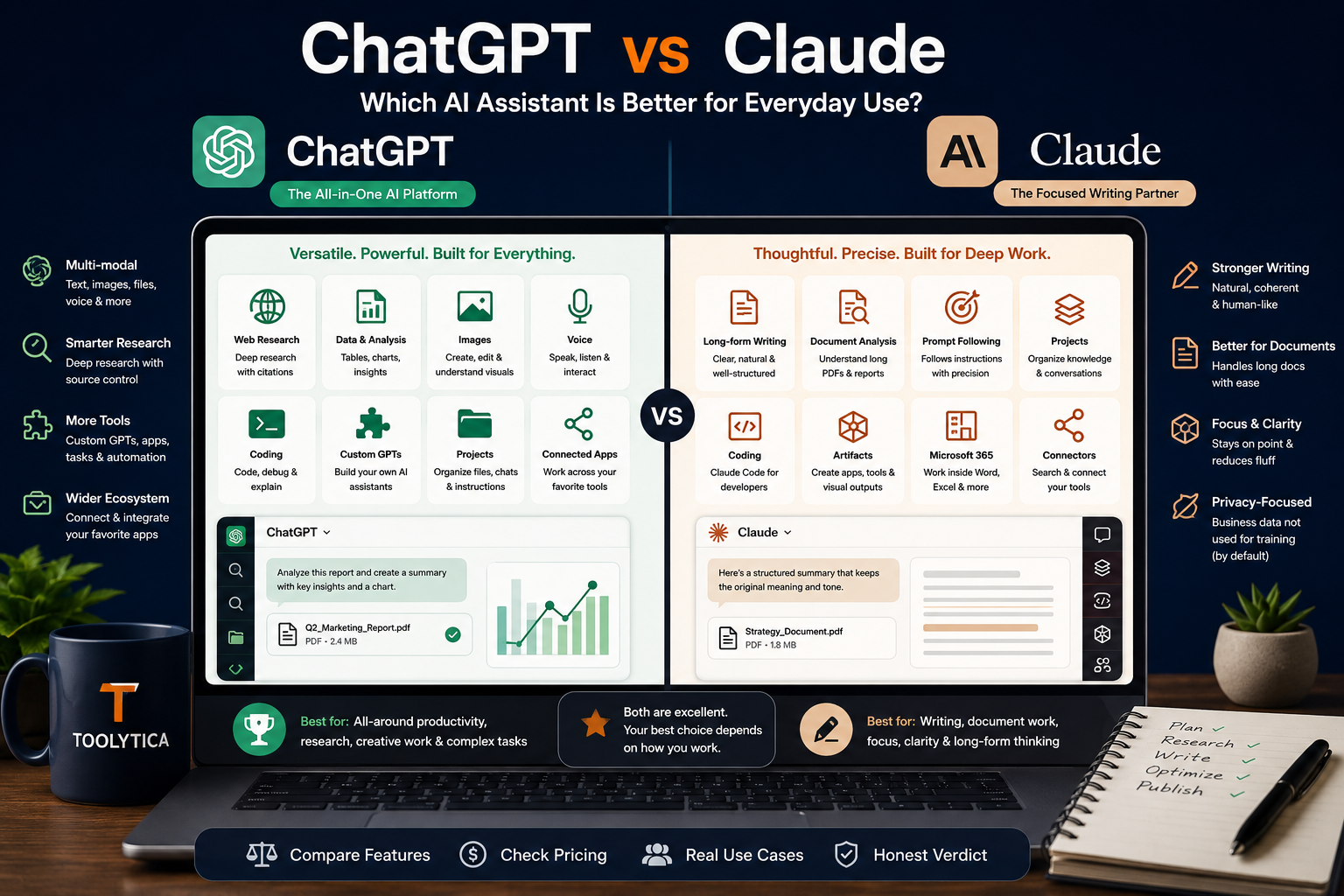
ChatGPT vs Claude is no longer a simple contest between one “creative” chatbot and one “careful” chatbot. Both can write, analyze files, search the web, work inside projects, and help with coding. The more useful question is which assistant is more reliable for the work you actually do.
We compared the free consumer versions with the same prompts for constrained writing, PDF analysis, and current web research. ChatGPT won two of the three completed head-to-head tests. Claude produced the better tightly constrained draft, while ChatGPT was stronger at extracting and reconciling facts from a PDF and at researching current plan details. However, ChatGPT’s research answer included several malformed source links, so its factual win was not a clean citation-quality win.
Quick Verdict
Choose ChatGPT if you want the broader all-purpose assistant for mixed work: research, files, data, images, voice, coding, custom GPTs, and varied everyday tasks. In our tests, it was the stronger option for structured PDF analysis and current product research.
Choose Claude if your priority is controlled long-form writing, thoughtful rewriting, or working through large amounts of text in a focused interface. It followed a strict writing brief more closely in our test and produced the cleaner final copy.
For most people who want only one general AI subscription, ChatGPT is the safer overall choice. For writers, editors, and document-heavy users who value prose quality and instruction discipline more than a broad tool ecosystem, Claude may be the better fit.
ChatGPT vs Claude at a Glance
| Category | Better choice | Why |
|---|---|---|
| Overall versatility | ChatGPT | Broader mix of research, files, data analysis, images, voice, projects, custom GPTs, and coding tools |
| Constrained writing | Claude | Followed the requested length, structure, and “output only” instruction more closely in our test |
| PDF analysis | ChatGPT | Found more relevant metrics, handled the contradictions correctly, and separated blockers from risks more precisely |
| Current web research | ChatGPT, with a caveat | More current feature comparison, but several links in the answer were malformed |
| Long documents | Claude | Large context options and a focused document workflow make it well suited to text-heavy work |
| Coding ecosystem | ChatGPT | Codex integration and a broader general-purpose toolset; Claude Code remains a strong alternative for terminal-centered development |
| Image generation | ChatGPT | Native image generation is part of the consumer product; Claude is not positioned as an image-generation suite |
| Simplest paid comparison | Tie | ChatGPT Plus and Claude Pro both list a $20 monthly entry point in the US |
How We Tested ChatGPT vs Claude
This was a practical comparison, not a scientific benchmark. We used ChatGPT Free with its default available model and Claude Free with its available Sonnet model. Consumer AI products can route requests between models, impose changing limits, and update behavior without notice, so these results describe the tested sessions rather than every possible response.
We designed three everyday tasks:
- Rewrite a fact-heavy product update under strict formatting and length constraints.
- Analyze a two-page PDF containing calculations, contradictions, risks, and launch blockers.
- Compare current ChatGPT and Claude consumer plans using official sources only.
Test Scorecard
| Test | ChatGPT | Claude | Winner |
|---|---|---|---|
| Constrained writing | 7/10 | 9/10 | Claude |
| PDF analysis | 9.5/10 | 8/10 | ChatGPT |
| Official-source web research | 8.5/10 | 7/10 | ChatGPT |
Result across the three paired tests: ChatGPT won two; Claude won one. The sample is deliberately small, so treat the result as evidence about these workflows—not proof that one model is universally more accurate.
Test 1: Claude Was Better at Constrained Writing
The first prompt asked each assistant to rewrite a product update in exactly three paragraphs and 170–190 words. It had to preserve nine facts, avoid headings and bullets, focus on small-business owners, and return only the final copy.
The source facts included a May 12, 2026 pilot launch, 240 invitations, 168 activations, a three-notebook Free limit, an $8 monthly Plus plan, cancellation before the next billing date, and desktop-only offline access.
What Claude Did Better
Claude kept the requested three-paragraph structure, stayed close to the target length, preserved the material facts, and produced natural copy aimed at the requested audience. It also avoided unnecessary framing before or after the answer.
Where ChatGPT Lost Points
ChatGPT preserved the important facts and wrote clearly, but its answer was substantially shorter than requested. It also added conversational framing around the draft instead of returning only the final copy. Those are small issues in casual use, but they matter when a brief has a fixed word count or must be pasted directly into a publishing workflow.
Winner: Claude. For briefs governed by exact length, structure, tone, and output-format rules, Claude was more disciplined in this test.
That does not mean Claude always writes better. ChatGPT remains flexible for ideation, outlining, and iterative editing. But if your workflow depends on satisfying several constraints at once, Claude deserves the first test.
If writing is your main use case, our comparison of the best AI tools for writing better emails shows where general assistants differ from dedicated writing tools.
Test 2: ChatGPT Was Better at PDF Analysis
The second test used a synthetic two-page project report. It contained figures that needed recalculation, two internal contradictions, a budget reconciliation, an iOS notification defect, an incomplete accessibility review, and an unsigned legal document that explicitly blocked launch.
The prompt asked for four outputs: verified metrics, inconsistencies, launch blockers, and recommended actions.
The Key Facts Hidden in the PDF
| Item | Correct interpretation |
|---|---|
| Activation rate | 96 activated ÷ 120 invited = 80%, not the 78% written in the executive summary |
| Weekly active rate | 72 ÷ 96 = 75% of activated accounts, or 60% of all invitees |
| Budget balance | €18,000 − €11,450 − €2,600 = €3,950 |
| iOS failure rate | 9 failures ÷ 25 testers = 36% |
| Launch date | October 6 was the approved date; October 3 remained in an outdated summary |
| Confirmed legal blocker | The unsigned data-processing appendix explicitly blocked public launch |
Why ChatGPT Won
ChatGPT calculated the metrics correctly, surfaced more useful ratios, identified the obsolete launch date, and explained why the contradiction existed. It also separated explicit blockers from items that were merely at risk or already fixed.
Most importantly, it recognized that the iOS defect was an explicit launch condition in the executive summary, even though the risk table did not label it with the exact word “blocker.” That is a stronger reading of the whole document than relying on one table in isolation.
Claude found the central activation-rate and launch-date inconsistencies and reconciled the budget correctly. However, it introduced a questionable “inconsistency” between a September 23 action deadline and a September 24 milestone. Completing an action one day before its milestone is not inherently contradictory. It also treated the iOS issue too narrowly.
Winner: ChatGPT. It delivered the more complete and decision-ready audit.
Neither result should be trusted blindly for contracts, medical records, financial statements, or other high-stakes documents. Recalculate important figures and inspect the cited pages. For specialized academic workflows, see our guide to the best AI tools for research papers.
Test 3: ChatGPT Found More Current Information, but Its Links Needed Repair
The research test asked both assistants to compare current individual ChatGPT and Claude plans using official OpenAI and Anthropic sources only. The answer needed pricing, uploads, research features, projects, context, coding tools, training controls, and practical caveats.
What ChatGPT Got Right
ChatGPT correctly captured several details that materially affect a buying decision:
- ChatGPT Plus is $20 per month and Claude Pro is $20 monthly in the US.
- Claude Pro offers a discounted annual price of $200 upfront, equivalent to about $17 per month.
- Claude Free now includes up to five Projects; it is no longer accurate to describe Projects as paid-only.
- Claude’s context can reach up to 1 million tokens on supported models rather than being universally fixed at 200,000.
- OpenAI’s current individual ladder includes Free, Go, Plus, and two Pro usage levels.
- New sign-ups and upgrades to the $200 ChatGPT Pro tier were paused on September 10, 2026; the $100 level remained available.
The Important ChatGPT Caveat
Several source URLs in the copied ChatGPT answer were malformed or contaminated by unrelated file extensions and tracking strings. The factual statements could be reverified on official pages, but a research answer is weaker when its citations do not open cleanly.
Where Claude Fell Behind
Claude’s answer had cleaner-looking citations, but it missed current product changes. It described Claude Free as lacking Projects, treated Claude context as a uniform 200,000 tokens, and oversimplified the consumer training-data setting. Those errors were more consequential than ChatGPT’s presentation issues because they could change which plan a reader chooses.
Winner: ChatGPT, with a citation-quality warning. It was more current, but every source link still needed manual verification.
For research where citations are the main requirement, a specialist may be a better starting point. Our best AI tools for research guide compares tools designed around source discovery and verification.
ChatGPT vs Claude Features and Pricing
Prices below are US consumer list prices checked on September 21, 2026. Taxes, currencies, promotions, model access, and usage limits can vary by region and account. Always confirm the final checkout price.
| Plan | Price | Best for | Important limitation |
|---|---|---|---|
| ChatGPT Free | $0 | General chat and light use of files, web, voice, images, and research | Advanced tools have separate variable caps |
| ChatGPT Go | $8/month | More usage than Free at a lower price than Plus | May include ads; fewer advanced benefits than Plus |
| ChatGPT Plus | $20/month | Individuals who use reasoning, files, projects, research, and Codex regularly | No annual billing option currently listed |
| ChatGPT Pro 5x | $100/month | Heavy individual use | High cost; limits still subject to guardrails |
| ChatGPT Pro 20x | $200/month | Highest individual usage allowance | New sign-ups and upgrades paused as of September 10, 2026 |
| Claude Free | $0 | Writing, file work, and testing Claude before paying | No Research or Claude Code; lower usage allowance |
| Claude Pro | $20/month or $200/year | Frequent writing, Projects, Research, and Claude Code | Individual Projects do not provide team collaboration |
| Claude Max | From $100/month | Heavy Claude and Claude Code usage | Expensive; allowance is described relative to Pro rather than as one fixed message count |
Official plan pages: ChatGPT pricing and Claude pricing.
Free Plans
Both free plans are useful enough to test real work before subscribing.
ChatGPT Free is broader. OpenAI lists everyday text chat plus limited access to uploads, image tools, voice, deep research, memory, context, and Codex. The exact advanced-tool allowance is not one permanent public daily number.
Claude Free is especially appealing for writing and file-based work. Anthropic’s current comparison lists file creation and code execution, up to five Projects, and context of up to 1 million tokens depending on the available model. Research and Claude Code require a paid individual plan.
ChatGPT Plus vs Claude Pro
At $20 per month, the better value depends on the bottleneck you need to remove.
Choose ChatGPT Plus when you want one subscription for mixed media, deeper research, data work, image generation, custom GPTs, projects, tasks, and Codex. It is the more expansive consumer package.
Choose Claude Pro when writing, long documents, Projects, Research, and Claude Code are central to your workflow. The annual option lowers the effective monthly price, which ChatGPT Plus does not currently match.
Do not pay for both immediately. Run your three most frequent tasks through both free plans, record where each one fails, and subscribe only when a specific limit becomes repetitive.
ChatGPT vs Claude for Writing
Claude’s advantage is not that every sentence sounds better. Its practical strength is maintaining tone and structural constraints across a longer response. That makes it useful for editing, reports, policy drafts, and rewrites where the output must feel coherent rather than assembled section by section.
ChatGPT is often better as a flexible writing workspace. It can move from brainstorming to outline, research, table, image, and final draft without leaving the same product. It is also easier to recommend when writing is only one part of a mixed workflow.
Choose Claude for: controlled prose, rewriting, long reports, tone-sensitive drafts, and document-centered work.
Choose ChatGPT for: ideation, multimodal content, rapid format changes, research-assisted drafting, and workflows that include images or data.
ChatGPT vs Claude for Files and Long Documents
Both products can summarize documents, extract facts, compare sections, and answer questions about uploaded files. The difference is less about whether they accept a PDF and more about how reliably they organize the answer.
Our PDF test favored ChatGPT because it connected information across several sections and returned a stronger action list. Claude remained competent and readable, but its extra “inconsistency” showed why fluent analysis still needs review.
Anthropic currently documents file uploads of up to 500 MB per chat file and up to 20 files in a chat, with PDFs up to 1,000 pages, subject to context limits. Project files have separate constraints. OpenAI publishes plan-dependent upload and context limits rather than one universal allowance for every ChatGPT user.
For either assistant, use a verification prompt such as:
List every calculation, quote the source numbers, identify the page or section, and separate explicit statements from your own inference.
That instruction makes hidden assumptions easier to catch.
ChatGPT vs Claude for Research and Accuracy
ChatGPT was more current in our plan-research test, but its malformed links illustrate a recurring problem: a citation can look authoritative without being usable.
Claude’s cleaner presentation did not compensate for outdated product claims. A neat source list is not enough if the comparison itself is stale.
For a wider comparison that also includes Perplexity, Consensus, and Elicit, read our guide to the best AI research assistants.
Whichever tool you use:
- Ask for first-party sources only when checking pricing, limits, privacy, or product availability.
- Open every link before publishing it.
- Check the page date and whether the information applies to your region and plan.
- Separate what the source explicitly says from the assistant’s inference.
- Recheck volatile facts immediately before publication.
For academic research, neither general assistant replaces a literature database or source-verification workflow. Use them to organize and interrogate material, not to invent references or decide whether a study is methodologically sound.
ChatGPT vs Claude for Coding
ChatGPT is the broader choice for users who want coding support inside a general assistant. Codex is available in limited form on Free and expands on paid plans. The same account can also handle research, files, images, and everyday questions.
Claude Code is available with Claude Pro and Max and is particularly attractive to developers who prefer terminal-centered workflows and sustained work across a codebase. Claude Free does not include Claude Code according to Anthropic’s current pricing table.
The better option depends on the environment, repository size, language, and task. Test both on a real but non-sensitive code sample. Evaluate whether the tool understands the surrounding code, writes an appropriate test, and explains risky changes—not merely whether it produces a plausible function.
Images, Voice, Projects, and Collaboration
ChatGPT has the clearer advantage for image generation and a broader native voice experience. If you regularly move between text, images, voice, spreadsheets, and web research, this breadth is one of its strongest reasons to win the overall recommendation.
Both products now offer individual Projects. Claude Free supports up to five, while Claude Pro and Max expand project use. ChatGPT’s pricing table also lists Projects and shared projects across individual tiers, though limits and available features vary.
Do not confuse project organization with full team governance. Claude’s individual plan comparison marks project sharing and collaboration as unavailable; organizations that need administrative controls, centralized billing, or managed workspaces should compare the business offerings separately.
Privacy and Training Controls
Neither consumer assistant should be treated as a private vault by default.
OpenAI says users can control whether conversations help improve its models through ChatGPT Data Controls. Its consumer pricing comparison describes training use as available with an opt-out. OpenAI’s Data Controls FAQ explains where to change the setting.
Anthropic also gives consumer users a choice about whether new and resumed chats and coding sessions may be used for model improvement. Its pricing table labels consumer training as opt-out, and Anthropic’s consumer terms update explains the choice and retention implications.
Settings and policies can change. Before uploading confidential, regulated, client-owned, or unpublished material, check the current product controls and your organization’s rules. For sensitive business work, evaluate the applicable business or enterprise plan rather than assuming a consumer opt-out satisfies your obligations.
Which One Should You Choose?
If you want to compare these assistants with other everyday options, see our guide to the best AI tools for personal productivity.
Choose ChatGPT if you:
- Need one assistant for research, documents, data, images, voice, and coding.
- Want the broader consumer feature ecosystem.
- Regularly analyze structured files or mixed-format tasks.
- Use image generation or custom GPTs.
- Prefer paying monthly rather than committing annually.
Choose Claude if you:
- Write and edit long documents frequently.
- Care strongly about tone, structure, and constrained output.
- Want Claude Code as part of a paid individual plan.
- Prefer Claude’s focused document interface.
- Can benefit from Claude Pro’s annual discount.
Keep both free if you:
- Use AI only occasionally.
- Can switch tools when one reaches a limit.
- Want to compare an important answer before trusting it.
- Have not yet identified a recurring limitation worth paying to remove.
Consider both paid only if you:
- Use AI professionally enough that the second subscription saves more time than it costs.
- Have distinct, repeatable workflows—for example, Claude for editorial work and ChatGPT for research, data, and images.
- Can document why each tool is necessary rather than subscribing because their feature lists overlap.
Final Recommendation
ChatGPT wins this comparison overall, but not because it was best at everything. It won two of the three completed paired tests and offers the more versatile consumer platform. That makes it the easiest default recommendation for people who want one AI assistant for many kinds of work.
Claude is the better specialist for controlled writing. It followed the strict brief more precisely and produced the stronger ready-to-use draft. Writers and document-heavy professionals should test Claude before defaulting to ChatGPT Plus.
The most realistic buying advice is simple: start with both free plans, run the same three real tasks, and pay only when you can name the recurring limit you need to remove. Features and model access change too quickly for a static checklist to replace that test.
Frequently Asked Questions
Is Claude better than ChatGPT?
Claude was better for constrained writing in our test, while ChatGPT was better for PDF analysis and current web research. ChatGPT is the stronger overall choice for mixed workflows; Claude may be better for writing and long-document work.
Is ChatGPT or Claude better for writing?
Claude followed a strict three-paragraph, 170–190-word brief more accurately in our test. ChatGPT remains strong for brainstorming and mixed-media drafting, but Claude is the better first choice when tone, structure, and length must be controlled closely.
Is ChatGPT or Claude better for PDFs?
ChatGPT performed better on our synthetic project-report test. It calculated the metrics correctly, identified the key contradictions, and distinguished launch blockers from risks more precisely. Both still require human verification for important documents.
Is Claude Pro cheaper than ChatGPT Plus?
Both list a $20 monthly US price. Claude Pro also lists $200 billed annually, equivalent to about $17 per month. ChatGPT Plus does not currently offer annual billing.
Does Claude Free have Projects?
Yes. Anthropic’s current individual pricing comparison lists up to five Projects on Claude Free. Older comparisons that describe Projects as paid-only are outdated.
Which has the larger context window?
It depends on the plan and model. Anthropic currently advertises up to 1 million tokens on supported Claude models, while OpenAI lists different ChatGPT context limits by tier and mode. A headline context number does not guarantee that every account or model receives that maximum.
Which is better for research?
ChatGPT produced the more current factual comparison in our test, but several generated links were malformed. For consequential research, use official or primary sources, open every citation, and consider a specialist research tool when source discovery is the main task.
Which is better for coding?
ChatGPT is the broader general-purpose option and includes Codex access that expands by plan. Claude Pro and Max include Claude Code, which may be preferable for terminal-centered development. The best choice depends on your repository and workflow, so test both on the same real coding task.
Can ChatGPT and Claude use my conversations for training?
Both companies provide consumer controls that let users opt out of model-improvement use. The wording, retention rules, and business-plan treatment differ, so check the current settings before uploading sensitive material.
Should I pay for both ChatGPT and Claude?
Most individuals should not begin with both. Use the free plans first. Paying for both is sensible only when each one supports a distinct recurring workflow and the time saved exceeds the combined subscription cost.