QuillBot Review: Is Premium Really Worth Paying For?
Quick Verdict
QuillBot is easy to underestimate.
It is still best known as a paraphrasing tool, but the platform now combines rewriting, grammar correction, summarization, translation, plagiarism checking, AI detection, citation generation, AI chat, and writing integrations.
That does not mean everyone needs Premium.
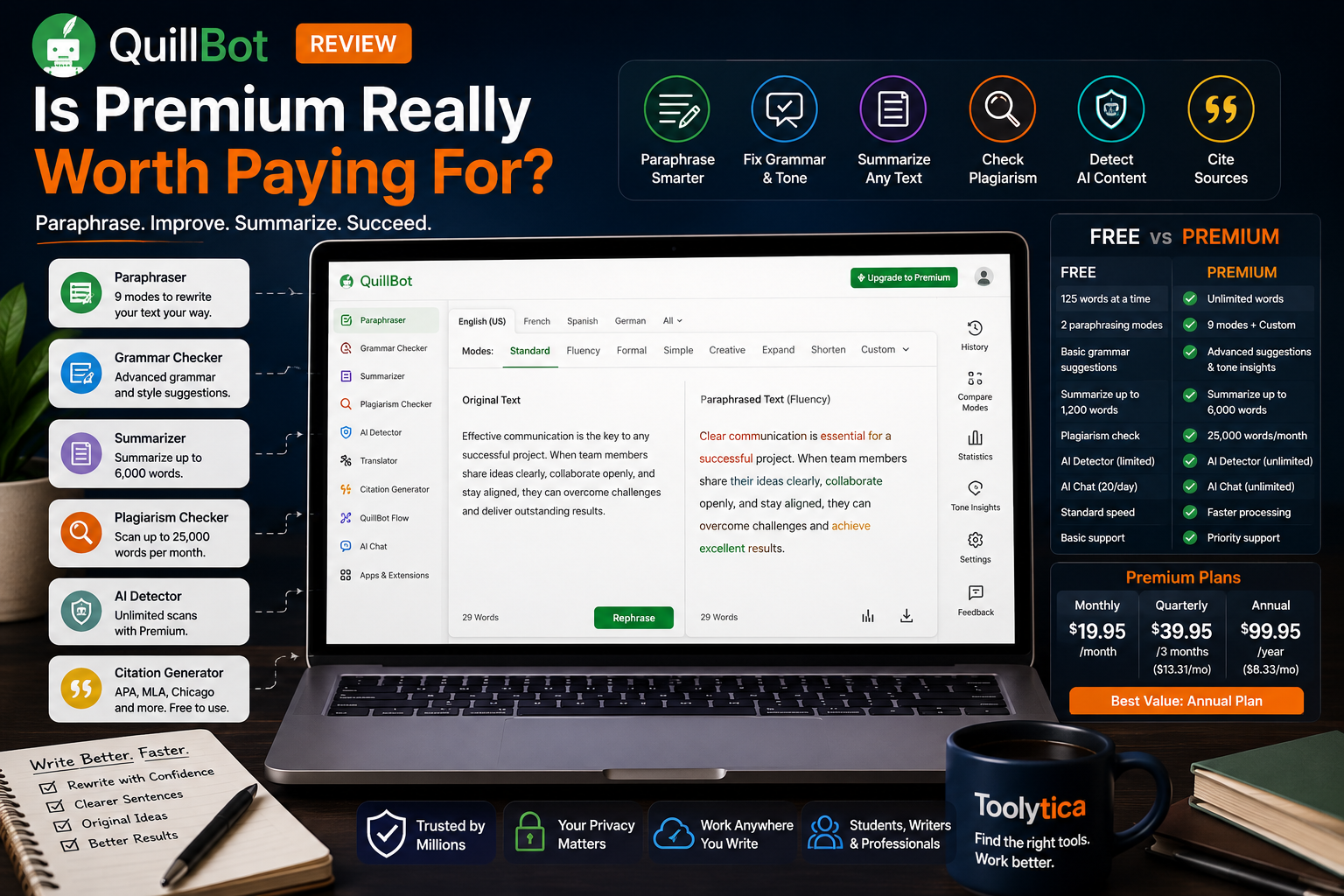
QuillBot Free is genuinely useful for rewriting individual sentences, improving awkward paragraphs, checking basic grammar, generating citations, and summarizing shorter texts. Its biggest limitation is friction: free users can paraphrase only 125 words at a time and access two rewriting modes.
Premium removes that friction. It unlocks unlimited paraphrasing, nine modes, advanced writing suggestions, tone insights, longer summaries, unlimited AI Detector use, unlimited AI Chat, and 25,000 words of plagiarism checking per month.
The practical conclusion is straightforward:
- Stay with QuillBot Free when you rewrite text only occasionally.
- Use Premium monthly for a short, intensive writing project.
- Consider Premium quarterly for a semester or medium-length project.
- Choose Premium annually only when QuillBot already saves you time every week.
- Do not subscribe only for the Citation Generator because that tool remains free.
QuillBot Premium is not a universal writing subscription. It is a worthwhile upgrade for people who frequently rewrite, summarize, polish, or check substantial amounts of text.
Toolytica Rating: ★★★★☆ 4.5/5
QuillBot Review: What the Tool Is Actually Good At
QuillBot works best when the idea already exists but the wording needs improvement.
A student may understand a topic but struggle to express it naturally. A professional may know exactly what an email should communicate but find that the first draft sounds awkward. A content writer may notice that several paragraphs use the same sentence patterns.
QuillBot can provide alternative ways to express those ideas without forcing the user to start again from a blank page.
That is different from asking an AI chatbot to generate an entire document.
QuillBot is most useful as a rewriting and editing layer. It helps users refine what they have already written, adjust tone, remove repetition, simplify complex sentences, and explore different phrasings.
The platform now includes many additional tools, but the Paraphraser remains the clearest reason to use it.
QuillBot Pricing in 2026
QuillBot Premium currently offers three main billing options.
| Plan | Total Price | Monthly Equivalent | Best For |
|---|---|---|---|
| Free | $0 | $0 | Occasional rewriting and basic corrections |
| Premium Monthly | $19.95/month | $19.95 | Short, intensive projects |
| Premium Quarterly | $39.95 every three months | About $13.31 | A semester or medium-term project |
| Premium Annual | $99.95/year | About $8.33 | Regular long-term use |
These prices were verified on QuillBot’s official pricing pages in July 2026. Pricing may be localized according to the user’s country, currency, taxes, app store, or current promotions.
Is the Monthly Plan Worth $19.95?
The monthly plan is expensive compared with the annual equivalent, but it can make sense when the need is temporary.
Examples include:
- Editing a thesis chapter;
- Preparing university applications;
- Rewriting website content;
- Completing a large report;
- Improving several job applications;
- Producing content during a short campaign;
- Polishing an English-language portfolio.
In those situations, one month of Premium may remove enough repetitive work to justify the cost.
The mistake would be leaving the subscription active after the project ends.
QuillBot subscriptions renew automatically, although users can disable renewal and retain Premium access until the current billing period expires.
Who Should Consider the Quarterly Plan?
The quarterly plan sits between flexibility and value.
It suits projects that are unlikely to finish within one month but do not justify paying for a full year. A student may use it for one academic term, while a job seeker could use it during a three-month application period.
The monthly equivalent is lower than the monthly plan, but the full $39.95 is charged for the three-month period.
Before choosing it, define what you expect to complete during those three months. Otherwise, the subscription can become another recurring expense that remains active out of habit.
When the Annual Plan Makes Sense
At $99.95 per year, the annual plan is the strongest financial offer for regular users.
It is roughly equivalent to paying $8.33 per month, compared with $19.95 on the flexible monthly plan.
The annual plan makes the most sense for:
- Students writing throughout the academic year;
- Researchers;
- Freelance writers;
- Bloggers;
- Editors;
- Teachers;
- Non-native English professionals;
- People managing recurring writing projects.
However, the discount only creates value if the tool continues to be used.
Paying nearly $100 upfront to rewrite a few paragraphs is not a better deal than using the free version.
QuillBot Free vs Premium: What Really Changes?
The upgrade is not about gaining access to one revolutionary feature.
Premium mainly removes the restrictions that interrupt longer workflows.
| Feature | QuillBot Free | QuillBot Premium |
| Paraphrasing limit | 125 words at a time | Unlimited |
| Paraphrasing modes | Standard and Fluency | Nine modes |
| Compare Modes | No | Yes |
| Paraphraser history | No | Yes |
| Advanced writing suggestions | No | Yes |
| Tone insights | No | Yes |
| Translation | Up to 5,000 characters | Unlimited |
| Summarizer input | Up to 1,200 words | Up to 6,000 words |
| Custom summaries | No | Yes |
| Plagiarism Checker | Not included | 25,000 words per month |
| AI Detector | 1,200 words and 10 scans per day | Unlimited |
| AI Chat | 20 queries per day | Unlimited |
| Processing speed | Standard | Faster |
| Priority assistance | No | Yes |
The limits and Premium benefits above were verified against QuillBot’s official plan comparison, updated in June 2026.
The free plan does not prevent users from doing useful work. It simply makes longer work more repetitive.
A user can split a 600-word text into smaller sections and paraphrase each part separately. Premium allows the same user to work with the complete document without constantly copying, cutting, and reconnecting sections.
That convenience is the real product being sold.
The Paraphraser Is Still QuillBot’s Best Feature
QuillBot’s Paraphraser remains its strongest and most recognizable tool.
The workflow is simple: paste existing text, select a mode, generate a rewrite, and compare the result with the original.
The free version provides Standard and Fluency modes. Premium unlocks nine modes, mode comparison, custom modes, paraphrasing history, and unlimited input length.
Where the Paraphraser Helps
QuillBot works particularly well when a sentence is accurate but uncomfortable to read.
Consider this sentence: The project worked well because communication between all departments was done in an effective manner.
A cleaner version might be: The project succeeded because the departments communicated effectively.
The meaning remains intact, but the sentence becomes shorter and more natural.
This is where QuillBot earns its place in a writing workflow. It can help users recognize that their first version was too long, repetitive, indirect, or formal.
It is particularly useful for people who understand English well but do not always write it naturally.
What QuillBot Cannot Understand for You
QuillBot can improve a sentence without knowing whether the sentence is true.
It cannot determine whether:
- The argument is supported by evidence;
- A business claim is accurate;
- A source has been cited correctly;
- A technical term has a specific meaning;
- The conclusion follows logically from the information;
- The sentence reflects your real experience.
This distinction matters.
Better wording can make weak reasoning look more convincing. Users still need to verify the substance behind the writing.
Every Rewrite Still Needs Review
QuillBot occasionally replaces a precise expression with a broader synonym or changes the tone more than expected.
Technical, legal, academic, and industry-specific wording deserves particular attention. A term that looks interchangeable to a language model may have a different professional meaning.
Before keeping a rewrite, check:
- Is the original meaning preserved?
- Does the sentence remain factually accurate?
- Does it sound like something I would say?
- Is the technical vocabulary still correct?
- Is the new version actually easier to understand?
QuillBot should generate options. The user should make the final editorial decision.
Are Nine Paraphrasing Modes Actually Useful?
Premium’s nine modes sound impressive, but most users will repeatedly rely on only a few.
Standard provides a balanced rewrite without aggressively changing the original.
Fluency focuses on natural grammar and readability.
Formal adapts the language for academic or professional contexts.
Simple makes difficult wording easier to understand.
Shorten removes unnecessary words.
Expand adds more explanation or detail.
Other modes and Custom modes can be useful for specific projects, but the practical advantage is not the total number of choices. It is being able to adapt the same idea to different audiences.
A university essay, a customer email, a LinkedIn post, and an internal report should not use identical language.
Premium also allows users to compare different mode outputs rather than testing and remembering them one by one.
Grammar Checking: Useful, but Not QuillBot’s Unique Advantage
QuillBot’s Grammar Checker can identify spelling, punctuation, and grammatical problems.
Free users receive basic corrections. Premium adds advanced writing recommendations and tone insights.
The checker works naturally alongside the Paraphraser. A user can rewrite an awkward sentence and then check the final result without moving to another platform.
However, grammar correction alone is not the strongest reason to choose QuillBot.
Grammarly has a clearer grammar-first identity and is designed around continuous communication support across emails, documents, browsers, and workplace applications. QuillBot remains more compelling when rewriting and paraphrasing are the primary needs.
Our detailed Grammarly vs QuillBot comparison explains how the two tools differ in grammar correction, paraphrasing, tone, pricing, and everyday writing workflows.
The Summarizer Is More Useful Than It First Appears
QuillBot’s Summarizer can condense long text into a shorter overview.
Free users can summarize up to 1,200 words at a time. Premium increases the input limit to 6,000 words and provides Custom summaries.
That makes it practical for:
- Articles;
- Meeting notes;
- Reports;
- Research material;
- Long emails;
- Course content;
- Background documents.
The Summarizer can save time when a user first needs to understand the main direction of a text before deciding which sections deserve closer attention.
It should not replace reading when precise details matter.
A summary may omit exceptions, methodology, conditions, or subtle arguments that affect the meaning of the source. This is especially important for legal, medical, financial, or academic material.
QuillBot is also primarily a text-based summarizer. Users who want to upload complete PDFs, ask document-specific questions, compare research papers, or trace answers back to source pages may prefer one of the best AI tools to summarize PDFs.
Plagiarism Checking Adds Real Value to Premium
The Plagiarism Checker is one of the clearest Premium-only benefits.
Premium includes up to 25,000 checked words per month.
That allowance can cover:
- Several student essays;
- A collection of blog articles;
- A dissertation chapter;
- A medium-length professional report;
- Multiple application documents.
It is not unlimited.
Heavy researchers, editors, or content teams may use the allowance quickly. Users should also remember that plagiarism software is a detection aid rather than a final judgment.
A similarity can be legitimate because of common phrases, correctly quoted material, references, or technical terminology. At the same time, an idea may be improperly borrowed even when the exact wording has changed enough to avoid detection.
The checker is most useful as a final review step that identifies areas requiring human attention.
The AI Detector Should Not Be Treated as Proof
QuillBot’s AI Detector is available on both plans, but free access is limited to text of up to 1,200 words and ten scans per day. Premium removes those limits.
AI detectors estimate whether writing resembles machine-generated text.
They cannot prove who wrote a document.
Human writing may be flagged, especially when it is formal, repetitive, highly structured, or written by a non-native speaker. AI-generated writing can also receive a low detection score after editing.
Use the detector as one signal, not as a verdict.
The same caution applies to the AI Humanizer. It can help reduce repetitive phrasing or make writing sound less mechanical, but passing an AI detector does not establish originality, accuracy, or authorship.
Improving the writing should be the goal.
Avoiding a particular detector score should not be the editorial strategy.
The Citation Generator Is Free
QuillBot’s Citation Generator supports major citation formats, including APA, MLA, and Chicago.
It is available without a Premium subscription. An account is mainly useful when users want to save their citation work.
This means the Citation Generator should not influence the Premium decision very much.
It is a useful free companion for students and researchers, but generated references should still be checked. Incomplete website metadata, unusual documents, and complex source types can produce formatting mistakes.
The generator saves time. It does not remove responsibility for citation accuracy.
QuillBot Works Beyond Its Website
QuillBot provides extensions and apps designed to bring its writing tools into existing workflows.
Its Microsoft Word add-in integrates QuillBot into Word rather than requiring users to copy every sentence between tabs. QuillBot also offers browser extensions and mobile and desktop applications.
These integrations matter most to frequent users.
Someone opening QuillBot once per month will not gain much from installing several extensions. Someone rewriting emails, reports, posts, and documents throughout the week may save significant time by accessing suggestions directly where the writing happens.
Convenience is therefore part of the Premium value calculation.
The more often a user writes, the more expensive repeated copy-and-paste friction becomes.
Who Gets the Most Value From QuillBot Premium?
Students With a Regular Writing Workload
Premium can make sense for students who produce essays, reports, summaries, research notes, and applications throughout the academic year.
The combination of longer paraphrasing, longer summaries, grammar suggestions, and plagiarism checking creates a practical workflow.
However, QuillBot should never be used to disguise copied work.
Paraphrasing a source does not remove the need to cite the original idea. Students also need to follow the AI and academic-integrity policies of their institution.
Non-Native English Writers
This is probably QuillBot’s strongest audience.
A user may have strong knowledge and clear ideas but struggle with sentence rhythm, concision, vocabulary, or professional tone in English.
QuillBot can suggest alternative expressions without replacing the user’s underlying expertise.
Fluency, Formal, Simple, and Shorten modes are particularly useful for this group.
The final text should still reflect the writer’s real level of knowledge and personal voice.
Content Creators and Bloggers
QuillBot can help creators:
- Remove repetitive wording;
- Shorten introductions;
- Rewrite social captions;
- Simplify explanations;
- Adjust tone;
- Generate alternative headlines;
- Clean up rough drafts.
It does not replace original research, fact-checking, search intent, examples, or editorial personality.
Overusing a paraphraser can make every article sound polished but anonymous.
For a site such as Toolytica, QuillBot is most useful during editing, not as the source of the initial analysis.
Professionals Writing in English
Professionals can use QuillBot to improve:
- Emails;
- Reports;
- Presentations;
- Proposals;
- Internal documents;
- LinkedIn posts;
- Job applications;
- Customer communication.
The product is particularly helpful when the writer understands the subject but wants the language to sound clearer and more natural.
Professionals whose main problem is drafting and managing emails rather than paraphrasing should also review our guide to the best AI tools for writing better emails.
Occasional Writers
Occasional users should normally remain on the free plan.
The 125-word limit is restrictive, but it is manageable when the task is one email, one paragraph, or a few individual sentences.
Premium becomes unnecessary when the user rarely reaches the limits.
Do not pay to remove a frustration you encounter only once every few months.
QuillBot’s Main Strengths
QuillBot’s greatest strength is that it solves a clear problem quickly.
It can take a sentence that feels wrong and provide several alternatives in seconds.
The free plan is useful enough to test the product properly, while Premium removes the restrictions that affect longer and more frequent work.
Other advantages include:
- Multiple rewriting styles;
- Strong support for non-native English writers;
- Grammar and summarization in the same workflow;
- A Premium plagiarism allowance;
- Browser and Word integrations;
- Monthly, quarterly, and annual options;
- A free Citation Generator;
- A relatively affordable annual plan.
QuillBot does not require users to become prompt experts.
The core workflow remains simple: provide text, select a mode, compare the result, and edit.
Where QuillBot Falls Short
QuillBot can improve writing without improving the idea behind it.
That is its central limitation.
A rewritten paragraph may still be:
- Factually incorrect;
- Poorly argued;
- Unsupported;
- Irrelevant;
- Generic;
- Improperly sourced.
Premium also has practical limitations.
The monthly price is high compared with the annual equivalent. Plagiarism checking is capped. Technical language needs careful review. AI Detector results are uncertain, and paraphrased output can sometimes sound overly polished or impersonal.
QuillBot is a language assistant.
It is not a replacement for research, expertise, critical thinking, or human editing.
Privacy: Avoid Pasting Sensitive Information Without Checking Settings
QuillBot states that user inputs and usage data may be used to provide the service, personalize results, and improve its models. For supported extension versions, users have controls that can disable storage of text inputs and, for account holders, opt out of using text inputs for model training. QuillBot says Team Plan inputs are not used for training.
This is important for anyone working with confidential material.
Avoid pasting information such as:
- Customer records;
- Internal company plans;
- Unreleased financial information;
- Personal identifiers;
- Legal secrets;
- Medical records;
- Passwords;
- Confidential contracts.
QuillBot publishes privacy and security documentation and says its third-party providers are contractually restricted from using customer data to train their own models.
Those safeguards do not make every document appropriate to upload.
The user still needs to assess the sensitivity of the material.
Cancellation, Automatic Renewal, and Refunds
QuillBot Premium subscriptions renew automatically according to the chosen billing cycle.
Users can cancel or turn off renewal at any time. Premium access continues until the end of the already paid period.
The refund policy deserves attention.
QuillBot currently states that refunds are issued only when required by applicable law. This means users should not assume that an annual subscription includes a broad, unconditional money-back guarantee. Purchases made through Apple or Google are subject to the refund processes of those platforms.
Before paying:
- Confirm the billing period;
- Check the final localized price;
- Review the renewal date;
- Understand the applicable refund rights;
- Disable renewal when the subscription is needed only temporarily.
QuillBot vs Grammarly: Which One Makes More Sense?
QuillBot and Grammarly overlap, but they solve different first problems.
QuillBot starts with existing text and asks: How can this be expressed differently?
Grammarly starts with active writing and asks: How can this be corrected and communicated more effectively?
QuillBot is the stronger choice for paraphrasing, alternative wording, shortening, simplifying, and transforming existing passages.
Grammarly is usually the more natural choice for continuous grammar checking, tone support, and professional communication across daily writing.
A student rewriting research notes may get more value from QuillBot.
A professional who mainly writes emails and messages may prefer Grammarly.
Some users can benefit from both, but subscribing to both makes sense only when they solve distinct and frequent problems.
Read our complete Grammarly vs QuillBot comparison before paying for either platform.
A Better Way to Test QuillBot Before Subscribing
Do not judge Premium only from the feature table.
Use QuillBot Free on real work for several days.
Test it with:
- A paragraph that genuinely needs rewriting;
- An email that sounds awkward;
- A summary of a long article;
- A passage containing technical terminology;
- A piece of writing that reflects your natural voice.
Notice where the free plan interrupts the workflow.
Premium may be justified when you repeatedly think:
- I need to process the complete document at once;
- I want to compare several rewriting styles;
- Splitting the text is wasting time;
- I need plagiarism checking;
- I use this tool almost every day;
- The Summarizer limit is too low.
Premium is probably unnecessary when Free completes the work with only minor inconvenience.
Is QuillBot Worth Paying For?
QuillBot is worth paying for when paraphrasing and rewriting are recurring parts of your work.
It is particularly valuable for non-native English writers, students with regular assignments, professionals producing English-language documents, and creators editing substantial amounts of text.
The annual plan provides the strongest price-to-usage ratio, but it should be purchased only after the free version has proved useful.
Choose QuillBot Free when you:
- Rewrite short passages occasionally;
- Need basic grammar corrections;
- Use the free Citation Generator;
- Summarize shorter texts;
- Want to test the platform.
Choose QuillBot Premium when you:
- Regularly rewrite long passages;
- Need more than two paraphrasing modes;
- Want advanced writing and tone suggestions;
- Use plagiarism checking;
- Summarize texts longer than 1,200 words;
- Write frequently in a second language;
- Use QuillBot across several writing environments.
Skip Premium when you expect QuillBot to generate original expertise, guarantee plagiarism-free work, prove whether content was written by AI, or eliminate the need for manual editing.
The clearest conclusion from this QuillBot review is:
QuillBot Free is a useful tool. QuillBot Premium is a smoother workflow.
The upgrade becomes worthwhile when you are no longer paying for additional features. You are paying to remove friction from writing you already do regularly.
Final Toolytica Rating: ★★★★☆ 4.5/5
Frequently Asked Questions
Is QuillBot Free?
Yes. QuillBot offers a free plan with paraphrasing of up to 125 words, Standard and Fluency modes, basic grammar corrections, limited summarization, limited AI detection, and access to several other tools.
How Much Does QuillBot Premium Cost?
QuillBot Premium currently costs $19.95 monthly, $39.95 every three months, or $99.95 annually. The annual plan is equivalent to approximately $8.33 per month. Prices may be localized at checkout.
Is QuillBot Premium Worth It?
Premium is worth considering for people who regularly paraphrase long passages, need several rewriting modes, summarize longer texts, use advanced writing suggestions, or require plagiarism checks.
Occasional users will usually get enough value from the free version.
What Is the QuillBot Free Word Limit?
Free users can paraphrase up to 125 words at a time. Premium paraphrasing is unlimited.
Does QuillBot Check Plagiarism?
Yes. The Plagiarism Checker is included with Premium and provides up to 25,000 checked words per month.
Is QuillBot’s Citation Generator Free?
Yes. QuillBot’s online Citation Generator can be used without a Premium subscription and supports multiple citation styles.
How Much Text Can QuillBot Summarize?
Free users can summarize up to 1,200 words at a time. Premium increases the input limit to 6,000 words and includes Custom summaries.
Is QuillBot Good for Students?
QuillBot can help students improve phrasing, summarize material, check grammar, create citations, and review plagiarism.
Students must still cite borrowed ideas and follow their institution’s rules on AI-assisted writing.
Is QuillBot Better Than Grammarly?
QuillBot is generally stronger for paraphrasing and transforming existing text.
Grammarly is generally stronger for continuous grammar, tone, and communication assistance.
Our Grammarly vs QuillBot comparison explains the differences in detail.
Can QuillBot Work in Microsoft Word?
Yes. QuillBot provides a Microsoft Word add-in as well as browser, mobile, and desktop integrations.
Can I Cancel QuillBot at Any Time?
Yes. Users can disable automatic renewal and retain Premium access until the end of the current billing period.
Does QuillBot Offer Refunds?
QuillBot currently states that refunds are issued only when required by applicable law. Purchases made through Apple or Google must follow the relevant app store’s refund process.
Can QuillBot Make AI Writing Undetectable?
No tool can guarantee that text will avoid AI detection.
QuillBot can revise wording and style, but AI detectors are probabilistic and should not be treated as definitive proof of authorship.